
HORSTMANN C-Stat 17-B 7 Day Programmable Room Thermostat Instruction Manual


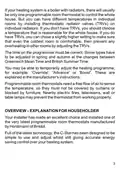

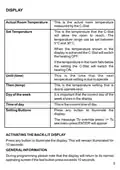



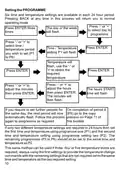




If the holiday period START date matches today's date, the
STANDBY temperature will be shown on the display together
with the suitcase icon.
If the holiday period START date does not match today's date
the display will remain in normal operating mode but with the
suitcase icon appearing on the right of the display. Indicating a
holiday period is pending
To cancel a set holiday programme in ADVANCE of its
activation, re-programme using the above procedure and set
the STARTdate and BACK date to today's date.
To cancel a set holiday programme during activation press
ENTER button twice, the unit will return to normal operating
mode and the suitcase icon will disappear.
THE DATES SPECIFIED BECOME EFFECTIVE FROM
MIDNIGHTOFTHE DAYENTERED
13

| General | Details |
|---|---|
| Name | HORSTMANN C-Stat 17-B 7 Day Programmable Room Thermostat Instruction Manual |
| Make | Horstmann |
| Language | English |
| Filetype | PDF (Download) |
| File size | 0.63 MB |
 (1 votes, average: 5.00 out of 5)
 Loading...


tado Smart Radiator Thermostat Installation Guide

HERSCHEL T-MT Mains Powered WiFi Thermostat

STEGO FTO Preset Thermostat User Guide

Honeywell CT87A Round Thermostat Instruction Manual

ENGO CONTROLS EASY-24W 24V Wired Thermostat User Guide

ESi ESRTP4RFW Programmable Room Thermostat Installation Guide

Danfoss RAE Radiator Thermostat Installation Guide

Primevolve NFJ2002E Space Heater with Thermostat Instruction Manual

homematic IP TRV-E-A Monday Radiator Thermostat Instruction Manual

Wyze WTHERM Smart WI-FI Thermostat User Manual