
HORSTMANN C-Stat 17-B 7 Day Programmable Room Thermostat Instruction Manual










Setting the OPTIMUM START
This setting will allow the C-Stat to anticipate the next set
temperature and switch on up to two hours in advance to ensure
room temperature has been reached by the time the new set
temperature applies.
As a consequence the switch on time could take place anywhere
between 2 hours and zero before the set time and temperature.
With the optimum start set to OFF the user will need to anticipate
the warm up time needed in the programme settings. (Typically
the set temperature will be set approx. 1 hour in advance of
when it is required)
Pressing the BACK at any time in this process will return you to
normal operating mode
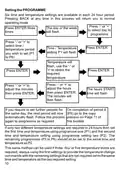
Press '-' or '+' until
Set Up appears on
the display
Press ENTER
Press ENTER twice
Select YES or NO
and press ENTER
to confirm
Press '-' or '+' until
Optimum Start
appears on the
display
This feature would normally be set by your installer.
20

| General | Details |
|---|---|
| Name | HORSTMANN C-Stat 17-B 7 Day Programmable Room Thermostat Instruction Manual |
| Make | Horstmann |
| Language | English |
| Filetype | PDF (Download) |
| File size | 0.63 MB |
 (1 votes, average: 5.00 out of 5)
 Loading...


Vtech E-Smart W960 Thermostat Instruction Manual

Google Nest Learning Thermostat Installation Guide

MRCOOL Mini-Stat WiFi Thermostat User Manual

homematic IP HmIP-eTRV-F Radiator Thermostat Instruction Manual

GENERAL HT300S Smart Room Thermostat User Manual

SUNSKY BHT-006 Series Thermostat Instruction Manual

expert4house BHT-18 AI Knob Thermostat User Guide

Klima 825200 Electric Underfloor Heating Thermostat User Manual

seitron TR D02B Wireless Digital Thermostat User Manual

75F HyperStat All In one Commercial Thermostat User Manual