
HORSTMANN C-Stat 17-B 7 Day Programmable Room Thermostat Instruction Manual








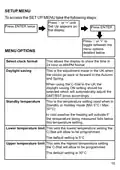


SETUPMENU
To access the SETUPMENU take the following steps:
Press '-' or '+' until
Set Up appears on
the display
Press ENTER twice
Press ENTER
Press '-' or '+' to
toggle between the
menu options
MENU OPTIONS
detailed below
Select clock format
Daylight saving
This allows the display to show the time in
24 hour or AM/PM format
This is the adjustment made in the UK when
the clocks go back or forward in the Autumn
and Spring.
When using the C-Stat in the UK the
daylight saving ON setting should be
selected which will automatically adjust the
GMT/BST times accordingly
Standby temperature
This is the temperature setting used when in
Standby or Holiday mode (Min 5°C / Max
30°C)
In cold weather the heating will activate if
the temperature being measured falls below
this temperature setting.
Lower temperature limit This sets the lowest temperature setting the
C-Stat will allow to be programmed.
The default setting is 5°C
Upper temperature limit This sets the highest temperature setting
the C-Stat will allow to be programmed
The default setting is 30°C
15

| General | Details |
|---|---|
| Name | HORSTMANN C-Stat 17-B 7 Day Programmable Room Thermostat Instruction Manual |
| Make | Horstmann |
| Language | English |
| Filetype | PDF (Download) |
| File size | 0.63 MB |
 (1 votes, average: 5.00 out of 5)
 Loading...


Roth Basicline 230T Programmable Clock Thermostat Instruction Manual

Danfoss TPOne-B Electronic Programmable Room Thermostat User Guide

Honeywell T7350 Programmable Thermostat Owner’s Manual

EUROTRONIC Programmable Energy-Saving Radiator Thermostat User Manual

Danfoss ECtemp Touch Electronic Intelligent Timer Thermostat Installation Guide

nVent RAYCHEM GM-TA Thermostat Instruction Manual

lae AC2-2 Two Stage Thermostat Instructions

GENERAL LIFE HT220 Digital Room Thermostat User Manual

Danfoss TVM-H Thermostat Valve Owner’s Manual

GLOBAL WiFi Heating Thermostat User Manual