
Home > GE Appliances > GE APPLIANCES RAK190V Energy Management Thermostat Owner’s Manual
GE APPLIANCES RAK190V Energy Management Thermostat Owner’s Manual












USING THE THERMOSTAT
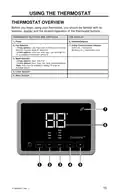
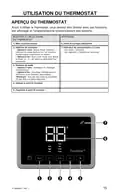
THERMOSTAT OVERVIEW
Before you begin using your thermostat, you should be familiar with its
features, display and the location/operation of the thermostat buttons.
THERMOSTAT BUTTONS AND SWITCHES
THE DISPLAY
1.) Power
6.) Selected Setpoint
2.) Fan Selection
– 2-way options: Low, High (auto or continuous based on
Zoneline Auxiliary Mode #1 selection)
7.) 2-Way Communication Indicator
Solid Link = Connected
Blinking Link = Connection Issue
– 8 wire options: Auto Low, Auto High, Low and High (if
“C” is enabled in thermostat setting 6)
3.) Mode Selection
– 2-way options: Heat, Cool Fan
– 8 wire options: Heat, Cool, Fan, Auto (Autochangeover)
*Note: Auto must be enabled in setting 15 to be an
available option
4.) Lower Setpoint
5.) Raise Setpoint
31-5000842 Rev. 1
15

| General | Details |
|---|---|
| Name | GE APPLIANCES RAK190V Energy Management Thermostat Owner’s Manual |
| Make | GE Appliances |
| Language | English |
| Filetype | PDF (Download) |
| File size | 0.39 MB |
 (1 votes, average: 5.00 out of 5)
 Loading...

GE APPLIANCES RAK160W2 Wireless Thermostat User Manual

GE APPLIANCES RAK190V 2 Way Energy Management Thermostat Instruction Manual

GE APPLIANCES RAK150VF2 Digital Wall Thermostat Instruction Manual

GE APPLIANCES THERMOSTAT Owner’s Manual


DEVIreg 530 Electronic Thermostat Installation Guide

Chytre Vypinace HC-T020-EWF Series Wireless Thermostat User Manual

Honeywell TH6100AF2004 T6 Hydronic Programmable Thermostat User Manual

GENERAL LIFE HT100S RF Wireless Room Thermostat User Manual

HELTUN HE-HT01 Heating Thermostat User Guide

Olympia BS-812-P Programmable Thermostat User Manual

LUX PSP511A Smart Temp Electronic Thermostat Instruction Manual

VIMAR 02913 Surface LTE Thermostat Installation Guide

Carrier 53DFS250-SL Programmable Digital Thermostat Owner’s Manual

Moes WHT-PJ01 Smart WiFi Thermostat User Manual