
Engo EFAN-230 Zigbee Smart Thermostat Owner’s Manual


MODBUS RTU PROTOCOL FOR EFAN-230 CONTROLLER
Configuration
Configuration must be carried out by a qualified person with the appropriate authorization and technical knowledge, in
accordance with the standards and regulations of the country and the EU. The manufacturer will not be held responsible
for any conduct not in accordance with the instructions.
ATTENTION:
There may be additional protection requirements for the entire installation and configuration, which the installer/
programmer is responsible for maintaining.
SLAVE 1
SLAVE 2
SLAVE 3
SLAVE X
EFAN-230B
EFAN-230W
EFAN-230B
EFAN-230W
General information about MODBUS RTU
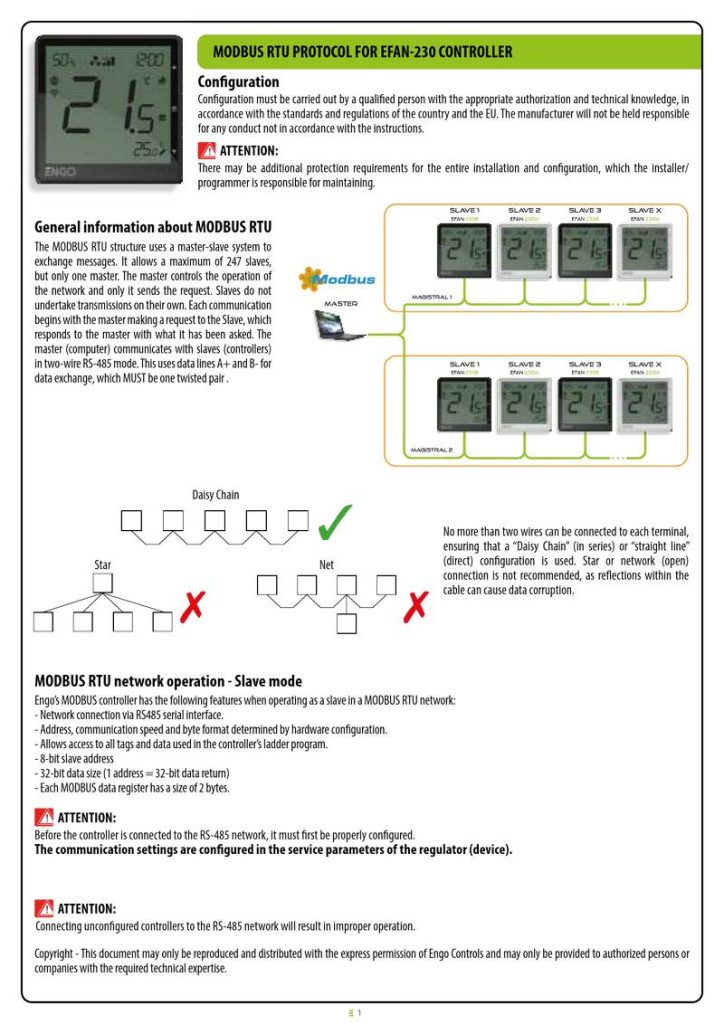
The MODBUS RTU structure uses a master-slave system to
exchange messages. It allows a maximum of 247 slaves,
but only one master. The master controls the operation of
the network and only it sends the request. Slaves do not
undertake transmissions on their own. Each communication
begins with the master making a request to the Slave, which
responds to the master with what it has been asked. The
master (computer) communicates with slaves (controllers)
in two-wire RS-485 mode. This uses data lines A+ and B- for
data exchange, which MUST be one twisted pair .
Magistral 1
master
SLAVE 1
EFAN-230B
SLAVE 2
EFAN-230W
SLAVE 3
E-B
SLAVE X
EFAN-230W
Magistral 2
Daisy Chain
No more than two wires can be connected to each terminal,
ensuring that a “Daisy Chain” (in series) or “straight line”
(direct) configuration is used. Star or network (open)
connection is not recommended, as reflections within the
cable can cause data corruption.
Star
Net
MODBUS RTU network operation - Slave mode
Engo’s MODBUS controller has the following features when operating as a slave in a MODBUS RTU network:
- Network connection via RS485 serial interface.
- Address, communication speed and byte format determined by hardware configuration.
- Allows access to all tags and data used in the controller’s ladder program.
- 8-bit slave address
- 32-bit data size (1 address = 32-bit data return)
- Each MODBUS data register has a size of 2 bytes.
ATTENTION:
Before the controller is connected to the RS-485 network, it must first be properly configured.
The communication settings are configured in the service parameters of the regulator (device).
ATTENTION:
Connecting unconfigured controllers to the RS-485 network will result in improper operation.
Copyright - This document may only be reproduced and distributed with the express permission of Engo Controls and may only be provided to authorized persons or
companies with the required technical expertise.
1


| General | Details |
|---|---|
| Name | Engo EFAN-230 Zigbee Smart Thermostat Owner’s Manual |
| Make | ENGO |
| Language | English |
| Filetype | PDF (Download) |
| File size | 0.12 MB |
 (1 votes, average: 5.00 out of 5)
 Loading...

ENGO E55W230WIFI Wi-Fi Thermostat User Guide

ENGO E20i Series Wi-Fi Wireless Internet Thermostat User Guide

ENGO EONEBATW, EONEBATB Internet Controlled Thermostat User Guide

ENGO E901 Programmable Wired Thermostat User Manual

ENGO E901 Wireless Internet Thermostat User Manual

ENGO EASY230W Wired Thermostat User Guide

ENGO EASYBATB Wired Battery Thermostat User Guide

White Rodgers 1E78 5 2 Day Programmable Thermostat Instruction Manual

NOBO NCU-2Te High Precision Thermostat Instruction Manual

Honeywell TL6120 5-2 Electric Heating Programmable Thermostat User Guide

DELTA DORE Tybox 5701FP Pilot Wire Thermostat User Guide

COPELAND 026-1739 Programmable Touchscreen Thermostat User Manual

Honeywell Programmable Thermostat T4 Pro Installation Guide
LUX PSP511Ca Programmable Thermostat Instruction Manual

PNI CT25PW WIFI Smart Thermostat User Manual

DEVI 140F1064 Touch Electronic Intelligent Timer Thermostat Installation Guide

WATTS WTC-ES Contact Thermostat User Manual