
ELDOM NHC-RHN-WiFi Electronic Thermostat User Manual















EN
EN
Controllers features and settings
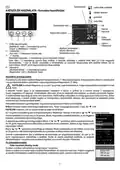
Setting specific temperature
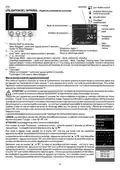
Use buttons 2 and 3 to change the temperature. The maximum temperature that can be set is 28 °C and the
minimum is 7 °C. Pressing any of these two buttons shall display the current temperature set. With the
following keystrokes you may change the assignment in the desired direction. If no new button is pressed
within 5 seconds, the new task shall be memorized and automatically the unit shall switch to the main screen. If
any of the buttons 2 or 3 shall be held for more than 0.7 s, the temperature set point value automatically starts
to increase or decrease with the speed of 4 units per second.
Adjusting the power of the appliance
When the measured temperature is lower than the set one, the convector heater switches on - its power
indicator scale fills in. The more the temperature is approaching the set one, the less is the filling of the scale.
When the set temperature is reached, the indicator goes out.The power control function can be switched off by
the sub-menu Settings by deactivating the check-mark Reg. power. In this case, under all operating modes,
the convector heater shall run at full power during heating or shall be completely switched off when the
temperature set is reached.
Childlock
This feature locks all control panel buttons, limiting the possibility of unauthorized access to the controller
settings. The feature is turned on by the child protection sub-menu, followed by the instruction on the display - Press OK to lock the
buttons. The following message is displayed - Buttons are locked!. It is suitable to press the button 1 to exit the settings menu, displaying
a symbol illustrating child protection
.To turn off child protection, you must hold the OK button for a time longer than 7 seconds.
Protection against convector heater falling
If the convector heater is knocked down while switched on, the controller switches off the heater, the unit displays a message Convector
fell, and activates an audible alarm. The alarm will be deactivated automatically after restoring the appliance normal position or by
pressing button 1 to switch off the convector heater. It may be a malfunction if the convector heater was stored in a cold place for a long
time and then placed in a significantly warmer place.
Open window feature
The controller has a built-in feature for recognizing an open window that automatically stops heating. An open window icon appears on
the display. This feature operates in two modes - Smart and On. Switching from one mode to the other is done by changing the setup
Open window in sub-menu System Settings. When the setting is Smart, the convector heater shall continue heating as soon as it
detects that the window is closed or after 15 minutes have elapsed since the protection mode is activated, while the heating mode ON
shall continue for 60 minutes once the mode is activated.The Open window feature is disabled when you press button 1, which switches
the convector heater to Standby mode, or from the sub-menuSystemsetOpen WintoOff
Keeping the system date and time
The controller unit keeps the system date and time
For all Timer / Program, Delayed Start, and Power Meters to work correctly, the date and time must be verified. Verification is set from
the main menu, sub-menuTime and Date.The auto-enable option check box works only on models with WiFi control.
Remote control over the Internet
This feature requires an additional WiFi module installed in the configuration of the following convector heater models: RH10NW,
RH15NW, RH20NW, RH25NW, RH30NW, RH01WxxW-x.
If the appliance you bought has a model number corresponding to one of the listed above - please read the
supplement to this Instruction manual.
Two stage overheat protection
Apart from the electro-mechanical thermal protection, the convector heaters also rely on the electronic
protection built into the controller. This protection prevents accidental overheating of the appliance inside. The
feature temporarily interrupts the heating until the temperature drops below the allowed maximum.Asymbol is displayed.
Color graphic display
The electronics have a high-resolution color display. The Display sub-menu sets Brightness settings (from 1 to 10) and Dimming
activation check-box. Dimming automatically reduces the brightness of the display 30 seconds after the last press of a button (the
feature does not work at set brightness -1).
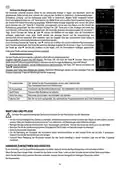
Reporting consumed electricity
The controller supports separate counters for daily and nocturnal electricity consumption. In order to report correctly the concerned
data, it shall be necessary to set the unit power from the sub-menu Settings - Power setting, and the start time of each tariff in the Home
tariffs sub-menu. When the OK button is pressed once, the electricity consumption counters are displayed and
the date and time of their last reset. While this screen is displayed, if the OK button is held for 2 seconds, then
the counters are reset and the resetting date and time are recorded. Next time you press the OK button, it
switches to the screens with a graph of the electricity consumed by hours. The controller shall store such
information for the last 7 days. By pressing the ▲ or ▼ buttons, the charts shall change with the days for
18

| General | Details |
|---|---|
| Name | ELDOM NHC-RHN-WiFi Electronic Thermostat User Manual |
| Make | ELDOM |
| Language | English |
| Filetype | PDF (Download) |
| File size | 2.08 MB |
 (1 votes, average: 5.00 out of 5)
 Loading...


Honeywell N100 Series Non Programmable Thermostat Installation Guide

Network Thermostat X7-Series Thermostat Installation Guide

SunTouch SunStat CommandPlus Programmable Thermostat Instruction Manual

beca BAC-003 Series WiFi Thermostat Fan Coil

Global Sources WT598 1T1 Smart Thermostat Instructions

NOBO NTL4S 07 NTL Heater with Thermostat Instruction Manual

KCONTR K6HWIFI WiFi Smart Thermostat User Guide

CYDATA DAISY Wi-Fi Enabled Thermostat Installation Guide

GENERAL LIFE HT25S RF Wireless Room Thermostat User Manual

Wyze Thermostat User Guide