
ELDOM NHC-RHN-WiFi Electronic Thermostat User Manual















EN
EN
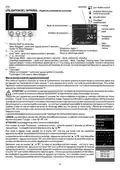
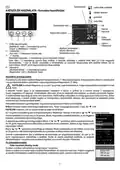
open window detection
Symbols:
HOW TO USE THEAPPLIANCE-Convector control board
overheating protection
child protection
extra heating
T+
Operating
mode
Clock
Power
indicator
Internet
connection
Room
temperature
1
2
3
4
1 – Switching the convector heater On / Off;
„Settings“ menu - after pressing for 2 sec.
„Exit“ from „Settings“ menu
Date / Error
Messages
Set temperature /
Additional timer information /
Time to delay start
2 – „-“ or Down;
„Sleep mode“ - after pressing for 2 sec.
3 – „+“ or Up;
Delayed start - after pressing for 2 sec. while in Standby mode
Extra heating - after pressing for 2 sec. while in Heating mode. The appliance operates at a temperature increased by 2.5 оС
above the set temperature for one hour. Then the temperature is restored to the set temperature before the mode is enabled.
This mode is also disabled by pressing button 1.
4 – „Information“
„Clear timers“ – after pressing for 2 sec.
„Confirmation“ (ОК) in „Settings“ menu
Appliance switching on and off
Switching the convector On is carried out by switching the key located on the right side panel (pressing the end of the key marked "I")
and then pressing the button 1 on the electronic control panel. Switching the appliance Off is carried out in the same way as using button
1 of the electronic control board and then pressing the key marked "0".
ATTENTION! The side panel switch and button 1 of the electronic control board are function keys. Complete turning off of the
appliance is carried out ONLYby taking the power supply cord out of the power supply socket.
Each time the appliance is switched on, on the graphic display for 2 seconds are shown the hardware and software versions. Then is
displayed the main screen with temperature, date, time, and additional information depending on the current operating mode. The
controller stores the last active operating mode for an unlimited period of time before shutting down the device and always starts with the
same when switched on again. The controller also has the ability to save information about system time, date, sleep mode, and delayed
start mode in cases of short-time power failures. Period of such data saving - up to 24 hours. (if the convector heater has been turned on
for at least 4 minutes) or up to 40 seconds (if it was switched on for a shorter time).
The device is preconfigured so that it enters in Heating mode when it is switched on for the first time.
LANGUAGE! The information can be displayed in different languages. Selecting a language is carried out from the sub-menu
Language » 2sec. ⏻ + ▼+ OK.
ATTENTION!It is imperative to set the time, date and the languageinitially!
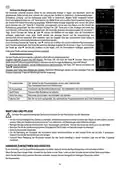
By holding the button 1 for 2 seconds is displayed the main menu which means entering the Settings mode.
Navigate in the menu with the "▲" and "▼" buttons.
To enter the current settings, press the OK button. Once the screen with the relevant settings is displayed, the
individual parameters in it are corrected as follows:
The current parameter is displayed enclosed in a rectangle. With the "▲" and "▼" buttons, the parameters
set are crawled. Pressing the OK key enters the correction mode of the current parameter as its value is
displayed with a negative color in a filled rectangle.
Now with the "▲" and "▼" buttons you can change the value of the parameter. Once the required value is
selected, press the OK button to confirm the change and exit the parameter adjustment mode.An exception to
this rule are parameters as bookmarks (enabled / disabled). Instead, pressing the OK button changes the
status of the bookmark directly. Once all parameters have been set, the changes made are confirmed by
pressing button 1, and the controller returns to the main menu. For additional settings in the main menu, see
the "Controller Features" section.
XXXyy-XXX
SW ver yyy
HW ver yyy
16

| General | Details |
|---|---|
| Name | ELDOM NHC-RHN-WiFi Electronic Thermostat User Manual |
| Make | ELDOM |
| Language | English |
| Filetype | PDF (Download) |
| File size | 2.08 MB |
 (1 votes, average: 5.00 out of 5)
 Loading...


HEAT DECOR HD-T1000 WIFI Thermostat User Guide

homematic IP TRV-E-A Monday Radiator Thermostat Instruction Manual

EMOS P5601UF Floor Heating Thermostat User Manual

White Rodgers 1F72 5 2 Day Programmable Thermostat Instructions

STELPRO STE302NP Programming Electronic Thermostat

iO HVAC CONTROLS Z-2000-T Thermostat Instruction Manual

ESi Controls ESRTP4TOUCH Programmable Room Thermostat Instruction Manual

Honeywell CM921 Wireless Programmable Room Thermostat User Guide

ECSPST Fort Programmable Thermostat User Guide

Honeywell Home T3 Pro Non-Programmable Thermostat User Manual