
Home > COLDBUSTER > COLDBUSTER MCD5 Programmable Thermostat User Manual
COLDBUSTER MCD5 Programmable Thermostat User Manual


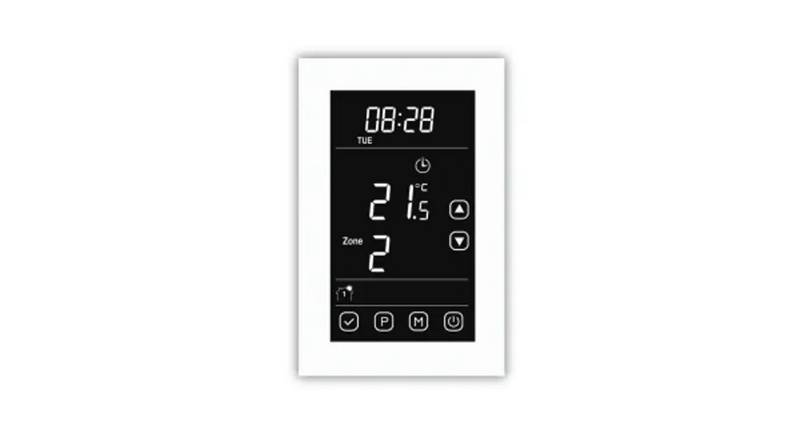
DEFAULT SCREEN PAGE
Day & Time
ain Menu Button
art of next zone
her Button
Set Temp
Manual Button
GETTING STARTED
1
On starting up, first peel off the plastic screen protector. The first option to appear will be the region/country
you are in. Tap the down arrow to the 3rd option down which is for AUS/NZ. Tap on this option. A black tick
will appear on the right-hand side. Then press the blue tick to confirm this regional option. The next screen
defaults to English. Then press the Blue Tick to confirm the Language. Then follow the prompts for the
date & time. If any numeral needs to be changed, press on the applicable figure, which will then enlarge &
then use the up or down arrows to change.
If that option has already been done but the date or time is incorrect do as follows.
CHANGE DATE:
Press main menu button, press USER settings, then scroll down with the down arrow to DATE. Press on
DATE. Then press on the applicable day, month, or year. The numerals will then enlarge. Then use the
up or down arrow to get to the right numeral. When all is correct, then press the button and then
press the Left(back) button twice to get back to the Default Screen Page.
CHANGE TIME:
Press main menu button, press USER settings, then scroll down with the down arrow to TIME. Press on
TIME. Then press on the applicable Hour or Minute. The numerals will then enlarge. Then use the up or
down arrow to get to the right numeral. When all is correct, then press the button and then press the
Left (back) button twice to get back to the Default Screen Page.
DATE & TIME Formats:
You can change the DATE Format (DD-MM-YYY or MM-DD-YYYY) & TIME format (12hour or 24hour) as
options within the USER SETTINGS.
Choose the setting, confirm with the button & then press the left (Back) button to get back to the Default
Screen.
HOW TO PROGRAM THE THERMOSTAT:
The initial choices to be made for programming are which days are workdays & which are home days.
Workdays have 4 zones in a day & home days have 2 zones in a day.
Having 4 zones in a day gives greater flexibility with the 1st zone being the morning, 2nd zone being daytime,
3rd zone being afternoon evening & 4th zone being overnight.
Home days with 2 zones basically means on all day and off at night.
To choose between Workdays & Home days go MAIN MENU button, HEATING SCHEDULE & then WEEK
TYPE and follow the prompts.
To program the thermostat, go MAIN MENU button, EVENT SCHEDULE.
The 1st zone comes up & is called “WAKE UP”.
Press on the time. The time will enlarge & you can set the time with the up or down arrows. (If the
thermostat is in Adaptive Mode, then the floor heating will be warm by your set time). Then press the to
confirm.
Press on the temperature. The temperature will enlarge & you can set the temperature with the up or
down arrows. A suggested “ON” temperature is 25oC. Then press the to confirm.
Then press the which will move the screen onto the 2nd zone namely “Leave Home”. To have the
thermostat switch off during a time zone, a suggested temperature to switch it off, would be 10oC.
Do as above to set the 3rd (Come Home) & 4th (Go to Sleep) zones.

| General | Details |
|---|---|
| Name | COLDBUSTER MCD5 Programmable Thermostat User Manual |
| Make | COLDBUSTER |
| Language | English |
| Filetype | PDF (Download) |
| File size | 0.16 MB |
 (1 votes, average: 5.00 out of 5)
 Loading...

COLDBUSTER MWD5 Programmable Thermostat User Manual

RTH21 Programmable Thermostat Coldbuster Dual Instruction Manual
COLDBUSTER CB Dual Thermostat User Manual


LUX PSPH521 Series Programmable Heat Pump Thermostat Instruction Manual

EMERSON 1F75P-21PR Display Thermostat Instruction Manual

Carrier 33TWSPL-4 Wifi Stat Plus Thermostat Owner’s Manual

Aprilaire 8538 Digital Heat Cool Thermostat Owner’s Manual

EBERLE UTE 1032-55, UTE 1032-50 Flush Mounted Room Thermostat Owner’s Manual

heatmiser neoStat-Pro Smart Thermostat Instruction Manual

ecoer EST02 Smart Wi-Fi Thermostat User Guide

EPH CONTROLS CDT2 Room Thermostat Instruction Manual

BEOK TGM50 Thermostat User Guide
PECO CONTROL SYSTEMS T8168B-2 BACnet IP Connection Thermostat Instructions