
Home > COLDBUSTER > RTH21 Programmable Thermostat Coldbuster Dual Instruction Manual
RTH21 Programmable Thermostat Coldbuster Dual Instruction Manual


SETTING THE TIME AND DAY
ADJUSTING THE PARAMETER VALUES
Note:
Only modify these parameters if it is essential.
Press
Use
, the time display will flash.
to adjust.
ACCESSING PARAMETERS
Turn the thermostat off by pressing
After turning the thermostat off, press
.
Press
Use
again, the day display will flash.
to adjust.
Programmable Thermostat
Coldbuster Dual
.
Use
or
to adjust.
Press
to store and exit.
Press
Press
to move to next menu.
to store and exit.
AUTO / MANUAL MODE
01.Temperature calibration for Zone 1
- 1°C = decrease 1°C , 1°C = increase 1°C ...
Press
to select Auto or Manual mode.
02.Temperature calibration for Zone 2
- 1°C = decrease 1°C , 1°C = increase 1°C ...
Auto mode:
Manual mode:
03. 5+2 / 7 Day Program Option (default 01)
01 = 5+2 Day Program, 02 = 7 Day Program
In Manual mode, press
temperature.
to set the desired
04. Dual Options
01 set both zones as thermostats
02 set zone 1 as a thermostat and zone 2 as a timer
In Auto mode, press
programmed temperature unitl the next programmed
period. will flash in this case.
to override the current
Large Touch Screen
Simple Programming
Accurate Control
05. Reset
This allows you to reset your thermostat to factory default.
When your thermostat is turned off, press and hold
for about 5 seconds until you see Menu 05.
Press and hold
until you see RES on screen.
LOCKING THE KEYPAD
To lock the keypad, press and hold for 5 seconds.
You will see . To unlock, repeat the steps above
and will disappear.
5+2 / 7 Day Schedules
User-friendly Menu
TEMPORARY OVERRIDE
TURNING THE THERMOSTAT ON/OFF
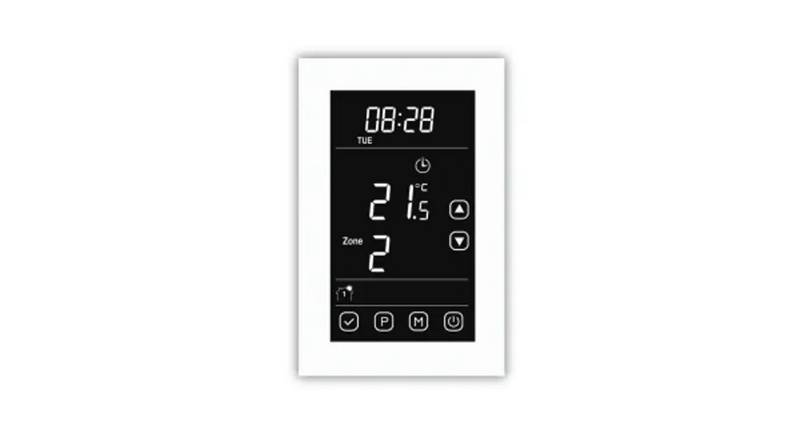
2 Zones Programmable Heating
Press
to turn on/off the thermostat. When your
In Auto mode, press
will flash.
and the temperature display
thermostat is turned off the LCD will display OFF.
The outputs for all zones will be turned off.
Use
to adjust.
Coldbuster Floor Hea�ng
8/81 Frenchs Forest Road E
Frenchs Forest NSW 2086
Press
to confirm.
will flash on the screen.
Your thermostat will maintain the new setpoint until the
next programmed period.
ALTERNATING THE ZONES
Phone: +61 0 9982 5374 / Toll Free: 1800 85 75 65
Email: sales@coldbuster.com.au
When your thermostat is turned on press and hold
about 5 seconds to switch between zone 1 and zone 2.
for
To cancel the override setting, press
.


| General | Details |
|---|---|
| Name | RTH21 Programmable Thermostat Coldbuster Dual Instruction Manual |
| Make | COLDBUSTER |
| Language | English |
| Filetype | PDF (Download) |
| File size | 0.24 MB |
 (1 votes, average: 5.00 out of 5)
 Loading...

COLDBUSTER MWD5 Programmable Thermostat User Manual
COLDBUSTER CB Dual Thermostat User Manual

COLDBUSTER MCD5 Programmable Thermostat User Manual

Coldbuster RTH21 Manual: Questions and Answers
What is the difference between Auto and Manual mode on the Coldbuster RTH21?
Auto mode overrides programmed temperature until the next period. Manual mode lets you set the desired temperature directly.
| Mode | Function |
|---|---|
| Auto | Press to override current programmed temperature until next period |
| Manual | Press to set desired temperature |
Can I use the Coldbuster RTH21 with both zones as separate thermostats?
Yes. In parameter 04, set option 01 to use both zones as thermostats. Option 02 sets zone 1 as thermostat and zone 2 as timer. Instruction Manual, p. 1
More Coldbuster thermostat manuals

ZigBee BAC-3000 Series Thermostat User Guide

EPH Controls RF1A Programmable RF Thermostat Instruction Manual

Honeywell T8131A Programmable Thermostat Owner’s Manual

ARUNA 302S RF Digital Room Thermostat User Manual

SALUS RT310SR Wireless Thermostat User Manual

TIOEVO0003 TEVO Wireless Thermostat User Manual

aube technologies CT230-120GA Slave and Master Thermostat Instruction Manual

MONARCH I 1031 Homematic IP Wall Thermostat Instruction Manual

Uponor T-247 BUS Smatrix Base Thermostat Installation Guide

mars 7602-457 Communicating Programmable Thermostat Instruction Manual