Home > COLDBUSTER > COLDBUSTER MWD5 Programmable Thermostat User Manual

COLDBUSTER MWD5 Programmable Thermostat User Manual

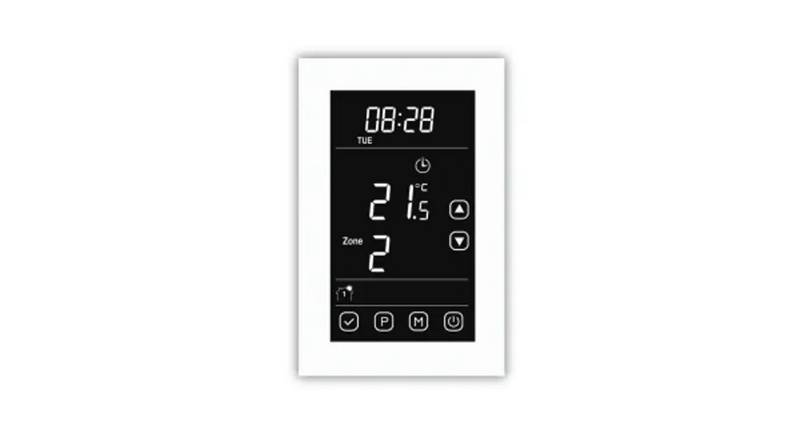
MWD5  
PROGRAMMABLE  
THERMOSTAT  
App controlled over WiFi  
QUICK REFERENCE USER MANUAL  
COLDBUSTER FLOORHEATING  
8/81 Frenchs Forest Road East,  
Frenchs Forest, NSW 2086  
CONTACT US @ 1800 85 75 65  
GeneralDetails
NameCOLDBUSTER MWD5 Programmable Thermostat User Manual
MakeCOLDBUSTER
LanguageEnglish
FiletypePDF (Download)
File size0.19 MB
Download PDF
1 Star2 Stars3 Stars4 Stars5 Stars (1 votes, average: 5.00 out of 5)
Loading...
RTH21 Programmable Thermostat Coldbuster Dual Instruction Manual
COLDBUSTER CB Dual Thermostat User Manual
COLDBUSTER MCD5 Programmable Thermostat User Manual

COLDBUSTER MWD5 Programmable Thermostat User Manual
Get the free PDF manual for the COLDBUSTER MWD5 Programmable Thermostat User Manual and access setup steps, usage instructions, and troubleshooting tips. 👉 View online or download now to keep your thermostat running smoothly!

COLDBUSTER MWD5 Programmable Thermostat User Manual Overview

Summary of Contents

  • Page 1: Programmable thermostat App controlled over WiFi Quick reference user manual Coldbuster floor heating
  • Page 2: Get the thermostat connected to your WiFi and to your smartphone. First, get the app onto your smartphone. Ensure you do not download any other app that looks similar, they don’t work on the Australasia version. Tap the Menu button on the home screen. Tap the Wi-Fi Connection button to set up the Wi-Fi connection. Confirm the network key with ✓ to start connecting the thermostat. If this is your first time, create a username and password. Tap the Connect to App button to connect to your app. You must now give the thermostat a name and identify the heating zone it is in. The menu button provides access to various features of the thermostat.
  • Page 3: Some other helpful info. Default screen page Day & time Wi-Fi connection Main menu button Getting started If the screen asks which area of Australia you are in, press the applicable option or press the down arrow to scroll down. Change date: Press main menu button, press user settings, then scroll down with the down arrow to date. Change time: Press main menu button, press user settings, then scroll down with the down arrow to time. Date & time formats: You can change the date format and time format as options within the user settings. How to program the thermostat: The initial choices to be made for programming are which days are workdays and which are home days. Workdays have 4 zones in a day and home days have 2 zones in a day. To program the thermostat, go main menu button, event schedule.
  • Page 4: Use manual mode to set the desired temperature, keeping the floor heating on until turned off or switched to programming mode. Access the manual screen by pressing the manual button on the default screen. Adjust the temperature using the up or down arrows; it will turn red when heating is active. Other useful modes include comfort mode, boost mode, and holiday mode, accessible via the other button. Comfort mode allows for a time frame with temperature adjustments, overriding the auto schedule. Boost mode activates the heater for 100% of the next hour. Holiday mode prevents freezing while away and reactivates heating upon return. To set holiday mode, confirm your leave and return dates after selecting it from the menu. You can exit any mode by pressing the designated button.
  • Page 5: Child lock can be enabled by accessing the user settings and adjusting the digital slide switch. To confirm the child lock setting, press the button in the lower right corner of the screen. The child lock activates after about 2 minutes when the screen saver appears. To disable the child lock, draw an L on the screen in a single stroke. The adaptive function is defaulted to ON and allows the thermostat to preheat before the set time. This function is beneficial in Floor sensor mode but may increase running costs in Room Limit or Room sensor mode. To switch the adaptive function OFF, access the engineer settings and tap the grey area next to ON. The energy use section provides information on the cost of running floor heating. It includes a 7-day usage graph and breakdown of KWh and price for the last week, month, and year. Inaccurate readings may occur if the thermostat is used for a large floor area or if a smart electricity meter is in place.
  • Page 6: Sensor application The default with the thermostat is the floor sensor mode, measuring the floor temperature. Suggested floor temperature is 25°C – 30°C. The thermostat can also be set to room/floor limit and room modes. Room floor limit measures room temperature while adhering to floor temperature limitations. For wooden floors, the maximum floor temperature is generally around 27°C. Minimum limits are suitable for very cold climates to prevent floor temperature from dropping too low. Room sensor measures room temperature and maintains it at the set temperature. Suggested room temperatures vary between 19°C to 21°C. Higher set temperatures increase running costs. Instructions for changing options include pressing the Menu button and selecting Engineer Settings.