
Home > COLDBUSTER > COLDBUSTER MWD5 Programmable Thermostat User Manual
COLDBUSTER MWD5 Programmable Thermostat User Manual


Some other helpful info.
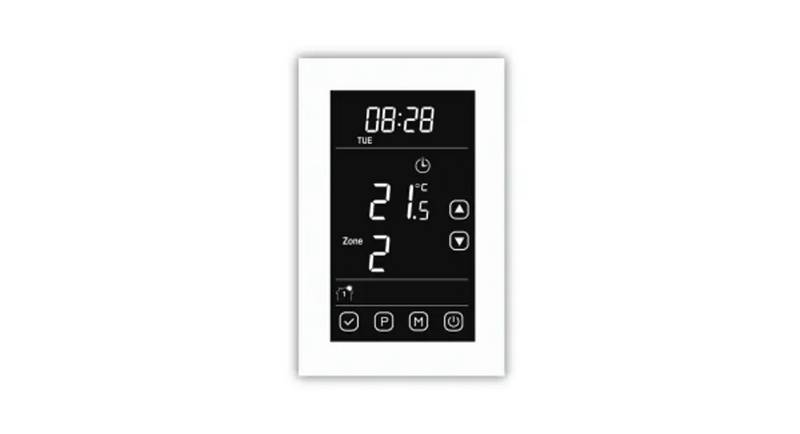
DEFAULT SCREEN PAGE
Day & Time
Wi-Fi connection
Main Menu Button
Start of next zone
Other Button
Set Temp
Manual Button
GETTING STARTED
1
If the screen asks which area of Australia you are in, press the applicable option or press the down arrow to
scroll down. Then follow the prompts for the date & time. If any numeral needs to be changed, press on the
applicable figure, which will then enlarge & then use the up or down arrows to change.
If that option has already been done but the date or time is incorrect do as follows.
CHANGE DATE:
Press main menu button, press USER settings, then scroll down with the down arrow to DATE. Press on
DATE. Then press on the applicable day, month or year. The numerals will then enlarge. Then use the up
or down arrow to get to the right numeral. When all is correct, then press the ✓button and then press the
Left(back) button twice to get back to the Default Screen Page.
CHANGE TIME:
Press main menu button, press USER settings, then scroll down with the down arrow to TIME. Press on
TIME. Then press on the applicable Hour or Minute. The numerals will then enlarge. Then use the up or
down arrow to get to the right numeral. When all is correct, then press the ✓button and then press the
Left (back) button twice to get back to the Default Screen Page.
DATE & TIME Formats:
You can change the DATE Format (DD-MM-YYY or MM-DD-YYYY) & TIME format (12hour or 24hour) as
options within the USER SETTINGS.
Choose the setting, confirm with the ✓button & then press the left (Back) button to get back to the
Default Screen.
HOW TO PROGRAM THE THERMOSTAT:
The initial choices to be made for programming are which days are workdays & which are home days.
Workdays have 4 zones in a day & home days have 2 zones in a day.
Having 4 zones in a day gives greater flexibility with the 1st zone being the morning, 2nd zone being daytime,
3rd zone being afternoon evening & 4th zone being overnight.
Home days with 2 zones basically means on all day and off at night.
To choose between Workdays & Home days go MAIN MENU button, HEATING SCHEDULE & then WEEK
TYPE and follow the prompts.
To program the thermostat, go MAIN MENU button, EVENT SCHEDULE.
The 1st zone comes up & is called “WAKE UP”.
Press on the time. The time will enlarge & you can set the time with the up or down arrows. (If the
thermostat is in Adaptive Mode then the floor heating will be warm by your set time). Then press the ✓to
confirm.
Press on the temperature. The temperature will enlarge & you can set the temperature with the up or
down arrows. A suggested “ON” temperature is 25oC. Then press the ✓to confirm.
Then press the ➔which will move the screen onto the 2nd zone namely “Leave Home”. To have the
thermostat switch off during a time zone, a suggested temperature to switch it off, would be 10oC.
Do as above to set the 3rd (Come Home) & 4th (Go to Sleep) zones.

| General | Details |
|---|---|
| Name | COLDBUSTER MWD5 Programmable Thermostat User Manual |
| Make | COLDBUSTER |
| Language | English |
| Filetype | PDF (Download) |
| File size | 0.19 MB |
 (1 votes, average: 5.00 out of 5)
 Loading...


RTH21 Programmable Thermostat Coldbuster Dual Instruction Manual
COLDBUSTER CB Dual Thermostat User Manual

COLDBUSTER MCD5 Programmable Thermostat User Manual


tado SRTX_ADAPTER Smart Radiator Thermostat Instruction Manual

VIVE TP-S-855C Digital Programmable Thermostat Instruction Manual

DIGITEN DTC-310 Electronic Temperature Controller Thermostat User Manual

Honeywell TH9320WF Smart Thermostat 9000 Color Touchscreen Installation Guide

SIEMENS RDF660MB Flush Mount Room Thermostat Instruction Manual

Honeywell D1-528 Thermostat User Guide

EUROTRONIC Sparmatic COMET Programmable Energy-Saving Radiator Thermostat User Manual

InfraComfort HY01WE Programmable Non Wi-Fi Thermostat User Manual

Emerson ST55 Sensi Wi-Fi Programmable Thermostat Installation Guide

DELTA DORE Tybox 5701FP Pilot Wire Thermostat User Guide