
×
- 1. User's Manual
- 2. Environmental Policy (Airzone Interface → Airzone Blueface Zero → Main Screen → Hvac Control → User Settings → Airzone Think)
- 3. Environmental Policy (Recycling And Disposal Guidelines → Penalties For Violations)
- 4. Airzone Interfaces (Airzone Blueface Zero → Main Screen → Operation Mode → Zone Settings → User Settings)
- 5. Hvac Control (Set-point Temperature → Efficiency Indicator → Eco-adapt Function → User Settings → Information → Fan Speed)
- 6. Zone Navigation (Operation Mode → Access To The Zone → Switch The Zone On Or Off → Zone Set-point Temperature → Zone Room Temperature → Remote Zone Navigation Icons)
- 7. Zone Settings (Sleep Mode → Anti-freezing → Lite Settings → Grille Angle → Control Stages → Q-adapt)
- 8. Airzone Blueface Zero Parameters (User Settings → Information → System → Hvac Control → Eco-adapt Function → Zone Settings → Operation Mode)
- 9. Airzone Think (Screensaver → Control Bar → Main Screen → Eco-adapt Function → Settings Menu → Time Schedules)
- 10. Hvac Control (Operation Mode → Fan Speed)
- 11. Settings Menu (Mode → Speed → Sleep Mode → Zone Navigation)
- 12. Airzone Think Parameters (Flexa 4.0 → Flexa 3.0 → Hvac Control → Fan Speed → Zone Settings → Sleep Mode)
- 13. Airzone Lite (Important → Basic Functions → Set-point Temperature)
- 14. Change Of Battery (Important)
- 15. Incidents (Warnings → Anti-freezing → Active Window → Dhw → Low Battery → Occupancy)
- 16. Errors (Communication Errors → Ac Unit Error → Other Errors → Airzone Lite Errors)
- 17. Política Medioambiental (Interfaces Airzone → Airzone Blueface Zero → Control De Climatización → Función Eco-adapt → Ajustes De Usuario → Menú De Configuración)
- 18. Política Medioambiental (Recogida Selectiva De Aparatos Eléctricos → Gestión Ambiental → Reglamentación Sobre Protección Medioambiental → Sanciones Por Infracciones)
- 19. Interfaces Airzone (Airzone Blueface Zero → Pantalla Principal → Modo De Funcionamiento → Función Eco-adapt → Navegación Por Zonas → Control De Climatización)
- 20. Control De Climatización (Temperatura De Consigna → Indicador De Eficiencia → Función Eco-adapt → Ajustes De Usuario → Información → Velocidad Del Ventilador)
- 21. Navegación Por Zonas (Acceso A Todas Las Zonas → Encender/apagar Todas Las Zonas → Temperatura De Consigna De La Zona → Modo De Funcionamiento)
- 22. Configuración De Zona (Modo Sleep → Antihielo → Ajustes Lite → Ángulos De Rejilla → Ajuste De Lamas → Q-adapt)
- 23. Parámetros Airzone Blueface Zero (Identifique Su Sistema Desde El Termostato Airzone Blueface Zero, Acceda A: → Control De Climatización → Función Eco-adapt → Navegación Por Zonas → Modos De Funcionamiento → Configuración De Zona → Modo Sleep → Antihielo)
- 24. Airzone Think (Pantalla Principal → Función Eco-adapt → Modo De Funcionamiento → Menú De Configuración → Temperatura De Consigna → Programaciones Horarias)
- 25. Control De Climatización (Modo De Funcionamiento → Velocidad Del Ventilador)
- 26. Menú De Configuración (Modo → Velocidad → Modo Sleep → Navegación Por Zonas (no Disponible En La Versión 3.5.0))
- 27. Parámetros Airzone Think (Control De Climatización → Velocidad Del Ventilador → Configuración De Zona → Modo → Velocidad → Modo Sleep → Navegación Por Zonas)
- 28. Funciones Básicas (Importante → Nota)
- 29. Cambio De Batería (Cuando Aparezca En Pantalla El Icono De Batería Baja)
- 30. Incidencias (Avisos → Antihielo → Ventana Activa → Acs → Batería Baja → Presencia Activa)
- 31. Errores (Errores De Comunicación → Error De Máquina → Otros Errores → Errores Airzone Lite)
- 32. Politique Environnementale (Interfaces Airzone → Airzone Blueface Zero → Contrôle De Chauffage Et Refroidissement → Fonction Eco-adapt → Navigation Par Zones → Mode De Fonctionnement)
- 33. Politique Environnementale (Ne Jetez Pas L'appareil Dans La Poubelle Des Déchets Ménagers. → Les Pièces Qui Le Composent Peuvent Être Recyclées. → Rendez-vous Chez Le Distributeur, Si Vous Souhaitez Remplacer L'appareil Par Un Autre. → Les Transgresseurs S'exposent Aux Sanctions Et Aux Dispositions Prévues Par La Loi En Matière De Protection Sur L'environnement.)
- 34. Interfaces Airzone (Airzone Blueface Zero → Écran De Veille → Heure Et Date → Température Ambiante → Humidité Relative → État De La Zone, Avertissements Et Erreurs)
- 35. Contrôle De Chauffage Et Refroidissement (Température De Consigne → Indicateur Defficacité → Fonction Eco-adapt → Configuration Dutilisateur → Informations → Vitesse Du Ventilateur)
- 36. Navigation Par Zones (Accès À Toutes Les Zones → Allumer/éteindre Toutes Les Zones → Mode De Fonctionnement → Erreurs → Icônes De Navigation Dans Les Zones À Distance)
- 37. Configuration De Zone (Mode Veille → Hors-gel → Réglages De Lite → Angle Des Grilles → Étapes De Contrôle → Q-adapt)
- 38. Airzone Blueface Zero Paramètres (Identifier Votre Système À Partir Du Thermostat Airzone Blueface Zero, Accès : → Configuration D'utilisateur → Contrôle De Chauffage Et Refroidissement → Fonction Eco-adapt → Vitesse Du Ventilateur → Mode De Fonctionnement → Navigation Par Zones)
- 39. Airzone Think (Écran De Veille → Écran Principal → Fonction Eco-adapt → Mode De Fonctionnement → Menu De Configuration → Température De Consigne → Programmations Horaires)
- 40. Contrôle De Chauffage Et Refroidissement (Mode De Fonctionnement → Vitesse Du Ventilateur)
- 41. Menu De Configuration (Mode → Vitesse → Mode Veille → Navigation Par Zones (non Disponible Dans Version 3.5.0))
- 42. Airzone Think Paramètres (Parameters → Contrôle De Chauffage Et Refroidissement → Vitesse Du Ventilateur → Configuration De Zone → Mode → Vitesse → Mode Veille)
- 43. Airzone Lite (Fonctions De Base → Température De Consigne)
- 44. Changement De Pile (Attention)
- 45. Incidences (Avertissements → Hors-gel → Fenêtre Active → Ecs → Pile Faible → Présence Active)
- 46. Erreurs (Erreurs De Communication → Erreur De L'unité → Autres Erreurs → Erreurs Airzone Lite)
- 47. Politica Ambientale (Interfacce Airzone → Controllo Della Climatizzazione → Funzione Eco-adapt → Navigazione Nelle Zone → Modo Di Funzionamento → Menu Di Configurazione)
- 48. Politica Ambientale (Non Smaltire Mai Questa Unità Insieme Agli Altri Rifiuti Domestici. I Prodotti Elettrici Ed Elettronici Contengono Sostanze Che Possono Essere Dannose Per L'ambiente In Assenza Di Un Adeguato Trattamento.)
- 49. Interfacce Airzone (Airzone Blueface Zero → Schermo Principale → Modo Di Funzionamento → Funzione Eco-adapt → Controllo Della Climatizzazione → Configurazione Di Zona Utente)
- 50. Controllo Della Climatizzazione (Indicatore Di Efficienza → Funzione Eco-adapt → Configurazione Utente → Informazioni)
- 51. Navigazione Nelle Zone (Accesso A Tutte Le Zone → Modo Di Funzionamento → Freddo → Caldo → Ventilazione → Deumidificazione*)
- 52. Configurazione Di Zona (Modo Sleep → Antigelo → Impostazioni Lite → Angolazione Bocchetta → Tipi Di Impianto → Q-adapt)
- 53. Airzone Blueface Zero Parametri (Identifica Il Tuo Sistema Dal Termostato Airzone Blueface Zero, Accedi : → Configurazione Utente → Funzione Eco-adapt → Modo Di Funzionamento → Configurazione Di Zona* → Modo Sleep → Tipi Di Impianto)
- 54. Airzone Think (Funzione Eco-adapt → Modo Di Funzionamento → Menu Di Configurazione → Programmazioni Orarie → Frequenza Di Comunicazione)
- 55. Controllo Della Climatizzazione (Modo Di Funzionamento → Velocità Del Ventilatore)
- 56. Menu Di Configurazione (Modo → Velocità → Modo Sleep → Navigazione Nelle Zone)
- 57. Airzone Think Parametri (Flexa 4.0 → Flexa 3.0 → Controllo Della Climatizzazione → Velocità Del Ventilatore → Menu Di Configurazione → Modo Sleep)
- 58. Airzone Lite (Funzioni Di Base → Temperatura Impostata)
- 59. Cambio Della Batteria (Sostituire La Batteria Quando Sullo Schermo Compare L'icona Che Indica Batteria Bassa → Importante)
- 60. Incidenze (Avvisi → Antigelo → Finestra Attiva → Acs → Batteria Bassa → Umidità → Preparazione)
- 61. Errori (Errori Di Comunicazione → Errore Macchina → Altri Errori → Errori Airzone Lite)
- 62. Política Ambiental (Interfaces Airzone → Airzone Blueface Zero → Controlo De Climatização → Função Eco-adapt → Navegação Por Zonas → Airzone Think)
- 63. Política Ambiental (Recolha Seletiva De Dispositivos Elétricos → Gestão Ambiental Correta → Reciclagem De Peças → Entregue A Unidade Não Utilizada → Sanções E Medidas Legais)
- 64. Interfaces Airzone (Airzone Blueface Zero → Proteção De Ecrã → Modo De Funcionamento → Função Eco-adapt → Controlo De Climatização → Configuração De Utilizador)
- 65. Controlo De Climatização (Temperatura De Referência → Indicador De Eficiência → Função Eco-adapt → Configuração De Utilizador → Avisos)
- 66. Navegação Por Zonas (Acesso A Todas As Zonas → Ligar/desligar Todas As Zonas → Temperatura De Referência Da Zona → Modo De Funcionamento)
- 67. Configuração Da Zona (Modo Sleep → Antigelo → Ajustes Lite → Ângulos De Grelha → Etapas Controlo → Q-adapt)
- 68. Airzone Blueface Zero Parâmetros (Configuraçao De Utilizador → Informaçao → Controlo De Climatizaçao → Funçao Eco-adapt → Modo De Funcionamento → Navegaçao Por Zonas)
- 69. Airzone Think (Proteção De Ecrã → Ecrã Principal → Função Eco-adapt → Modo De Funcionamento → Menu De Configuração → Programações Temporizadas)
- 70. Controlo De Climatização (Modo De Funcionamento → Velocidade Do Ventilador)
- 71. Menu De Configuração (Modo → Velocidade → Modo Sleep → Navegação Por Zonas)
- 72. Airzone Think Parâmetros (Flexa 4.0 → Flexa 3.0 → Acuazone → Radiant → Controlo De Climatização → Menu De Configuraçao)
- 73. Airzone Lite (Funções Básicas → Temperatura De Referência)
- 74. Troca De Bateria (Importante)
- 75. Incidências (Avisos → Antigelo → Janela Ativa → Aqs → Pouca Bateria → Presença Ativa)
- 76. Erros (Erros De Comunicação → Erro De Máquina. → Outros Erros → Erros Airzone Lite)
- 77. Umweltschutz (Airzone-schnittstellen → Airzone Blueface Zero → Hauptbildschirm → Klimatisierungsregelung → Betriebsmodus → Störungen)
- 78. Umweltschutz
- 79. Airzone-schnittstellen (Airzone Blueface Zero → Hauptbildschirm → Betriebsmodus → Zonenauswahl → Klimatisierungsregelung → Benutzerkonfiguration)
- 80. Klimatisierungsregelung (Solltemperatur → Effizienzanzeige → Funktion Eco-adapt → Benutzerkonfiguration → Informationen)
- 81. Zonenauswahl (Betriebsmodus → Zugriff Auf Alle → Alle Zonen Ein-/ausschalten → Zugriff Auf Zone → Solltemperatur Der Zone → Raumtemperatur Der Zone)
- 82. Zonenkonfiguration (Sleepmodus → Lite-einstellungen → Gitterwinkel → Kontrollstufen → Q-adapt → Lamellen-einstellung)
- 83. Airzone Blueface Zero-parameter (Benutzerkonfiguration → Informationen → Klimatisierungsregelung → Funktion Eco-adapt → Zonenauswahl → Betriebsmodus)
- 84. Airzone Think (Steuerleiste → Hauptbildschirm → Eco-adapt Des Systems → Konfigurationsmenü → Zeitprogrammierungen)
- 85. Klimatisierungsregelung (Betriebsmodus → Lüfterdrehzahl)
- 86. Konfigurationsmenü (Modus → Geschwindigkeit → Sleepmodus → Zonenauswahl)
- 87. Airzone Think-parameters (Flexa 4.0 → Flexa 3.0 → Acuazone → Radiant → Ra6 → Parameters)
- 88. Airzone Lite (Wichtig → Grundfunktionen)
- 89. Batteriewechsel (Wichtig)
- 90. Störungen (Meldungen → Antifrost → Fenster Aktiv → Batterie Schwach → Präsenz Aktiv → Filterwartung)
- 91. Fehler (Kommunikationsfehler → Gerätefehler. Fehlfunktion Der Klimamaschine → Sonstige Fehler → Airzone Lite Fehler)
- 92. Környezetvédelmi Irányelvek (Airzone Interfészek → A Légkondicionáló Vezérlése → Eco-adapt Funkció → Felhasználói Beállítások → Zónabeállítások → Váratlan Események)
- 93. Környezetvédelmi Irányelvek (Megfelelő Környezetgazdálkodás → Újrahasznosítható Alkatrészek → Előírások Betartása)
- 94. Airzone Interfészek (Airzone Blueface Zero → Képernyővédő → A Zóna Neve → Szobahőmérséklet → Zónabeállítások → Felhasználói Beállítások)
- 95. A Légkondicionáló Vezérlése (Set-point Temperature (beállított Hőmérséklet) → Hatékonysági Mutató → Eco-adapt Funkció → Felhasználói Beállítások → Information (információ))
- 96. A Ventilátor Sebessége (Nagy Sebesség → Kis Sebesség → Közepes Sebesség → Automatikus Sebesség → Navigáció A Zónákban → Üzemmód)
- 97. Heating (fűtés) (Ventilation (szellőztetés) → Dry (szárítás)* → Sleep Mode (alvó Üzemmód) → Anti-freezing (fagymentesítés) → Lite Settings (lite Beállítások) → Grille Angle (rácsszög))
- 98. Control Stages (ellenőrző Szakaszok) (Air (levegő) → Radiant (sugárzás) → Combined (kombinált) → Adjust Slats (lapátbeállítások) → Q-adapt → Power (teljesítmény))
- 99. Airzone Blueface Zero Paraméterek (Felhasználói Beállítások → A Légkondicionáló Vezérlése → Eco-adapt Funkció → Navigáció A Zónákban → Zónabeállítások → Alvó Üzemmód)
- 100. Airzone Think (Főképernyő → Eco-adapt Funkció → Üzemmód → Beállítások Menü → Alvó Üzemmód → Az Idő Ütemezése)
- 101. A Légkondicionáló Vezérlése (Set-point Temperature (beállított Hőmérséklet) → Üzemmód → Cooling (hűtés) → Heating (fűtés) → Ventilation (szellőztetés) → Dry (szárítás)*)
- 102. Beállítások Menü (Mode (üzemmód) → Speed (sebesség) → Sleep Mode (alvó Üzemmód) → Zone Navigation (navigáció A Zónákban))
- 103. Airzone Think Paraméterek (Flexa 4.0 → Flexa 3.0 → A Légkondicionáló Vezérlése → Zónabeállítások → Üzemmód → Navigáció A Zónákban)
- 104. Airzone Lite (Hőmérséklet Növelése → Hőmérséklet Csökkentése → Alapfunkciók → Set-point Temperature (beállított Hőmérséklet))
- 105. Elemcsere (Alacsony Akkumulátor Ikon → Megjegyzés A Vezeték Nélküli Lite Termosztátokról → Elem Cseréje → Fontos Információk Az Elemekről → Rongálásgátló Rendszer Eltávolítása)
- 106. Váratlan Események (Figyelmeztetések → Anti-freezing (fagymentesítés) → Active Window (aktív Ablak) → Dhw (hmv) → Low Battery (alacsony Akkumulátor) → Occupancy (aktív Jelenlét))
- 107. Ntc2 Alarm (Filter Maintenance → Hibák → Kommunikációs Hibák → Ac Unit Error → Egyéb Hibák → Airzone Lite Hibák)
- 108. Miljöpolicy (Airzone-gränssnitt → Klimatstyrning → Eco-adapt-funktion → Användarinställningar → Navigering Genom Zoner → Driftläge)
- 109. Miljöpolicy (Systemets Komponenter Är Återvinningsbara → Korrekt Miljöhantering)
- 110. Airzone-gränssnitt (Airzone Blueface Zero → Zonstatus, Meddelanden Och Fel → Huvudskärm → Driftläge → Klimatstyrning → Zoninställningar)
- 111. Klimatstyrning (Set-point Temperature (förinställd Temperatur) → Effektivitetsindikator → Eco-adapt-funktion → Manual (manuell) → Användarinställningar → Information)
- 112. Fläkthastighet (Navigering Genom Zoner → Driftläge)
- 113. Heating (värme) (Ventilation → Dry (avfuktning) → Zoninställningar → Sleep Mode (viloläge) → Anti-freezing (avfrostning) → Lite Settings (lite-inställningar))
- 114. Adjust Slats (inställning Av Luftriktare) (Q-adapt)
- 115. Parametrar För Airzone Blueface Zero (Identifiera Ditt System Från Termostaten Airzone Blueface Zero Genom Att Välja: → Användarinställningar → Klimatstyrning → Zoninställningar*)
- 116. Airzone Think (Skärmsläckare → Zonstatus → Huvudskärm → Eco-adapt-funktion → Inställningsmeny → Tidsscheman)
- 117. Klimatstyrning (Set-point Temperature (förinställd Temperatur) → Driftläge → Fläkthastighet)
- 118. Inställningsmeny (Mode (driftläge) → Speed (hastighet) → Sleep Mode (viloläge) → Zone Navigation (navigering Genom Zoner))
- 119. Parametrar För Airzone Think (Flexa 4.0 → Flexa 3.0 → Acuazone → Radiant → Klimatstyrning → Zoninställningar)
- 120. Airzone Lite (Grundläggande Funktion → Set-point Temperature (förinställd Temperatur) → Viktigt → Obs)
- 121. Byte Av Batteri (Viktigt)
- 122. Incidenter (Anti-freezing → Active Window → Dhw → Low Battery → Occupancy → Filter Maintenance)
- 123. Fel (Kommunikationsfel → Termostat Centralenhet / Zonmodul → Gateway Airzone-systemet → Bacnet-gateway Centralenhet → Webserver Airzone-systemet → Fel För Airzone Lite)
- 124. Milieubeleid (Airzone-interfaces → Klimaatregeling → Eco-adapt Functie → Ventilatorsnelheid → Menu Instellingen → Storingen)
- 125. Milieubeleid
- 126. Airzone-interfaces (Airzone Blueface Zero → Screensaver → Omgevingstemperatuur → Relatieve Luchtvochtigheid → Klimaatregeling → Zone-instellingen)
- 127. Klimaatregeling (Set-point Temperature (ingestelde Temperatuur) → Efficiëntieweergave → Eco-adapt Functie → Manual (handmatig) → Gebruikersinstellingen → Information (informatie))
- 128. Ventilatorsnelheid (Hoge Snelheid → Gemiddelde Snelheid → Lage Snelheid → Automatische Snelheid → Functiemodus)
- 129. Heating (verwarmen) (Ventilation (ventilatie) → Dry (drogen) → Zone-instellingen → Sleep Mode (sluimermodus) → Anti-freezing (vorstbescherming) → Lite Settings (lite-instellingen))
- 130. Control Stages (bedieningsfasen) (Air (lucht) → Radiant (straling) → Combined (gecombineerd) → Adjust Slats (lamellen Afstellen) → Q-adapt)
- 131. Parameters Voor Airzone Blueface Zero (Gebruikersinstellingen → Klimaatregeling → Eco-adapt Functie → Ventilatorsnelheid → Functiemodus → Zone-instellingen → Vorstbescherming)
- 132. Airzone Think (Screensaver → Hoofdscherm → Eco-adapt Functie → Ventilatorsnelheid → Functiemodus → Instellingen)
- 133. Klimaatregeling (Set-point Temperature (ingestelde Temperatuur) → Functiemodus → Ventilatorsnelheid)
- 134. Mode (modus) (Speed (snelheid) → Sleep Mode (sluimermodus) → Zone Navigation (navigatie Door Zones))
- 135. Parameters Voor Airzone Think (Flexa 4.0 → Flexa 3.0 → Acuazone → Radiant → Ra6 → Parameters)
- 136. Airzone Lite (Basisfuncties → Temperatuur Verhogen → Temperatuur Verlagen → Alleen Voor Draadloze Lite-thermostaat → Belangrijk → Opmerking)
- 137. De Batterij Vervangen (Wanneer Het Pictogram Batterij Bijna Leeg → Belangrijk:)
- 138. Storingen (Waarschuwingen → Anti-freezing (vorstbescherming) → Active Window (geopend Venster) → Dhw (sww) → Low Battery (batterij Bijna Leeg) → Occupancy (aanwezigheid Actief))
- 139. Ntc2 Alarm (Filter Maintenance → Storingen → Communicatiefouten → Ac Unit Error → Fouten Airzone Lite)
- 140. Ochrona Środowiska (Panele Sterowania Airzone → Airzone Blueface Zero → Sterowanie Klimatyzacją → Funkcja Eco-adapt → Ustawienia Użytkownika → Airzone Think)
- 141. Ochrona Środowiska (Urządzenia Nie Wolno Wyrzucać Razem Z Odpadami Domowymi. → Części, Z Których Złożone Jest Urządzenie, Można Poddać Recyklingowi. → Naruszenia Podlegają Karom Przewidzianym W Ustawie O Ochronie Przyrody.)
- 142. Panele Sterowania Airzone (Airzone Blueface Zero → Ekran Główny → Tryb Pracy → Funkcja Eco-adapt → Sterowanie Klimatyzacją → Ustawienia Użytkownika)
- 143. Sterowanie Klimatyzacją (Set-point Temperature (temperatura Zadana) → Wskaźnik Wydajności → Funkcja Eco-adapt → Ustawienia Użytkownika → Information (informacja))
- 144. Prędkość Wentylatora (Wysoka Prędkość → Średnia Prędkość → Niska Prędkość → Automatyczna Prędkość → Nawigacja Po Strefach → Tryb Pracy)
- 145. Heating (ogrzewanie) (Ventilation (wentylacja) → Dry (osuszanie) → Sleep Mode (tryb Sleep) → Anti-freezing (ochrona Przez Zamarznięciem) → Lite Settings (ustawienia Lite) → Grille Angle (kąt Nachylenia Kierownic))
- 146. Control Stages (rodzaj Klimatyzacji) (Air (powietrze) → Radiant (promiennik) → Combined (łączony) → Adjust Slats (regulacja Lamelek) → Q-adapt)
- 147. Parametry Airzone Blueface Zero (Sterowanie Klimatyzacją → Funkcja Eco-adapt → Ustawienia Użytkownika → Nawigacja Po Strefach → Tryb Pracy → Ustawienia Strefy*)
- 148. Airzone Think (Ekran Główny → Funkcja Eco-adapt → Tryb Pracy → Programator Czasowy → Tryb Sleep → Częstotliwość Komunikacji)
- 149. Sterowanie Klimatyzacją (Set-point Temperature (temperatura Zadana) → Tryb Pracy → Prędkość Wentylatora)
- 150. Menu Ustawienia (Mode (tryb Pracy) → Speed (prędkość) → Sleep Mode (tryb Sleep) → Zone Navigation (nawigacja Po Strefach))
- 151. Parametry Airzone Think (Flexa 4.0 → Flexa 3.0 → Acuazone → Radiant → Sterowanie Klimatyzacją → Tryb Pracy)
- 152. Airzone Lite (Zwiększanie Temperatury → Zmniejszanie Temperatury → Podstawowe Funkcje → Set-point Temperature (temperatura Zadana) → Uwaga → Ważne)
- 153. Wymiana Baterii (Kiedy Na Ekranie Wyświetli Się Ikona Ostrzegająca O Niskim Poziomie Baterii → Uwaga: W Przypadku Bezprzewodowych Termostatów Lite → Ważne: → Przypominamy, Że Zużytą Baterię Należy Zanieść Do Odpowiedniego Punktu Zbiórki Odpadów. → Uwaga: Przed Zdjęciem Termostatu Ze Ściany Należy Pamiętać O Usunięciu Zabezpieczenia)
- 154. Błędy (Ostrzeżenia → Anti-freezing → Active Window → Dhw → Low Battery → Occupancy)
- 155. Ntc2 Alarm (alarm Ntc2) (Filter Maintenance (konserwacja Filtra) → Błędy → Ac Unit Error (błąd Jednostki Klimatyzacyjnej) → Inne Błędy)
- 156. Błędy Airzone Lite (Utrata Połączenia Z Centralą → Utrata Komunikacji Między Centralą Systemu A Modułem Strefy → Utrata Komunikacji Z Modułem Strefy)
- 157. Miljømessige Retningslinjer (Airzone Grensesnitt → Airzone Blueface Zero → Hvac-kontroll → Eco-adapt-funksjon → Brukerinnstillinger → Grunnleggende Funksjoner)
- 158. Miljømessige Retningslinjer (Ikke Kast Dette Utstyret I Husholdningsavfallet → Separat Innsamling Av Elektriske Apparater → Resirkulering Av Deler → Gjeldende Forskrifter Angående Miljøvern → Returnering Av Originalutstyr → Brudd På Miljøvernloven)
- 159. Airzone Grensesnitt (Airzone Blueface Zero → Hovedskjerm → Driftsmodus → Soneinnstillinger → Brukerinnstillinger)
- 160. Hvac-kontroll (Set-point Temperature (settpunktstemperatur) → Effektivitetsindikator → Eco-adapt-funksjon → Brukerinnstillinger → Information (informasjon))
- 161. Viftehastighet (Sonenavigasjon → Driftsmodus)
- 162. Heating (oppvarming) (Ventilation (ventilasjon) → Dry (tørr) → Sleep Mode (hvilemodus) → Anti-freezing (kuldebestandig) → Lite Settings (lite-innstillinger) → Grille Angle (ristvinkel))
- 163. Adjust Slats (Q-adapt)
- 164. Airzone Blueface Zero-parametre (Identifiser Systemet Ditt Fra Airzone Blueface Zero-termostaten, Åpne: → Brukerinnstillinger → Informasjon → System → Flexa 4.0 → Flexa 3.0 → Acuazone)
- 165. Airzone Think (Hovedskjerm → Eco-adapt-funksjon → Viftehastighet → Driftsmodus → Innstillingsmeny → Tidsplaner)
- 166. Hvac-kontroll (Set-point Temperature (settpunktstemperatur) → Driftsmodus → Viftehastighet)
- 167. Innstillingsmeny (Mode (modus) → Speed (hastighet) → Sleep Mode (hvilemodus) → Zone Navigation (sonenavigasjon))
- 168. Airzone Think-parametre (Flexa 4.0 → Flexa 3.0 → Hvac-kontroll → Viftehastighet → Soneinnstillinger → Modus)
- 169. Grunnleggende Funksjoner (Set-point Temperature (settpunktstemperatur) → Kommunikasjonsfrekvens: 868 Mhz → Maksimal Strålingskraft: 0 Dbm → Viktig)
- 170. Bytte Av Batteri (Når Ikonet Som Viser Lavt Batteri Vises På Skjermen Må Batteriet Skiftes Ut. → Viktig: Det Anbefales Å Bruke Batterier Fra Ledende Merker, I Likhet Med De Medfølgende. → Husk Å Levere Det Gamle Batteriet På En Passende Gjenvinningsstasjon.)
- 171. Hendelser (Advarsler → Anti-freezing → Active Window → Dhw → Low Battery → Occupancy)
- 172. Feil (Kommunikasjonsfeil → Termostat Hovedkontrolltavle / Sonemodul → Bacnet-gateway Hovedkontrolltavle → Alarmkoblingsfeil Hovedkontrolltavle → Andre Feil → Airzone Lite-feil)
- 173. Aplinkosaugos Politika (Airzone' Sąsajos → Airzone Blueface Zero' → Pagrindinis Ekranas → Hvac Kontrolė → Vartotojo Nustatymai → Airzone Think')
- 174. Aplinkosaugos Politika (Sudedamąsias Dalis Galima Perdirbti → Už Pažeidimus Taikomos Nuobaudos)
- 175. Airzone Blueface Zero' (Ekrano Užsklanda → Laikas Ir Data → Zonos → Kambario Temperatūra → Santykinis Drėgnis → Hvac Kontrolė)
- 176. Hvac Kontrolė (Set-point Temperature (nustatytoji Temperatūra) → Efektyvumo Indikatorius → Eco-adapt' Funkcija → Vartotojo Nustatymai → Information (informacija))
- 177. Ventiliatoriaus Greitis (Zonų Navigacija → Eksploatacinis Režimas)
- 178. Heating (šildymas) (Ventilation (vėdinimas) → Dry (sausas)* → Sleep Mode (miegojimo Režimas) → Anti-freezing (apsauga Nuo Užšalimo) → Lite Settings (lite' Nustatymai) → Control Stages (valdymo Pakopos))
- 179. Adjust Slats (Q-adapt → Maximum → Power → Standard → Silence → Minimum)
- 180. Airzone Blueface Zero' Parametrai (Identifikuokite Savo Sistemą Per Airzone Blueface Zero' Termostatą, Kurį Rasite: → Vartotojo Nustatymai → Informacija → Sistemai → Parametrai → Hvac Kontrolė → Eco-adapt' Funkcija)
- 181. Airzone Think (Ekrano Užsklanda → Valdymo Juosta → Pagrindinis Ekranas → Eco-adapt' Funkcija → Miego Režimas → Laiko Tvarkaraščiai)
- 182. Hvac Kontrolė (Set-point Temperature (nustatytoji Temperatūra) → Eksploatacinis Režimas → Ventiliatoriaus Greitis)
- 183. Nustatymų Meniu (Mode (režimas) → Speed (greitis) → Sleep Mode (miegojimo Režimas) → Zone Navigation (zonų Navigacija))
- 184. Airzone Think' Parametrai (Flexa 4.0 → Flexa 3.0 → Acuazone → Radiant → Hvac Kontrolė → Zonų Navigacija)
- 185. Airzone Lite' (Įjungta/išjungta → Pagrindinės Funkcijos → Set-point Temperature (nustatytoji Temperatūra) → Šviesos Diodų Šviesos Rodo Nustatytą Temperatūrą)
- 186. Pakeisti Bateriją (Kai Ekrane Pasirodo Mažo Akumuliatoriaus Piktograma → Svarbu:)
- 187. Incidentai (Įspėjimai → Anti-freezing → Active Window → Dhw → Low Battery → Occupancy)
- 188. Klaidos (Ryšio Klaidos → Termostatas Pagrindinė Valdymo Plokštė / Zonos Modulis → Lite Termostatas Pagrindinė Valdymo Plokštė → Bacnet Tinklų Sietuvas Pagrindinė Valdymo Plokštė → Kitos Klaidos → Airzone Lite' Klaidos)
- 189. Satura Rādītājs (Vides Politika → Airzone Saskarne → Hvac Vadība → Eco-adapt Funkcija → Lietotāja Iestatījumi → Darbības Režīms)
- 190. Vides Politika (Aprīkojuma Sastāvdaļas Var Pārstrādāt → Aprīkojuma Nomaiņas Gadījumā Oriģinālais Aprīkojums Ir Jāatgriež Izplatītājam)
- 191. Airzone Saskarnes (Airzone Blueface Zero → Ekrānsaudzētājs → Zonas Nosaukums → Telpas Temperatūra → Relatīvais Mitrums → Zonas Statuss, Brīdinājumi Vai Kļūdas)
- 192. Hvac Vadība (Set-point Temperature (iestatītā Temperatūra) → Efektivitātes Indikators → Eco-adapt Funkcija → Lietotāja Iestatījumi → Information (informācija) → Errors (kļūdas))
- 193. Ventilatora Ātrums (Navigācija Zonās → Darbības Režīms)
- 194. Heating (Ventilation → Dry → Sleep Mode → Anti-freezing → Lite Settings → Grille Angle)
- 195. Adjust Slats (Q-adapt → Maximum → Power → Standard → Silence → Minimum)
- 196. Airzone Blueface Zero Parametri (Identificējiet Savu Sistēmu No Airzone Blueface Zero Termostata, Piekļuve: → Lietotāja Iestatījumi → Informācija → Sistēma → Hvac Vadība → Eco-adapt Funkcija → Darbības Režīms)
- 197. Airzone Think (Ekrānsaudzētājs → Galvenais Ekrāns → Eco-adapt Funkcija → Darbības Režīms → Iestatījumu Izvēlne → Miega Režīms)
- 198. Hvac Vadība (Set-point Temperature (iestatītā Temperatūra) → Darbības Režīms → Ventilatora Ātrums)
- 199. Iestatījumu Izvēlne (Mode (režīms) → Speed (ātrums) → Sleep Mode (miega Režīms) → Zone Navigation (navigācija Zonās))
- 200. Airzone Think Parametri (Flexa 4.0 → Flexa 3.0 → Hvac Vadība → Ventilatora Ātrums → Zonas Iestatījumi → Miega Režīms)
- 201. Airzone Lite (Svarīgi! → Pamatfunkcijas → Set-point Temperature (iestatītā Temperatūra))
- 202. Baterijas Nomaiņa (Ja Displejā Parādās Zema Baterijas Uzlādes Līmeņa Ikona → Svarīgi! → Piezīme: Pirms Termostata Noņemšanas No Sienas Neaizmirstiet Noņemt Aizsargsistēmu (ja Tā Ir Uzstādīta).)
- 203. Starpgadījumi (Brīdinājumi → Anti-freezing → Active Window → Dhw → Low Battery → Occupancy)
- 204. Kļūdas (Sakaru Kļūdas → Termostats Galvenais Vadības Panelis / Zonu Modulis → Citas Kļūdas → Airzone Lite Kļūdas)
- 205. Politika V Oblasti Životního Prostředí (Rozhraní Airzone → Hlavní Obrazovka → Ovládání Hvac → Funkce Eco-adapt → Nastavení Zóny → Incidenty)
- 206. Politika V Oblasti Životního Prostředí
- 207. Rozhraní Airzone (Airzone Blueface Zero → Hlavní Obrazovka → Provozní Režim → Funkce Eco-adapt → Ovládání Hvac → Nastavení Zóny)
- 208. Ovládání Hvac (Set-point Temperature (požadovaná Teplota) → Ukazatel Účinnosti → Funkce Eco-adapt → Uživatelské Nastavení → Information (informace))
- 209. Rychlost Ventilátoru (Navigace V Zóně → Provozní Režim → Incidenty)
- 210. Heating (topení) (Ventilation (větrání) → Dry* (sušení) → Sleep Mode (režim Spánku) → Anti-freezing (proti Zamrzání) → Lite Settings (nastavení Lite) → Grille Angle (úhel Mřížky))
- 211. Adjust Slats (nastavení Lamel) (Q-adapt)
- 212. Parametry Airzone Blueface Zero (Identifikujte Svůj Systém Na Termostatu Airzone Blueface Zero. → Uživatelské Nastavení → Ovládání Hvac → Funkce Eco-adapt → Navigace V Zóně → Provozní Režim → Nastavení Zóny*)
- 213. Airzone Think (Hlavní Obrazovka → Funkce Eco → Rychlost Ventilátoru → Provozní Režim → Režim Spánku → Časové Plány)
- 214. Ovládání Hvac (Set-point Temperature (požadovaná Teplota) → Provozní Režim → Rychlost Ventilátoru)
- 215. Nabídka Nastavení (Mode (režim) → Speed (rychlost) → Sleep Mode (režim Spánku) → Zone Navigation (navigace V Zóně))
- 216. Parametry Airzone Think (Flexa 4.0 → Flexa 3.0 → Ovládání Hvac → Rychlost Ventilátoru → Nabídka Nastavení → Režim)
- 217. Airzone Lite (Komunikační Frekvence: 868 Mhz → Důležité → Základní Funkce)
- 218. Výměna Baterie (Důležité)
- 219. Incidenty (Anti-freezing → Active Window → Dhw → Low Battery → Occupancy → Dew)
- 220. Chyby V Komunikaci (Termostat Hlavní Ovládací Panel / Zónový Modul → Brána Systém Airzone → Jiné Chyby → Chyby Airzone Lite)
- 221. Miljøpolitik (Airzone-grænseflader → Airzone Blueface Zero → Hvac-styring → Brugerindstillinger → Zoneindstillinger → Grundlæggende Funktioner)
- 222. Miljøpolitik
- 223. Airzone-grænseflader (Airzone Blueface Zero → Pauseskærm → Tid Og Dato → Zonenavn → Rumtemperatur → Hvac-styring)
- 224. Hvac-styring (Set-point Temperature → Effektivitetsindikator → Eco-adapt-funktion → Brugerindstillinger)
- 225. Ventilatorhastighed (Zonenavigering → Driftstilstand)
- 226. Heating (opvarmning) (Ventilation → Dry* (tørring) → Zoneindstillinger → Sleep Mode (dvaletilstand) → Anti-freezing (frostbeskyttelse) → Lite Settings (lite-indstillinger))
- 227. Adjust Slats (Q-adapt → Valgmuligheder)
- 228. Parametre For Airzone Blueface Zero (Brugerindstillinger → Systemet → Flexa 4.0 → Flexa 3.0 → Hvac-styring → Eco-adapt-funktion)
- 229. Airzone Think (Hovedskærm → Indstillingsmenu → Dvaletilstand → Tidsplaner → Eco-adapt-funktion → Ventilatorhastighed)
- 230. Hvac-styring (Set-point Temperature (referencetemperatur) → Driftstilstand → Ventilatorhastighed)
- 231. Indstillingsmenu (Mode (tilstand) → Speed (hastighed) → Sleep Mode (dvaletilstand) → Zone Navigation (zonenavigering))
- 232. Parametre For Airzone Think (Flexa 4.0 → Flexa 3.0 → Acuazone → Radiant → Hvac-styring → Indstillingsmenu)
- 233. Kommunikationsfrekvens (Maksimal Strålingskraft → Vigtigt → Grundlæggende Funktioner → On/off (tænd/sluk) → Set-point Temperature (referencetemperatur))
- 234. Udskiftning Af Batteriet (Når Ikonet For Lav Batteristrøm → Vigtigt: → Bemærk:)
- 235. Hændelser (Advarsler → Anti-freezing (frostbeskyttelse) → Active Window (åbent Vindue) → Dhw (varmtvandsbeholder) → Low Battery (lav Batteristrøm) → Occupancy (tilstedeværelse))
- 236. Ntc2 Alarm (ntc2-alarm) (Filter Maintenance (filtervedligeholdelse) → Ac Unit Error (fejl På Airconditionanlægget) → Airzone Lite Fejl → Kommunikationsfejl → Andre Fejl → Termostat Hovedkontroltavle / Zonemodul)
- 237.
×
AIRZONE Blueface Zero Thermostat User Manual







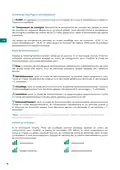
































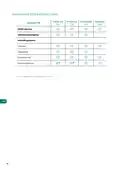


Zone settings
Press on the icons to access the parameters:
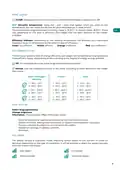
Sleep mode. Sleep mode is an eco-timer for switching off the zone. The selectable values
are:
Off. The timer is off.
EN
30. Activates the timer and after 30 minutes, the zone is switched off.
60. Activates the timer. After 30 minutes, the zone changes its temperature by one
degree and 60 minutes after activation, the zone switches off.
90. Activates the timer. After 30 minutes, the zone changes its temperature by one
degree. 60 minutes after activation, the zone changes its temperature by another
degree. 90 minutes after activation, the zone switches off.
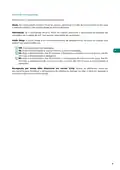
Anti-freezing. Prevents the room temperature in the zone from dropping below 12°C, even
if the zone is off. (In Stop mode it will not be activated).
Lite settings. In this parameter, you can define the base set-point temperature for the
zone where the Airzone Lite thermostat is installed. You can also configure the wired Lite
thermostat to act as a wireless thermostat: after a few seconds (during which it indicates
the status of the zone), it will switch off.
Note: To access the Lite settings parameter, from any Airzone Blueface zero thermostat you
must access the zone controlled by your Lite thermostat using the Zone navigation option.
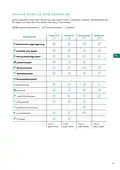
Depending on your installation and the configuration of your system, you can manage the
following parameters:
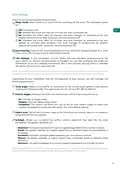
Grille angle. Allows you to define an inclination on the Airzone smart grilles in the zone for
cooling and heating modes. The options are 40°, 45°, 50° and 90° (90° by default).
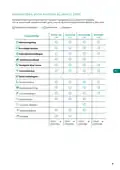
Control stages. Allows you to select the element you wish to heat or cool the zone.
• Air. Only the air stage works.
• Radiant. Only the radiant stage works.
• Combined. The system combines the use of the air and radiant stages to reach the
comfort temperature quickly and efficiently. This is the default setting.
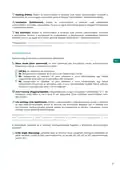
Adjust slats. Define the inclination type of the horizontal and vertical slats on the systems
where this function is available.
Q-Adapt. Allows you to define the airflow control algorithm that best fits the duct
installation. The options available are:
• Maximum: the system operates at maximum speed regardless of the number of zones.
• Power: the system operates at a higher speed than in Standard mode to ensure airflow is
increased.
• Standard: the system changes speed depending on the number of zones.
• Silence: the system operates at a lower speed than in Standard mode to improve noise
reduction.
• Minimum: the system operates at minimum speed regardless of the number of zones.
Note: In case of having a 0-10 V gateway; the algorithm, in addition, will take into account the
minimum and maximum voltage values set by your installer in this menu.
7

| General | Details |
|---|---|
| Name | AIRZONE Blueface Zero Thermostat User Manual |
| Make | AIRZONE |
| Language | English |
| Filetype | PDF (Download) |
| File size | 1.82 MB |
 (1 votes, average: 5.00 out of 5)
 Loading...

AIRZONE AZS62THINKRB, AZS62THINKRN Wireless Think Thermostat Instruction Manual

AIRZONE AZX6AIQSNSB-AZX6AC1VALR Think Wireless Monochrome Thermostat User Manual

AIRZONE IBPRO6 FLEXA 3.0 Blueface Zero Wired Thermostat User Manual


Innova B3V151 Electronic Thermostat User Manual

WHITE RODGERS 1E30-373 Low Voltage Thermostat Instruction Manual

Hydro Smart HSRADSTATWIFI HSRadStat Wi Fi Thermostat User Guide

WarmlyYours TH115-AF-GA-08 SmartStat TH115 Series Thermostat Instruction Manual

VIESSMANN ViCare ZK05991 Wireless Thermostat Instruction Manual

White-Rodgers 1F83-277 Heating & Air Conditioning Auto Changeover Heat Pump Thermostat User Manual

BOSCH Radiator Thermostat Instructions

LUX TX700U Universal Thermostat Instruction Manual

GENERAL LIFE 230S RF Digital Room Thermostat User Manual

BACKER ELECTRIC BMST 7 Backermatic Safety Thermostat Instructions
Table of Contents
- 1. User's Manual →
- 2. Environmental Policy - Airzone Interface →
- 3. Environmental Policy - Recycling And Disposal Guidelines →
- 4. Airzone Interfaces - Airzone Blueface Zero →
- 5. Hvac Control - Set-point Temperature →
- 6. Zone Navigation - Operation Mode →
- 7. Zone Settings - Sleep Mode →
- 8. Airzone Blueface Zero Parameters - User Settings →
- 9. Airzone Think - Screensaver →
- 10. Hvac Control - Operation Mode →
- 11. Settings Menu - Mode →
- 12. Airzone Think Parameters - Flexa 4.0 →
- 13. Airzone Lite - Important →
- 14. Change Of Battery - Important →
- 15. Incidents - Warnings →
- 16. Errors - Communication Errors →
- 17. Política Medioambiental - Interfaces Airzone →
- 18. Política Medioambiental - Recogida Selectiva De Aparatos Elé... →
- 19. Interfaces Airzone - Airzone Blueface Zero →
- 20. Control De Climatización - Temperatura De Consigna →
- 21. Navegación Por Zonas - Acceso A Todas Las Zonas →
- 22. Configuración De Zona - Modo Sleep →
- 23. Parámetros Airzone Blueface Zero - Identifique Su Sistema Des... →
- 24. Airzone Think - Pantalla Principal →
- 25. Control De Climatización - Modo De Funcionamiento →
- 26. Menú De Configuración - Modo →
- 27. Parámetros Airzone Think - Control De Climatización →
- 28. Funciones Básicas - Importante →
- 29. Cambio De Batería - Cuando Aparezca En Pantalla El Icono De ... →
- 30. Incidencias - Avisos →
- 31. Errores - Errores De Comunicación →
- 32. Politique Environnementale - Interfaces Airzone →
- 33. Politique Environnementale - Ne Jetez Pas L'appareil Dans La... →
- 34. Interfaces Airzone - Airzone Blueface Zero →
- 35. Contrôle De Chauffage Et Refroidissement - Température De Co... →
- 36. Navigation Par Zones - Accès À Toutes Les Zones →
- 37. Configuration De Zone - Mode Veille →
- 38. Airzone Blueface Zero Paramètres - Identifier Votre Système À... →
- 39. Airzone Think - Écran De Veille →
- 40. Contrôle De Chauffage Et Refroidissement - Mode De Fonctionn... →
- 41. Menu De Configuration - Mode →
- 42. Airzone Think Paramètres - Parameters →
- 43. Airzone Lite - Fonctions De Base →
- 44. Changement De Pile - Attention →
- 45. Incidences - Avertissements →
- 46. Erreurs - Erreurs De Communication →
- 47. Politica Ambientale - Interfacce Airzone →
- 48. Politica Ambientale - Non Smaltire Mai Questa Unità Insieme ... →
- 49. Interfacce Airzone - Airzone Blueface Zero →
- 50. Controllo Della Climatizzazione - Indicatore Di Efficienza →
- 51. Navigazione Nelle Zone - Accesso A Tutte Le Zone →
- 52. Configurazione Di Zona - Modo Sleep →
- 53. Airzone Blueface Zero Parametri - Identifica Il Tuo Sistema D... →
- 54. Airzone Think - Funzione Eco-adapt →
- 55. Controllo Della Climatizzazione - Modo Di Funzionamento →
- 56. Menu Di Configurazione - Modo →
- 57. Airzone Think Parametri - Flexa 4.0 →
- 58. Airzone Lite - Funzioni Di Base →
- 59. Cambio Della Batteria - Sostituire La Batteria Quando Sullo ... →
- 60. Incidenze - Avvisi →
- 61. Errori - Errori Di Comunicazione →
- 62. Política Ambiental - Interfaces Airzone →
- 63. Política Ambiental - Recolha Seletiva De Dispositivos Elétri... →
- 64. Interfaces Airzone - Airzone Blueface Zero →
- 65. Controlo De Climatização - Temperatura De Referência →
- 66. Navegação Por Zonas - Acesso A Todas As Zonas →
- 67. Configuração Da Zona - Modo Sleep →
- 68. Airzone Blueface Zero Parâmetros - Configuraçao De Utilizador →
- 69. Airzone Think - Proteção De Ecrã →
- 70. Controlo De Climatização - Modo De Funcionamento →
- 71. Menu De Configuração - Modo →
- 72. Airzone Think Parâmetros - Flexa 4.0 →
- 73. Airzone Lite - Funções Básicas →
- 74. Troca De Bateria - Importante →
- 75. Incidências - Avisos →
- 76. Erros - Erros De Comunicação →
- 77. Umweltschutz - Airzone-schnittstell... →
- 78. Umweltschutz →
- 79. Airzone-schnittstell... - Airzone Blueface Zero →
- 80. Klimatisierungsregel... - Solltemperatur →
- 81. Zonenauswahl - Betriebsmodus →
- 82. Zonenkonfiguration - Sleepmodus →
- 83. Airzone Blueface Zero-parameter - Benutzerkonfiguratio... →
- 84. Airzone Think - Steuerleiste →
- 85. Klimatisierungsregel... - Betriebsmodus →
- 86. Konfigurationsmenü - Modus →
- 87. Airzone Think-parameters - Flexa 4.0 →
- 88. Airzone Lite - Wichtig →
- 89. Batteriewechsel - Wichtig →
- 90. Störungen - Meldungen →
- 91. Fehler - Kommunikationsfehler →
- 92. Környezetvédelmi Irányelvek - Airzone Interfészek →
- 93. Környezetvédelmi Irányelvek - Megfelelő Környezetgazdálkodás →
- 94. Airzone Interfészek - Airzone Blueface Zero →
- 95. A Légkondicionáló Vezérlése - Set-point Temperature (beállít... →
- 96. A Ventilátor Sebessége - Nagy Sebesség →
- 97. Heating (fűtés) - Ventilation (szellőztetés) →
- 98. Control Stages (ellenőrző Szakaszok) - Air (levegő) →
- 99. Airzone Blueface Zero Paraméterek - Felhasználói Beállítások →
- 100. Airzone Think - Főképernyő →
- 101. A Légkondicionáló Vezérlése - Set-point Temperature (beállít... →
- 102. Beállítások Menü - Mode (üzemmód) →
- 103. Airzone Think Paraméterek - Flexa 4.0 →
- 104. Airzone Lite - Hőmérséklet Növelése →
- 105. Elemcsere - Alacsony Akkumulátor Ikon →
- 106. Váratlan Események - Figyelmeztetések →
- 107. Ntc2 Alarm - Filter Maintenance →
- 108. Miljöpolicy - Airzone-gränssnitt →
- 109. Miljöpolicy - Systemets Komponenter Är Återvinningsbara →
- 110. Airzone-gränssnitt - Airzone Blueface Zero →
- 111. Klimatstyrning - Set-point Temperature (förinställd Temperat... →
- 112. Fläkthastighet - Navigering Genom Zoner →
- 113. Heating (värme) - Ventilation →
- 114. Adjust Slats (inställning Av Luftriktare) - Q-adapt →
- 115. Parametrar För Airzone Blueface Zero - Identifiera Ditt Syste... →
- 116. Airzone Think - Skärmsläckare →
- 117. Klimatstyrning - Set-point Temperature (förinställd Temperat... →
- 118. Inställningsmeny - Mode (driftläge) →
- 119. Parametrar För Airzone Think - Flexa 4.0 →
- 120. Airzone Lite - Grundläggande Funktion →
- 121. Byte Av Batteri - Viktigt →
- 122. Incidenter - Anti-freezing →
- 123. Fel - Kommunikationsfel →
- 124. Milieubeleid - Airzone-interfaces →
- 125. Milieubeleid →
- 126. Airzone-interfaces - Airzone Blueface Zero →
- 127. Klimaatregeling - Set-point Temperature (ingestelde Temperat... →
- 128. Ventilatorsnelheid - Hoge Snelheid →
- 129. Heating (verwarmen) - Ventilation (ventilatie) →
- 130. Control Stages (bedieningsfasen) - Air (lucht) →
- 131. Parameters Voor Airzone Blueface Zero - Gebruikersinstelling... →
- 132. Airzone Think - Screensaver →
- 133. Klimaatregeling - Set-point Temperature (ingestelde Temperat... →
- 134. Mode (modus) - Speed (snelheid) →
- 135. Parameters Voor Airzone Think - Flexa 4.0 →
- 136. Airzone Lite - Basisfuncties →
- 137. De Batterij Vervangen - Wanneer Het Pictogram Batterij Bijna... →
- 138. Storingen - Waarschuwingen →
- 139. Ntc2 Alarm - Filter Maintenance →
- 140. Ochrona Środowiska - Panele Sterowania Airzone →
- 141. Ochrona Środowiska - Urządzenia Nie Wolno Wyrzucać Razem Z O... →
- 142. Panele Sterowania Airzone - Airzone Blueface Zero →
- 143. Sterowanie Klimatyzacją - Set-point Temperature (temperatura... →
- 144. Prędkość Wentylatora - Wysoka Prędkość →
- 145. Heating (ogrzewanie) - Ventilation (wentylacja) →
- 146. Control Stages (rodzaj Klimatyzacji) - Air (powietrze) →
- 147. Parametry Airzone Blueface Zero - Sterowanie Klimatyzacją →
- 148. Airzone Think - Ekran Główny →
- 149. Sterowanie Klimatyzacją - Set-point Temperature (temperatura... →
- 150. Menu Ustawienia - Mode (tryb Pracy) →
- 151. Parametry Airzone Think - Flexa 4.0 →
- 152. Airzone Lite - Zwiększanie Temperatury →
- 153. Wymiana Baterii - Kiedy Na Ekranie Wyświetli Się Ikona Ostrz... →
- 154. Błędy - Ostrzeżenia →
- 155. Ntc2 Alarm (alarm Ntc2) - Filter Maintenance (konserwacja Fi... →
- 156. Błędy Airzone Lite - Utrata Połączenia Z Centralą →
- 157. Miljømessige Retningslinjer - Airzone Grensesnitt →
- 158. Miljømessige Retningslinjer - Ikke Kast Dette Utstyret I Hus... →
- 159. Airzone Grensesnitt - Airzone Blueface Zero →
- 160. Hvac-kontroll - Set-point Temperature (settpunktstemperatu... →
- 161. Viftehastighet - Sonenavigasjon →
- 162. Heating (oppvarming) - Ventilation (ventilasjon) →
- 163. Adjust Slats - Q-adapt →
- 164. Airzone Blueface Zero-parametre - Identifiser Systemet Ditt F... →
- 165. Airzone Think - Hovedskjerm →
- 166. Hvac-kontroll - Set-point Temperature (settpunktstemperatu... →
- 167. Innstillingsmeny - Mode (modus) →
- 168. Airzone Think-parametre - Flexa 4.0 →
- 169. Grunnleggende Funksjoner - Set-point Temperature (settpunkts... →
- 170. Bytte Av Batteri - Når Ikonet Som Viser Lavt Batteri Vises P... →
- 171. Hendelser - Advarsler →
- 172. Feil - Kommunikasjonsfeil →
- 173. Aplinkosaugos Politika - Airzone' Sąsajos →
- 174. Aplinkosaugos Politika - Sudedamąsias Dalis Galima Perdirbti →
- 175. Airzone Blueface Zero' - Ekrano Užsklanda →
- 176. Hvac Kontrolė - Set-point Temperature (nustatytoji Temperatū... →
- 177. Ventiliatoriaus Greitis - Zonų Navigacija →
- 178. Heating (šildymas) - Ventilation (vėdinimas) →
- 179. Adjust Slats - Q-adapt →
- 180. Airzone Blueface Zero' Parametrai - Identifikuokite Savo Sist... →
- 181. Airzone Think - Ekrano Užsklanda →
- 182. Hvac Kontrolė - Set-point Temperature (nustatytoji Temperatū... →
- 183. Nustatymų Meniu - Mode (režimas) →
- 184. Airzone Think' Parametrai - Flexa 4.0 →
- 185. Airzone Lite' - Įjungta/išjungta →
- 186. Pakeisti Bateriją - Kai Ekrane Pasirodo Mažo Akumuliatoriaus... →
- 187. Incidentai - Įspėjimai →
- 188. Klaidos - Ryšio Klaidos →
- 189. Satura Rādītājs - Vides Politika →
- 190. Vides Politika - Aprīkojuma Sastāvdaļas Var Pārstrādāt →
- 191. Airzone Saskarnes - Airzone Blueface Zero →
- 192. Hvac Vadība - Set-point Temperature (iestatītā Temperatūra) →
- 193. Ventilatora Ātrums - Navigācija Zonās →
- 194. Heating - Ventilation →
- 195. Adjust Slats - Q-adapt →
- 196. Airzone Blueface Zero Parametri - Identificējiet Savu Sistēmu... →
- 197. Airzone Think - Ekrānsaudzētājs →
- 198. Hvac Vadība - Set-point Temperature (iestatītā Temperatūra) →
- 199. Iestatījumu Izvēlne - Mode (režīms) →
- 200. Airzone Think Parametri - Flexa 4.0 →
- 201. Airzone Lite - Svarīgi! →
- 202. Baterijas Nomaiņa - Ja Displejā Parādās Zema Baterijas Uzlād... →
- 203. Starpgadījumi - Brīdinājumi →
- 204. Kļūdas - Sakaru Kļūdas →
- 205. Politika V Oblasti Životního Prostředí - Rozhraní Airzone →
- 206. Politika V Oblasti Životního Prostředí →
- 207. Rozhraní Airzone - Airzone Blueface Zero →
- 208. Ovládání Hvac - Set-point Temperature (požadovaná Teplota) →
- 209. Rychlost Ventilátoru - Navigace V Zóně →
- 210. Heating (topení) - Ventilation (větrání) →
- 211. Adjust Slats (nastavení Lamel) - Q-adapt →
- 212. Parametry Airzone Blueface Zero - Identifikujte Svůj Systém N... →
- 213. Airzone Think - Hlavní Obrazovka →
- 214. Ovládání Hvac - Set-point Temperature (požadovaná Teplota) →
- 215. Nabídka Nastavení - Mode (režim) →
- 216. Parametry Airzone Think - Flexa 4.0 →
- 217. Airzone Lite - Komunikační Frekvence: 868 Mhz →
- 218. Výměna Baterie - Důležité →
- 219. Incidenty - Anti-freezing →
- 220. Chyby V Komunikaci - Termostat Hlavní Ovládací Panel / Zónov... →
- 221. Miljøpolitik - Airzone-grænseflader →
- 222. Miljøpolitik →
- 223. Airzone-grænseflader - Airzone Blueface Zero →
- 224. Hvac-styring - Set-point Temperature →
- 225. Ventilatorhastighed - Zonenavigering →
- 226. Heating (opvarmning) - Ventilation →
- 227. Adjust Slats - Q-adapt →
- 228. Parametre For Airzone Blueface Zero - Brugerindstillinger →
- 229. Airzone Think - Hovedskærm →
- 230. Hvac-styring - Set-point Temperature (referencetemperatur... →
- 231. Indstillingsmenu - Mode (tilstand) →
- 232. Parametre For Airzone Think - Flexa 4.0 →
- 233. Kommunikationsfrekve... - Maksimal Strålingskraft →
- 234. Udskiftning Af Batteriet - Når Ikonet For Lav Batteristrøm →
- 235. Hændelser - Advarsler →
- 236. Ntc2 Alarm (ntc2-alarm) - Filter Maintenance (filtervedligeh... →
- 237. Page 237 →