
Sygonix 2735095 Wireless Indoor Thermostat Instruction Manual
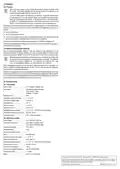


Display
code
Factory
default
Display
code
Factory
default
Setting
System Settings
Setting
System Settings
Calibration
temperature
deviation
IP address
“high”
PH
PL
00 to FF
A1
Adjustment range -9 to +9 °C
Adjustment range 0.5 to 5 °C
-1 °C
IP address “low” 01 to FF
Press and hold the
stat.
button on the thermo-
Example:
Switching
differential
(hysteresis)
Programme the
IP address of
the switching
module
If the thermostat measures a temperature of
+20 °C with a setting of 1 °C, the thermostat will
switch on the heating at +19 °C and again off at
+21 °C.
A2
+1 °C
Switch on the switching module (the orange
LED is permanently lit).
BS
00
After successful transmission of the IP, the
thermostat display shows “55”. If the transmis-
sion has failed, repeat the process.
N1:
0 = All buttons except the
be locked
power button will
A3
A4
Button lock
0
0
1 = All buttons are locked
0 = Return to the previous function
Internal sensor controls the temperature.
N3.
Behaviour after
power failure
BN
Bo
Sensor selection
N1
1 = Switch off
Internal sensor controls the temperature. If N3
is activated, the external sensor is used as the
temperature limiting sensor.
2 = Switch on
The weekday must be set correctly for the
programme to recognise the weekend. You will
find more information under “Operation and use”
--> “Set time and weekday”.
Product informa-
tion
Cannot be changed
0 = 5 days
(Mo-Fr) /
2 days
Weekly interval
setting
A5
Settings:
9 Error codes
(Sa/Su)
P1 = 5 days / 2 days,
P2 = 6 days / 1 day,
P3 = 7 days
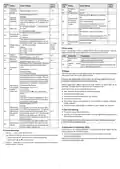
An error code will show if there is a problem with the internal or external sensor. When this
happens the thermostat will stop heating until the cause of the error is removed.
Set the lowest selectable temperature.
Minimum
temperature
A6
A7
+5 °C
35 °C
Code
Explanation
Suggestions
Adjustment range: +1 to +10 °C
Set the highest selectable temperature.
Internal sensor
error
Switch the thermostat off and contact technical support
service or other technical personnel.
Check the external sensor connection.
Maximum
temperature
E1
Adjustment range: +20 to +70 °C
The heater will turn on automatically if the sensor
measures the temperature below the preset
value.
External
error
sensor
E2
Switch the thermostat off and contact technical support ser-
vice or other technical personnel.
Frost protec-
tion
A8
+5 °C
Settings range: +1 to +10 °C
10 Range
Advanced setting:
N1 or N3 (internal sensor)
The transmission range of the radio signals between the temperature controller and a suitable
This feature prevents the floor temperature from
increasing excessively. For example, if the room
cannot be heated up to the preset temperature
due to the window being open, the floor heating
alone can try to compensate for the difference.
radio receiver is up to 200 m under optimal conditions.
However, this indication refers to the so-called “open field range” (with direct visual con-
tact between transmitter and receiver without interference).
Different objects have a different impact on the range; therefore, no specific range can be
guaranteed. The range should be sufficient for use in a detached house.
Advanced setting: N3 only
High tempera-
ture protection
(external
Settings range: +20 to +70 °C
A9
45 °C
Sometimes the range can be considerably reduced due to:
Cancel Setting:
Press and hold the button until the display
shows “--”.
ꢀ
sensor only)
Walls, reinforced concrete ceilings and metal-framed drywalls.
ꢀ
Coated/metallised insulated glass.
Example:
ꢀ
Proximity to metal and conductive objects (e.g. radiators).
If the sensor measures a temperature of +50 °C
with a temperature preset of +50 °C, the thermo-
stat will switch off the radiator.
Adjustment range: 1 to 9 °C
ꢀ
Proximity to the human body.
ꢀ
Other devices using the same frequency for communication (e.g. wireless headphones,
wireless speakers).
ꢀ
Proximity to electric motors/appliances, transformers, power supplies, and computers.
Example:
High tempera-
ture protection/
The limit value “AA” is set to +45 °C and “AB” to
2 °C. When a temperature of +45 °C is reached,
11 Care and cleaning
AA
Ao
differential set- the thermostat switches off the heating. When
ting (external
sensor)
+2 °C
ꢀ
This product does not require maintenance.
the temperature drops to +43 °C, the thermostat
switches on the heating again. But this only
works if the indoor temperature is lower than the
preset temperature.
ꢀ
Use a dry, soft, lint-free cloth to wipe the panel. Do not use aggressive cleaning agents, as
these can cause discolouration.
Always activate the button lock before wiping the front panel. Accidentally pressing the
buttons can cause unintended settings.
Press and hold the
button for three to five
seconds until all display items appear at a time.
Restore factory
defaults
After the thermostat has been successfully reset
to factory defaults, it switches off.
12 Declaration of Conformity (DOC)
Conrad Electronic SE, Klaus-Conrad-Straße 1, D-92240 Hirschau hereby declares that this
product conforms to the 2014/53/EU directive.
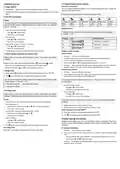
8.2 Advanced settings
1. Press the
button to switch off the thermostat.
ꢀ
Click on the following link to read the full text of the EU declaration of conformity:
2. Then, press and hold the
button for three to five seconds to enter advanced settings mode.
button repeatedly to select the desired setting.
and to adjust the values.
–
–
After that, press the
Use the buttons
Enter the product item number in the search box. You can then download the EU declaration of
conformity in the available languages.
3. Press the
button again to exit the settings menu. Settings will also be saved if no buttons are
pressed for approx. 10 seconds.
4

| General | Details |
|---|---|
| Name | Sygonix 2735095 Wireless Indoor Thermostat Instruction Manual |
| Make | Sygonix |
| Language | English |
| Filetype | PDF (Download) |
| File size | 0.79 MB |
 (1 votes, average: 5.00 out of 5)
 Loading...

sygonix SY-5470190 Wireless Indoor Thermostat Instruction Manual

Sygonix 2992337 DIN Rail Mounted Heating And Cooling Thermostat User Manual

sygonix 2735095 Wireless Heating Thermostat Instruction Manual

sygonix 3026090 WiFi Thermostat Installation Guide

Sygonix SY-6052180 Wi-Fi Thermostat Instruction Manual

sygonix 2522212 Installable Thermostat Instruction Manual

sygonix 2997033 Wi-Fi Radiator Thermostat Instruction Manual


Danfoss Link Connect Thermostat User Guide

GENERAL LIFE HT220 Wired Room Thermostat User Manual

ideal HEATING Halo Combi RF Wireless Boiler Thermostat User Guide

BEOK CONTROLS BOT-R6W Gas Boiler Thermostat Instruction Manual

Drayton Wiser Smart Room Thermostat Instruction Manual

TCL IPOWER Heat Mat Thermostat Instruction Manual

WTE WT-100 Zigbee Thermostat User Manual

resideo TH4110U2005 T4 Pro Programmable Thermostat User Manual

ENSTO ECO16BT-J Floor Heating Thermostat User Guide

Eberle UTE 3500 Smart Home Capable Flush Mounted Thermostat Installation Guide