
Sygonix 2735095 Wireless Indoor Thermostat Instruction Manual


7.6 Programming the weekly schedule
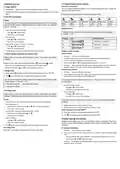
Overview: 6 time periods
7 Operation and use
7.1 Power ON/OFF
You can configure temperature settings for 6 time periods throughout the day. A symbol indi-
cates which time period is active.
ꢀ
Pressing the
button turns the wireless heating thermostat on and off.
ꢀ
When the thermostat is switched off, the display goes out and no temperature control takes
place.
Default times and temperatures for each period are shown below:
7.2 Set time and weekday
Notice
1: Wake up 2: Outdoor
3: Back home 4: Outdoor 5:Back home 6: Sleep
You must first switch on the wireless heating thermostat and ensure it is in normal status
(exit the “System settings”). Settings will exit and be saved if no keys are pressed for
approx. 10 seconds.
06:00
21 °C
08:00
17 °C
11:00
21 °C
13:30
17 °C
17:00
21 °C
22:00
17 °C
Weekday interval
1. Press
and the minutes will flash.
or to adjust values.
to save the setting.
Weekday intervals are based on the selected programme. Select “System settings” -->
“General” --> “A5”.
–
–
Press
Press
2. Adjust the hours:
Program
P1
Icon
Weekday interval
–
–
Press
Press
or to adjust values.
to save the setting.
5 days same / 2 days same
6 days same / 1 day same
7 days same
3. Adjust the day of week (1 = Monday... 7 = Sunday).
P2
–
–
Press
Press
or to adjust values.
to save the setting.
P3
4. The settings are saved and the thermostat returns to normal operation.
Program a weekly schedule
General setting
7.3 Switch between automatic and manual mode
1. Press the
button to turn off the thermostat.
Before doing so, ensure the wall thermostat is on and in normal status (exit “System
settings”).
2. Press and hold the
button for three to five seconds to enter the settings mode.
3. Press the
button repeatedly to access the setting “A5”.
4. Use the buttons
and to select the desired programme (P1, P2 or P3).
Pressing the
button switches between automatic ( ) and manual ( ) modes.
5. Press the
button again to exit the settings menu. Settings will also be saved if no buttons are
– sensor mode: The temperature settings are based the active program preset.
pressed for approx. 10 seconds. The menu is exited automatically after 10 seconds.
– Manual: Use the buttons
and to set the temperature manually.
Programming a schedule
7.4 Button lock
1. Press the
2. If the backlight is off, press the
for about three to five seconds to enter the settings mode.
button to switch on the thermostat.
ꢀ
Press and hold for approx. 5 seconds to turn the parental control lock ON / OFF.
button to turn it on, and then press and hold the
button
ꢀ
The
lock symbol will show to indicate that the parental lock is ON.
You can choose between two different parental locks depending on the settings under
“System settings” --> “General” --> “A3”:
The display shows the symbol of the first period “1: Wake up” and the time indication
starts flashing.
0 = All buttons except the
1 = All buttons are locked.
power button will be locked.
3. Set the time (hours: minutes)
–
–
Press
Press
or to adjust values.
to save and set the next value.
7.5 Holiday mode
4. Set the temperature
–
–
Press
Press
or to adjust values.
Before doing so, ensure the wall thermostat is on and in normal status (exit “System
settings”). Use holiday mode to set a time and temperature for the days you will be away.
to save and set the next period
Activate
1. Press and hold the
The display shows the symbol of the next period “2: Away” and the time indication starts
flashing.
button for three to five seconds to enter the settings menu.
2. Turn holiday mode „on“.
–
5. Repeat steps 3 and 4 to set all 6 periods for the day.
6. Settings will be saved if no buttons are pressed for approx. 10 sec.
Switch programmed schedule ON/OFF
ꢀ
Adjust the value using the buttons
and (ON = holiday mode enabled).
–
Press
to save the setting.
3. Set the number of days you will be away between “1 and 30”.
Press
The
to switch the programmed schedule ON or OFF.
–
–
Adjust the value using the buttons
Press to save the setting.
and
.
ꢀ
icon appears when the programmed schedule is ON.
4. Set the temperature.
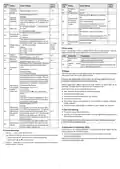
8 System settings and defaults
Adjusting system settings may cause your thermostat to behave unexpectedly. Read all in-
structions carefully before adjusting any settings. Refer to section „Troubleshooting“ for further
information.
–
–
Press
Press
or to adjust values.
to save the setting.
5. The
Exit holiday mode
Press to exit holiday mode and return to manual or auto mode.
symbol shows on the display to indicate that holiday mode is active.
8.1 General information
1. Press the
button to switch off the thermostat.
2. Then, press and hold the
mode.
button for three to five seconds to enter the general settings
–
–
After that, press the
Use the buttons
button repeatedly to select the desired setting from “A1” to “Ao”.
and to adjust the values.
3. Press the
button again to exit the settings menu. Settings will also be saved if no buttons are
pressed for approx. 10 seconds.
3

| General | Details |
|---|---|
| Name | Sygonix 2735095 Wireless Indoor Thermostat Instruction Manual |
| Make | Sygonix |
| Language | English |
| Filetype | PDF (Download) |
| File size | 0.79 MB |
 (1 votes, average: 5.00 out of 5)
 Loading...

sygonix SY-5470190 Wireless Indoor Thermostat Instruction Manual

Sygonix 2992337 DIN Rail Mounted Heating And Cooling Thermostat User Manual

sygonix 2735095 Wireless Heating Thermostat Instruction Manual

sygonix 3026090 WiFi Thermostat Installation Guide

Sygonix SY-6052180 Wi-Fi Thermostat Instruction Manual

sygonix 2522212 Installable Thermostat Instruction Manual

sygonix 2997033 Wi-Fi Radiator Thermostat Instruction Manual


PURGEAR STC-2304 Digital Thermostat User Guide

SIEMENS RDZ100ZB Zigbee Room Thermostat Owner’s Manual

EPH CONTROLS eTRV-HW Smart Hot Water Thermostat Instruction Manual

htc HYT001 WIFI Digital Heating Thermostat User Manual

OJ ELECTRONICS UDG-4999 Thermostat with Class A GFCI Owner’s Manual

GENERAL LIFE HT220 Wired Room Thermostat User Manual

Honeywell T827 Series Heat Only Vertical Thermostat Owner’s Manual

GENERAL 260S Wired Room Thermostat User Manual

BAXI uSense 2 Wired Smart Thermostat Gateway Installation Guide

resideo TH2110WF4008 Smart Thermostat User Guide