
×
- 1. Smart Wireless Thermostat
- 2. Contents
- 3. Main Functions (Technical Specifications)
- 4. Receiver Unit Command (Range Of The Set Temperature → Range Of The Measured Temperature → Accuracy → Control Unit Dimensions → Receiver Unit Dimensions → Protection Grade)
- 5. Control Unit Overview (Day Of The Week → Current Program (1 - 4) → Time → Signal Level (appears After Pairing) → Heating On → Cooling On)
- 6. Locked Keys (child Protection Function Active) (Heating Mode → Vacation Mode → Anti-freeze Mode → Open Window Function Active → Manual Mode → Receiver Unit Overview)
- 7. Basic Instructions For The First Use (Pairing The Two Units)
- 8. Delete Paired Units
- 9. Weak Or Lost Signal (Control From The Tuya Smart Application)
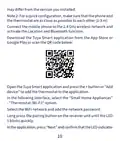
- 10. May Differ From The Version You Installed.
- 11. The Application Will Start Scanning Nearby Devices.
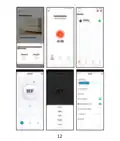
- 12.
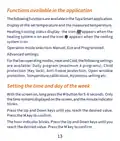
- 13. Functions Available In The Application (Operation Mode Selection → Advanced Settings → Setting The Time And Day Of The Week)
- 14. Open Window Detection Function (Daily Program Configuration Via Thermostat)
- 15. Example Of Daily Programs
- 16. Advanced Settings (Menu Description → Options → Temperature → Max.temperature Limit → Min. Temperature Limit → Anti-freeze Protection)
- 17. Key Lock Function (Open Window Detection Function → Owd - Detection Time → Owd - Temperature Drop (during Detection) → Owd - Time Delay → Return To Factory Settings → Software Version)
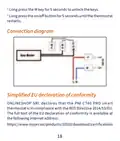
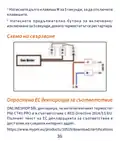
- 18. Connection Diagram (Simplified Eu Declaration Of Conformity → Onlineshop Srl Declares That The Pni Ct40 Pro Smart Thermostat Is In Compliance With The Red Directive 2014/53/eu.)
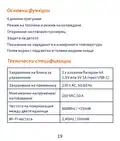
- 19. Основни Функции (Дневни Програми → Режим На Топлина И Режим На Охлаждане → Откриване На Отворен Прозорец → Защита На Детето → Показване На Зададената И Измерената Температура → Технически Спецификации)
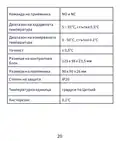
- 20. Команда На Приемника (Диапазон На Зададената Температура → Диапазон На Измерваната Температура → Размери На Контролния Блок → Размери На Приемника → Степен На Защита → Температурна Единица)
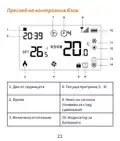
- 21. Преглед На Контролния Блок (Ден От Седмицата → Време → Текуща Програма (1 - 4) → Включено Отопление → Ниво На Сигнала → Индикатор За Батерията)
- 22. Охлаждането Е (Режим На Охлаждане → Режим На Отопление → Заключени Клавиши → Функцията За Отваряне На Прозореца Е Активна → Режим На Почивка → Ръчен Режим)
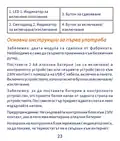
- 23. Основни Инструкции За Първа Употреба (Забележка: Двата Модула Са Сдвоени От Фабриката. → Предупреждение: Не Свързвайте Контролния Блок Към 230v Контакт, Ако В Него Има Монтирани Алкални Батерии.)
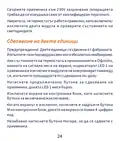
- 24. Свържете Приемника Към 230v Захранване (Уверете Се, Че Термостатът Работи Правилно → Сдвояване На Двете Единици → Предупреждение)
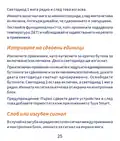
- 25. Светодиод 1 Мига Рядко И След Това Изгасва.
- 26. Управление От Приложението Tuya Smart
- 27. Play Или Сканирайте Qr Кода По-долу:
- 28. Интернет Връзка Е Успешна. Ако Светодиодът Продължава Да Мига Бавно, Връзката Е Неуспешна, Повторете Процедурата.
- 29.
- 30. Функции, Налични В Приложението (Дисплей На Зададената Температура И Измерената → Избор На Режим На Работа → Разширени Настройки → Задаване На Час И Ден От Седмицата)
- 31. Индикатор За Час (Функция За Откриване На Отворен Прозорец)
- 32. Деактивира Тази Функция, Връщайки Системата В Предишния
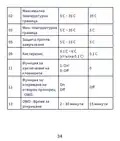
- 33. Меню Описание Опции Default
- 34. Максимална Температурна Граница (Мин. Температурна Граница → Защита Против Замръзване → Хистерезис → Функция За Заключване На Клавишите → Функция За Откриване На Отворен Прозорец)
- 35. Температурен Спад (Owd - Закъснение Във Времето → Върнете Се Към Фабричните Настройки → Версия На Софтуера → Wifi Информация → Регулиране На Яркостта)
- 36. Натиснете Дълго Клавиша M За 5 Секунди, За Да Отключите Клавишите. Натиснете Продължително Бутона За Включване/изключване За 5 Секунди, Дока…
- 37. Hauptfunktionen (Tagesprogramme → Heizmodus Und Kaltmodus → Erkennung Offener Fenster → Kindersicherung → Anzeige Der Eingestellten Und Gemessenen Temperatur → Technische Daten)
- 38. Wlan-frequenz (Befehl Der Empfängereinheit → Bereich Der Eingestellten Temperatur → Bereich Der Gemessenen Temperatur → Genauigkeit → Abmessungen Der Steuereinheit → Abmessungen Der Empfängereinheit)
- 39. Übersicht Der Steuereinheit (Wochentag → Uhrzeit → Heizung Ein → Kühlung Ein → Aktuelles Programm (1 - 4) → Signalpegel (erscheint Nach Dem Pairing) → Batterieanzeige)
- 40. Tastensperre (Heizmodus → Fenster-auf-funktion Aktiv → Urlaubsmodus → Manueller Modus → Frostschutzmodus → Übersicht Der Empfängereinheit)
- 41. Grundlegende Hinweise Zur Ersten Inbetriebnahme (Achtung: Schließen Sie Die Steuereinheit Nicht An Die 230-v-steckdose An, Wenn Sie Darin Alkalibatterien Eingelegt Haben. → Schließen Sie Die Empfängereinheit An Eine 230-v-stromversorgung An.)
- 42. Koppeln Der Beiden Geräte
- 43. Gekoppelte Einheiten Löschen (Schwaches Oder Verlorenes Signal)
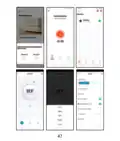
- 44. Steuerung Über Die Tuya Smart-anwendung
- 45. Laden Sie Die Tuya Smart-anwendung Aus Dem App Store Oder
- 46. Die Anwendung Beginnt Mit Dem Scannen Von Geräten In Der Nähe. Nachdem Ihr Thermostat Identifiziert Wurde, Drücken Sie Fertig', Um Den Vorga…
- 47.
- 48. In Der Anwendung Verfügbare Funktionen (Folgende Funktionen Sind In Der Tuya Smart-anwendung Verfügbar: → Heiz-/kühlstatusanzeige → Betriebsmodusauswahl → Erweiterte Einstellungen → Uhrzeit Und Wochentag Einstellen)
- 49. Die Stundenanzeige Blinkt. Drücken Sie Die Auf- Und Ab-tasten, Bis Sie Den Gewünschten Wert Erreicht Haben. Drücken Sie Zur Bestätigung Die …
- 50. Tagesprogramm-konfiguration Über Thermostat (Beispiele Für Tagesprogramme)
- 51. Erweiterte Einstellungen (Menu Beschreibung → Temperatur → Kalibrierung Des Eingebauten Sensors → Max. Temperaturgrenze → Min. Temperaturgrenze → Frostschutz)
- 52. Hysterese (Tastensperrfunktion → Fensteröffnungserkennung → Owd - Erkennungszeit → Owd - Temperaturabfall → Owd - Zeitverzögerung → Zurück Zu Den Werkseinstellungen)
- 53. Helligkeitsanpassung (Stromversorgungsmodus → Anschlussplan)
- 54. Vereinfachte Eu-konformitätserklärung (Onlineshop Srl Erklärt, Dass Der Intelligente Thermostat Pni Ct40 Pro Der Red-richtlinie 2014/53/eu Entspricht.)
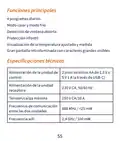
- 55. Funciones Principales (Especificaciones Técnicas)
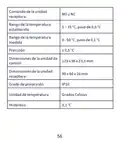
- 56. Comando De La Unidad Receptora (Rango De La Temperatura Establecida → Rango De La Temperatura Medida → Precisión → Dimensiones De La Unidad De Control → Dimensiones De La Unidad Receptora → Grado De Protección)
- 57. Descripción General De La Unidad De Control (Día De La Semana → Programa Actual (1 - 4) → Hora → Nivel De Señal (aparece Después Del Emparejamiento) → Calefacción Activada → Refrigeración Activada)
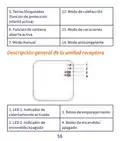
- 58. Teclas Bloqueadas (Modo De Calefacción → Función De Ventana Abierta Activa → Modo De Vacaciones → Modo Anticongelante → Modo Manual → Descripción General De La Unidad Receptora)
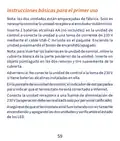
- 59. Instrucciones Básicas Para El Primer Uso (Nota Sobre La Conexión De La Unidad Receptora → Inserción De Baterías En La Unidad De Control → Advertencia Sobre La Conexión A La Toma De 230 V → Conexión A Internet Del Termostato → Verificación Del Funcionamiento Del Termostato)
- 60. Emparejamiento De Las Dos Unidades
- 61. Eliminar Unidades Emparejadas (Señal Débil O Perdida)
- 62. Control Desde La Aplicación Tuya Smart
- 63. Abra La Aplicación Tuya Smart Y Presione El Botón + O 'agregar Dispositivo' Para Agregar El Termostato A La Aplicación.
- 64.
- 65. Funciones Disponibles En La Aplicación (Smart → Visualización De La Temperatura Establecida Y La Temperatura Medida → Visualización Del Estado De Calefacción/refrigeración → Selección Del Modo De Funcionamiento)
- 66. Configuración Avanzada (Configuración De La Hora Y El Día De La Semana → Función De Detección De Ventana Abierta)
- 67. Configuración Del Programa Diario A Través Del (Termostato)
- 68. Ejemplo De Programas Diarios (Configuración Avanzada)
- 69. Menú Descripción (Opciones → Calibración De Temperatura Del Sensor Incorporado → Límite De Temperatura Máxima → Límite De Temperatura Mínima → Protección Anticongelante → Función De Bloqueo De Teclas)
- 70. Función De Detección (Owd → Owd - Tiempo De Detección → Owd - Caída De Temperatura (durante La Detección) → Owd - Retardo De Tiempo (retorno A La Configuración/programa Anterior) → Retorno A La Configuración De Fábrica → Versión Del Software)
- 71. Diagrama De Conexión (Declaración De Conformidad Ue Simplificada)
- 72. Fonctions Principales (Programmes Journaliers → Mode Chaud Et Mode Froid → Détection De Fenêtre Ouverte → Protection Enfant → Affichage De La Température Réglée Et Mesurée → Grand Écran Rétroéclairé Avec De Grands Caractères Visibles)
- 73. Commande De L'unité (Plage De La Température De Consigne → Plage De La Température Mesurée → Précision → Dimensions De L'unité De Commande → Dimensions De L'unité Réceptrice → Degré De Protection)
- 74. Présentation De Lunité De Contrôle (Jour De La Semaine → Heure → Chauffage Activé → Climatisation Activée → Programme Actuel (1 - 4) → Niveau Du Signal (apparaît Après L'appairage))
- 75. Touches Verrouillées (Mode Chauffage → Fonction D'ouverture De Fenêtre Active → Mode Vacances → Mode Antigel → Mode Manuel → Présentation De Lunité Réceptrice)
- 76. Instructions De Base Pour La Première Utilisation (Appairage Des Deux Unités)
- 77. Supprimer Les Unités Appairées
- 78. Signal Faible Ou Perdu
- 79. Contrôle Depuis L’application Tuya Smart
- 80. Dans Linterface Suivante, Sélectionnez Loption Petits Appareils Électroménagers - Thermostat (wi-fi) . Sélectionnez Le Réseau Wifi Et Ajoute…
- 81.
- 82. Fonctions Disponibles Dans Lapplication (Smart → Affichage De La Température De Consigne Et De La Température Mesurée → Affichage De Létat De Chauffage/refroidissement → Sélection Du Mode De Fonctionnement)
- 83. Réglages Avancés (Réglage De Lheure Et Du Jour De La Semaine)
- 84. Fonction De Détection De Fenêtre Ouverte (Configuration Du Programme Quotidien Via Le → Thermostat)
- 85. Exemple De Programmes Quotidiens
- 86. Paramètres Avancés (Menu Description → Options → Calibrage De La Température Du Capteur Intégré → Limite De Température Max. → Limite De Température Min. → Protection Antigel)
- 87. Fonction De Verrouillage Des Touches (Fonction De Détection De Fenêtre Ouverte - Owd → Owd - Temps De Détection → Owd - Chute De Température (pendant La Détection) → Owd - Temporisation (retour Au Réglage/programme Précédent) → Retour Aux Paramètres D'usine → Version Du Logiciel)
- 88. Réglage De La Luminosité (uniquement En Mode D'alimentation Usb) (Appuyez Longuement Sur La Touche M Pendant 5 Secondes Pour Déverrouiller Les Touches. → Schéma De Connexion)
- 89. Déclaration De Conformité Simplifiée De Lue (Onlineshop Srl Déclare Que Le Thermostat Intelligent Pni Ct40 Pro Est Conforme À La Directive Red 2014/53/ue.)
- 90. Fő Funkciók (Műszaki Előírások)
- 91. Vevő Egység Parancs (No És Nc → A Beállított Hőmérséklet Tartománya → A Mért Hőmérséklet Tartománya → A Vezérlőegység Méretei → A Vevőegység Méretei → Védelmi Fokozat)
- 92. Vezérlőegység Áttekintése (A Hét Napja → Idő → Fűtés Bekapcsolva → Hűtés Bekapcsolva → Akkumulátor Jelző → Hűtés Üzemmód)
- 93. Zárt Kulcsok (a Gyermekvédelmi Funkció Aktív) (Fűtési Mód → Az Ablak Megnyitása Funkció Aktív → Vakáció Mód → Kézi Üzemmód → Fagyálló Üzemmód → A Vevőegység Áttekintése)
- 94. Alapvető Utasítások Az Első Használathoz (A Két Egység Párosítása)
- 95. Párosított Egységek Törlése
- 96. Gyenge Vagy Elveszett Jel
- 97. Vezérlés A Tuya Smart Alkalmazásból
- 98. Termosztát (wi-fi) Opció (Wifi Hálózat Kiválasztása → Párosítás Gomb Megnyomása → Led Jelző Ellenőrzése → Közeli Eszközök Vizsgálata → Eljárás Befejezése → Vezeték Nélküli Internetkapcsolat Sikeressége)
- 99.
- 100. Az Alkalmazásban Elérhető Funkciók (Fűtés/hűtés Állapotának Kijelzése → Üzemmód Kiválasztása → Speciális Beállítások)
- 101. Beállítások Állnak Rendelkezésre: Napi Program, Gyermekvédelem, Fagyvédelem, Nyitott Ablakvédelem, Hőmérséklet Kalibrálás, Hiszterézis Beáll…
- 102. Napi Program Konfigurálása Termosztáton (Keresztül)
- 103. Példa A Napi Programokra (Speciális Beállítások)
- 104. Menü Leírás (A Beépített Érzékelő → Opciók → Default → Fagyálló Védelem → Billentyűzár Funkció → Nyitott Ablak Észlelési Funkció - Owd)
- 105. Owd - Időkésleltetés (Visszatérés A Gyári Beállításokhoz → Szoftver Verzió → Wifi Információ → Fényerő Beállítása)
- 106. Csatlakozási Diagram (Egyszerűsített Eu Megfelelőségi Nyilatkozat → Az Onlineshop Srl Kijelenti, Hogy A Pni Ct40 Pro Intelligens Termosztát Megfelel A 2014/53/eu Red Irányelvnek.)
- 107. Funzioni Principali (Programmi Giornalieri → Modalità Caldo E Freddo → Rilevamento Finestra Aperta → Protezione Bambini → Visualizzazione Della Temperatura Impostata E Misurata → Ampio Schermo Retroilluminato Con Caratteri Grandi E Visibili)
- 108. Comando Unità Ricevente (Range Della Temperatura Impostata → Range Della Temperatura Misurata → Precisione → Dimensioni Unità Di Controllo → Dimensioni Unità Ricevente → Grado Di Protezione)
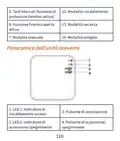
- 109. Panoramica Dellunità Di Controllo (Giorno Della Settimana → Ora → Riscaldamento Acceso → Raffreddamento Acceso → Programma Corrente (1 - 4) → Livello Del Segnale (appare Dopo L'associazione))
- 110. Tasti Bloccati (funzione Di Protezione Bambini Attiva) (Modalità Riscaldamento → Modalità Vacanza → Modalità Antigelo → Funzione Finestra Aperta Attiva → Modalità Manuale → Panoramica Dellunità Ricevente)
- 111. Istruzioni Di Base Per Il Primo Utilizzo (Associazione Delle Due Unità)
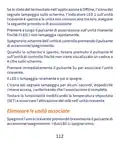
- 112. Eliminare Le Unità Associate
- 113. Segnale Debole O Perso
- 114. Controllo Dall’applicazione Tuya Smart
- 115. Premi A Lungo Il Pulsante Di Associazione Sullunità Ricevente (Nellapplicazione, Premi 'avanti' E Conferma Che Lindicatore → Lapplicazione Inizierà A Scansionare I Dispositivi Nelle Vicinanze → Dopo Che Il Termostato È Stato Identificato, Premi 'fatto' → Il Led 1 Sul Ricevitore Smetterà Di Lampeggiare → Se Il Led Continua A Lampeggiare Lentamente, La Connessione Non È Riuscita)
- 116.
- 117. Funzioni Disponibili Nellapplicazione (Visualizzazione Della Temperatura Impostata E Della Temperatura Misurata → Visualizzazione Dello Stato Di Riscaldamento/raffreddamento → Selezione Della Modalità Di Funzionamento → Impostazioni Avanzate → Impostazione Dellora E Del Giorno Della Settimana)
- 118. Funzione Di Rilevamento Finestra Aperta
- 119. Configurazione Del Programma Giornaliero (Tramite Termostato)
- 120. Esempio Di Programmi Giornalieri (Impostazioni Avanzate → Menu Descrizione Opzioni Default)
- 121. Limite Di Temperatura (Protezione Antigelo → Isteresi → Funzione Di Blocco Tasti → Funzione Di Rilevamento Finestra Aperta - Owd → Owd - Tempo Di Rilevamento → Owd - Calo Della Temperatura (durante Il Rilevamento))
- 122. Ritorno Alle Impostazioni Di Fabbrica (Versione Software → Informazioni Wifi → Regolazione Della Luminosità (solo In Modalità Di Alimentazione Usb))
- 123. Schema Di Collegamento (Dichiarazione Di Conformità Ue Semplificata → Onlineshop Srl Dichiara Che Il Termostato Intelligente Pni Ct40)
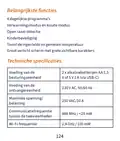
- 124. Belangrijkste Functies (Dagelijkse Programmas → Verwarmingsmodus En Koude Modus → Open Raam Detectie → Kinderbeveiliging → Toont De Ingestelde En Gemeten Temperatuur → Groot Verlicht Scherm Met Grote Zichtbare Karakters)
- 125. Opdracht Van De Ontvangereenheid (Bereik Van De Ingestelde Temperatuur → Bereik Van De Gemeten Temperatuur → Nauwkeurigheid → Afmetingen Van De Besturingseenheid → Afmetingen Van De Ontvangereenheid → Beschermingsgraad)
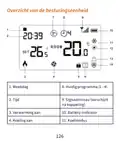
- 126. Overzicht Van De Besturingseenheid (Weekdag → Huidig Programma (1 - 4) → Tijd → Verwarming Aan → Koeling Aan → Batterij-indicator)
- 127. Vergrendelde Toetsen (Verwarmingsmodus → Open Raamfunctie Actief → Vakantiemodus → Antivriesmodus → Handmatige Modus → Overzicht Van De Ontvangereenheid)
- 128. Basisinstructies Voor Het Eerste Gebruik (Let Op: De Twee Units Zijn Af-fabriek Gekoppeld. → Waarschuwing: Sluit De Bedieningseenheid Niet Aan Op Het 230v-stopcontact Als Er Alkalinebatterijen In Zijn Geplaatst. → Controleer Of De Thermostaat Goed Werkt Door De Twee Units Aan/uit Te Zetten En De Status Van De Leds Te Controleren.)
- 129. De Twee Units Koppelen
- 130. Gekoppelde Units Verwijderen (Zwak Of Verloren Signaal)
- 131. Bediening Vanuit De Tuya Smart-applicatie
- 132. Thermostaat Aan De Applicatie Toevoegen (Kleine Huishoudelijke Apparaten → Wifi-netwerk En Netwerkwachtwoord → Koppelingsknop Op De Ontvangereenheid → Led-indicator Bevestigen → Apparaten Scannen In De Buurt → Draadloze Internetverbinding Succesvol)
- 133.
- 134. Functies Beschikbaar In De Applicatie (Weergave Van De Ingestelde Temperatuur En De Gemeten Temperatuur → Weergave Van De Verwarmings-/koelstatus → Selectie Van De Bedrijfsmodus)
- 135. Geavanceerde Instellingen (Bedrijfsmodi → Dagelijks Programma → Kinderbeveiliging → Antivriesbeveiliging → Open Raambeveiliging → Temperatuurkalibratie)
- 136. Open Raamdetectiefunctie (Configuratie Van Het Dagelijkse Programma Via → De Thermostaat)
- 137. Voorbeeld Van Dagprogramma’s
- 138. Geavanceerde Instellingen (Menu Beschrijving → Opties → Temperatuur → Kalibratie Van De Ingebouwde Sensor → Max. Temperatuurlimiet → Min.temperatuurlimiet)
- 139. Sleutelvergrendelings (Open Raamdetectie Functie - Owd → Owd - Detectietijd → Owd - Temperatuurdaling → Owd - Tijdvertraging → Terug Naar Fabrieksinstellingen → Softwareversie)
- 140. Aansluitschema (Vereenvoudigde Eu-conformiteitsverklaring)
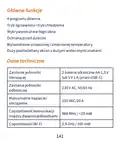
- 141. Główne Funkcje (Programy Dzienne → Tryb Ogrzewania I Tryb Chłodzenia → Wykrywanie Otwartego Okna → Ochrona Przed Dziećmi → Wyświetlanie Ustawionej I Zmierzonej Temperatury → Duży Podświetlany Ekran Z Dużymi Widocznymi Znakami)
- 142. Komenda Jednostki (Zakres Ustawionej Temperatury → Zakres Mierzonej Temperatury → Dokładność → Wymiary Jednostki Sterującej → Wymiary Jednostki Odbiorczej → Stopień Ochrony)
- 143. Przegląd Jednostki Sterującej (Dzień Tygodnia → Godzina → Ogrzewanie Włączone → Chłodzenie Włączone → Wskaźnik Baterii → Tryb Chłodzenia)
- 144. Zablokowane Klawisze (Tryb Ogrzewania → Tryb Wakacyjny → Aktywna Funkcja Otwartego Okna → Tryb Ręczny → Tryb Przeciwzamrożeniowy → Przegląd Jednostki Odbiorczej)
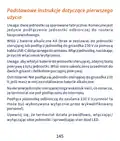
- 145. Podstawowe Instrukcje Dotyczące Pierwszego Użycia (Uwaga → Ostrzeżenie → Upewnij Się, Że Termostat Działa Prawidłowo)
- 146. Parowanie Dwóch Jednostek
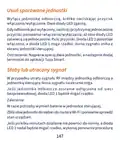
- 147. Usuń Sparowane Jednostki (Słaby Lub Utracony Sygnał)
- 148. Sterowanie Z Aplikacji Tuya Smart
- 149. Wybierz Opcję Małe Urządzenia Domowe' (Termostat (wi-fi) → Dodaj Hasło Sieciowe → Naciśnij I Przytrzymaj Przycisk Parowania → Aplikacja Rozpocznie Skanowanie Pobliskich Urządzeń → Połączenie Bezprzewodowe Z Internetem)
- 150.
- 151. Funkcje Dostępne W Aplikacji (Wyświetlanie Ustawionej Temperatury I Zmierzonej Temperatury → Wyświetlanie Statusu Ogrzewania/chłodzenia → Wybór Trybu Pracy → Ustawienia Zaawansowane)
- 152. Ustawienia (Ustawianie Godziny I Dnia Tygodnia → Funkcja Wykrywania Otwartego Okna)
- 153. Konfiguracja Programu Dziennego Za Pomocą (Termostatu)
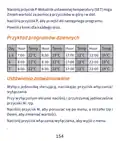
- 154. Przykład Programów Dziennych (Ustawienia Zaawansowane)
- 155. Kalibracja (Options → Default → Ochrona → Histereza → Funkcja Blokady Klawiszy → Funkcja Wykrywania Otwartego Okna - Owd)
- 156. Owd - Spadek Temperatury (podczas Wykrywania) (Owd - Opóźnienie Czasowe (powrót Do Poprzedniego Ustawienia/programu) → Powrót Do Ustawień Fabrycznych → Wersja Oprogramowania → Informacje O Wifi → Regulacja Jasności (tylko W Trybie Zasilania Usb))
- 157. Schemat Połączeń (Uproszczona Deklaracja Zgodności Ue → Onlineshop Srl Oświadcza, Że Inteligentny Termostat Pni Ct40 Pro Jest Zgodny Z Dyrektywą Red 2014/53/ue.)
- 158. Functii Principale (Programe Zilnice → Mod Incalzire Si Mod Racire → Detectie Geam Deschis → Protectie Copii → Afisare Temperatura Setata Si Masurata → Ecran Mare Retroiluminat Cu Caractere Mari Vizibile)
- 159. Interval Temperatura Setata (Interval Temperatura Masurata → Precizie → Dimensiuni Unitate Control → Dimensiuni Unitate Receptor → Clasa De Protectie La Apa → Unitate De Masura)
- 160. Prezentare Unitate De Comanda (Ziua Saptamanii → Ora → Incalzire Pornita → Racire Pornita → Nivel Semnal → Indicator Baterie)
- 161. Taste Blocata (functia 12. (Mod Incalzire → Functia Geam Deschis → Mod Vacanta → Mod Manual → Mod Anti-inghet → Prezentare Unitate Receptor)
- 162. Instructiuni De Baza La Prima Utilizare (Atentionare → Nota)
- 163. Imperechere Unitate De Control Cu Unitate (Receptor)
- 164. Stergere Imperechere Unitati (Semnal Slab Sau Pierdut)
- 165. Control Din Aplicatia Tuya Smart
- 166. Deschideti Aplicatia Tuya Smart Si Apasati Pe Butonul + Sau Pe 'add Device' Pentru A Adauga Termostatul In Aplicatie.
- 167.
- 168. Functii Disponibile In Aplicatie (Afisare Temperatura Setata Si Temperatura Masurata. → Afisare Stare Incalzire/racire. → Selectare Mod De Lucru. → Setari Avansate.)
- 169. Setare Program Zilnic (Setare Ora Si Ziua Saptamanii → Functia Detectie Geam Deschis)
- 170. Configurare Program Zilnic Prin Termostat
- 171. Exemplu De Programare Temperatura Pe Zile (Setari Avansate)
- 172. Valoare (Meniu Descriere → Optiuni → Calibrare → Setare Limita Maxima Temperatura Setata → Setare Limita Minima Temperatura Setata → Temperatura Protectie Inghet)
- 173. Owd - Scadere Temperatura (Owd - Timp Intarziere → Revenire La Setarile Din Fabrica → Versiune Software → Informatii Wifi → Reglare Luminozitate)
- 174. Diagrama Conexiuni (Declaratie Ue De Conformitate Simplificata → Termostat Inteligent Pni Ct Pro)
- 175.
- 176.
×
PNI-CT40 Smart Wireless Thermostat User Manual








































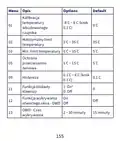






Advanced settings
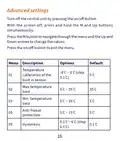
Turn off the control unit by pressing the on/off button.
With the screen off, press and hold the M and Up buttons
simultaneously.
Press the M button to navigate through the menu and the Up and
Down arrows to change the values.
Press the on/off button to exit the menu.
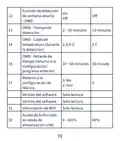
Menu Description
Options
Default
Temperature
calibration of the
built in sensor
-8°C ~ 8°C (step
0.1°C)
01
0°C
Max.temperature
limit
02
03
05
09
5°C ~ 35°C
5°C ~ 35°C
5°C ~ 15°C
35°C
5°C
Min. temperature
limit
Anti-freeze
protection
5°C
0.1°C ~ 6°C (step
0.1°C)
Hysteresis
0.1°C
16

| General | Details |
|---|---|
| Name | PNI-CT40 Smart Wireless Thermostat User Manual |
| Make | PNI |
| Language | English |
| Filetype | PDF (Download) |
| File size | 0.74 MB |
 (1 votes, average: 5.00 out of 5)
 Loading...

PNi CT36PRO Smart Thermostat Instruction Manual

PNI CT25PW WIFI Smart Thermostat User Manual

PNi ACRF8508 Wireless Programmable Room Thermostat Instruction Manual


Honeywell Non-Programmable Thermostat RTH5160D1003 Installation Guide

EMERSON ST765470 Digital Thermostat User Manual

Price Industries Disio Display Thermostat User Guide

Honeywell Home S200 Series FocusPRO Smart Thermostat User Guide

hansgrohe AXOR STARCK X Concealed Thermostat with Shut Off Valve Instruction Manual

Danfoss 088U0210 CF-RS Standard Room Thermostat Instruction Manual

Carrier TSTATCCEWF-01 Smart Thermostat Owner’s Manual

GENERAL LIFE HT25 Smart Room Thermostat User Manual

Guangzhou XR-01 Central Air Conditioning Thermostat User Manual

FantiniCosmi CH123E 230V Flush Mounting Thermostat Installation Guide
Table of Contents
- 1. Smart Wireless Thermostat →
- 2. Contents →
- 3. Main Functions - Technical Specifications →
- 4. Receiver Unit Command - Range Of The Set Temperature →
- 5. Control Unit Overview - Day Of The Week →
- 6. Locked Keys (child Protection Function Active) - Heating Mod... →
- 7. Basic Instructions For The First Use - Pairing The Two Units →
- 8. Delete Paired Units →
- 9. Weak Or Lost Signal - Control From The Tuya Smart Applicatio... →
- 10. May Differ From The Version You Installed. →
- 11. The Application Will Start Scanning Nearby Devices. →
- 12. Page 12 →
- 13. Functions Available In The Application - Operation Mode Sele... →
- 14. Open Window Detection Function - Daily Program Configuration... →
- 15. Example Of Daily Programs →
- 16. Advanced Settings - Menu Description →
- 17. Key Lock Function - Open Window Detection Function →
- 18. Connection Diagram - Simplified Eu Declaration Of Conformity →
- 19. Основни Функции - Дневни Програми →
- 20. Команда На Приемника - Диапазон На Зададената Температура →
- 21. Преглед На Контролния Блок - Ден От Седмицата →
- 22. Охлаждането Е - Режим На Охлаждане →
- 23. Основни Инструкции За Първа Употреба - Забележка: Двата Моду... →
- 24. Свържете Приемника Към 230v Захранване - Уверете Се, Че Терм... →
- 25. Светодиод 1 Мига Рядко И След Това Изгасва. →
- 26. Управление От Приложението Tuya Smart →
- 27. Play Или Сканирайте Qr Кода По-долу: →
- 28. Интернет Връзка Е Успешна. Ако Светодиодът Продължава Да Миг... →
- 29. Page 29 →
- 30. Функции, Налични В Приложението - Дисплей На Зададената Темп... →
- 31. Индикатор За Час - Функция За Откриване На Отворен Прозорец →
- 32. Деактивира Тази Функция, Връщайки Системата В Предишния →
- 33. Меню Описание Опции Default →
- 34. Максимална Температурна Граница - Мин. Температурна Граница →
- 35. Температурен Спад - Owd - Закъснение Във Времето →
- 36. Натиснете Дълго Клавиша M За 5 Секунди, За Да Отключите Клав... →
- 37. Hauptfunktionen - Tagesprogramme →
- 38. Wlan-frequenz - Befehl Der Empfängereinheit →
- 39. Übersicht Der Steuereinheit - Wochentag →
- 40. Tastensperre - Heizmodus →
- 41. Grundlegende Hinweise Zur Ersten Inbetriebnahme - Achtung: S... →
- 42. Koppeln Der Beiden Geräte →
- 43. Gekoppelte Einheiten Löschen - Schwaches Oder Verlorenes Sig... →
- 44. Steuerung Über Die Tuya Smart-anwendung →
- 45. Laden Sie Die Tuya Smart-anwendung Aus Dem App Store Oder →
- 46. Die Anwendung Beginnt Mit Dem Scannen Von Geräten In Der Näh... →
- 47. Page 47 →
- 48. In Der Anwendung Verfügbare Funktionen - Folgende Funktionen... →
- 49. Die Stundenanzeige Blinkt. Drücken Sie Die Auf- Und Ab-taste... →
- 50. Tagesprogramm-konfiguration Über Thermostat - Beispiele Für ... →
- 51. Erweiterte Einstellungen - Menu Beschreibung →
- 52. Hysterese - Tastensperrfunktion →
- 53. Helligkeitsanpassung - Stromversorgungsmodu... →
- 54. Vereinfachte Eu-konformitätserklärung - Onlineshop Srl Erklä... →
- 55. Funciones Principales - Especificaciones Técnicas →
- 56. Comando De La Unidad Receptora - Rango De La Temperatura Est... →
- 57. Descripción General De La Unidad De Control - Día De La Sema... →
- 58. Teclas Bloqueadas - Modo De Calefacción →
- 59. Instrucciones Básicas Para El Primer Uso - Nota Sobre La Con... →
- 60. Emparejamiento De Las Dos Unidades →
- 61. Eliminar Unidades Emparejadas - Señal Débil O Perdida →
- 62. Control Desde La Aplicación Tuya Smart →
- 63. Abra La Aplicación Tuya Smart Y Presione El Botón + O 'agreg... →
- 64. Page 64 →
- 65. Funciones Disponibles En La Aplicación - Smart →
- 66. Configuración Avanzada - Configuración De La Hora Y El Día D... →
- 67. Configuración Del Programa Diario A Través Del - Termostato →
- 68. Ejemplo De Programas Diarios - Configuración Avanzada →
- 69. Menú Descripción - Opciones →
- 70. Función De Detección - Owd →
- 71. Diagrama De Conexión - Declaración De Conformidad Ue Simplif... →
- 72. Fonctions Principales - Programmes Journaliers →
- 73. Commande De L'unité - Plage De La Température De Consigne →
- 74. Présentation De Lunité De Contrôle - Jour De La Semaine →
- 75. Touches Verrouillées - Mode Chauffage →
- 76. Instructions De Base Pour La Première Utilisation - Appairag... →
- 77. Supprimer Les Unités Appairées →
- 78. Signal Faible Ou Perdu →
- 79. Contrôle Depuis L’application Tuya Smart →
- 80. Dans Linterface Suivante, Sélectionnez Loption Petits Appare... →
- 81. Page 81 →
- 82. Fonctions Disponibles Dans Lapplication - Smart →
- 83. Réglages Avancés - Réglage De Lheure Et Du Jour De La Semain... →
- 84. Fonction De Détection De Fenêtre Ouverte - Configuration Du ... →
- 85. Exemple De Programmes Quotidiens →
- 86. Paramètres Avancés - Menu Description →
- 87. Fonction De Verrouillage Des Touches - Fonction De Détection... →
- 88. Réglage De La Luminosité (uniquement En Mode D'alimentation ... →
- 89. Déclaration De Conformité Simplifiée De Lue - Onlineshop Srl... →
- 90. Fő Funkciók - Műszaki Előírások →
- 91. Vevő Egység Parancs - No És Nc →
- 92. Vezérlőegység Áttekintése - A Hét Napja →
- 93. Zárt Kulcsok (a Gyermekvédelmi Funkció Aktív) - Fűtési Mód →
- 94. Alapvető Utasítások Az Első Használathoz - A Két Egység Páro... →
- 95. Párosított Egységek Törlése →
- 96. Gyenge Vagy Elveszett Jel →
- 97. Vezérlés A Tuya Smart Alkalmazásból →
- 98. Termosztát (wi-fi) Opció - Wifi Hálózat Kiválasztása →
- 99. Page 99 →
- 100. Az Alkalmazásban Elérhető Funkciók - Fűtés/hűtés Állapotának... →
- 101. Beállítások Állnak Rendelkezésre: Napi Program, Gyermekvédel... →
- 102. Napi Program Konfigurálása Termosztáton - Keresztül →
- 103. Példa A Napi Programokra - Speciális Beállítások →
- 104. Menü Leírás - A Beépített Érzékelő →
- 105. Owd - Időkésleltetés - Visszatérés A Gyári Beállításokhoz →
- 106. Csatlakozási Diagram - Egyszerűsített Eu Megfelelőségi Nyila... →
- 107. Funzioni Principali - Programmi Giornalieri →
- 108. Comando Unità Ricevente - Range Della Temperatura Impostata →
- 109. Panoramica Dellunità Di Controllo - Giorno Della Settimana →
- 110. Tasti Bloccati (funzione Di Protezione Bambini Attiva) - Mod... →
- 111. Istruzioni Di Base Per Il Primo Utilizzo - Associazione Dell... →
- 112. Eliminare Le Unità Associate →
- 113. Segnale Debole O Perso →
- 114. Controllo Dall’applicazione Tuya Smart →
- 115. Premi A Lungo Il Pulsante Di Associazione Sullunità Ricevent... →
- 116. Page 116 →
- 117. Funzioni Disponibili Nellapplicazione - Visualizzazione Dell... →
- 118. Funzione Di Rilevamento Finestra Aperta →
- 119. Configurazione Del Programma Giornaliero - Tramite Termostat... →
- 120. Esempio Di Programmi Giornalieri - Impostazioni Avanzate →
- 121. Limite Di Temperatura - Protezione Antigelo →
- 122. Ritorno Alle Impostazioni Di Fabbrica - Versione Software →
- 123. Schema Di Collegamento - Dichiarazione Di Conformità Ue Semp... →
- 124. Belangrijkste Functies - Dagelijkse Programmas →
- 125. Opdracht Van De Ontvangereenheid - Bereik Van De Ingestelde ... →
- 126. Overzicht Van De Besturingseenheid - Weekdag →
- 127. Vergrendelde Toetsen - Verwarmingsmodus →
- 128. Basisinstructies Voor Het Eerste Gebruik - Let Op: De Twee U... →
- 129. De Twee Units Koppelen →
- 130. Gekoppelde Units Verwijderen - Zwak Of Verloren Signaal →
- 131. Bediening Vanuit De Tuya Smart-applicatie →
- 132. Thermostaat Aan De Applicatie Toevoegen - Kleine Huishoudeli... →
- 133. Page 133 →
- 134. Functies Beschikbaar In De Applicatie - Weergave Van De Inge... →
- 135. Geavanceerde Instellingen - Bedrijfsmodi →
- 136. Open Raamdetectiefunctie - Configuratie Van Het Dagelijkse P... →
- 137. Voorbeeld Van Dagprogramma’s →
- 138. Geavanceerde Instellingen - Menu Beschrijving →
- 139. Sleutelvergrendeling... - Open Raamdetectie Functie - Owd →
- 140. Aansluitschema - Vereenvoudigde Eu-conformiteitsverk... →
- 141. Główne Funkcje - Programy Dzienne →
- 142. Komenda Jednostki - Zakres Ustawionej Temperatury →
- 143. Przegląd Jednostki Sterującej - Dzień Tygodnia →
- 144. Zablokowane Klawisze - Tryb Ogrzewania →
- 145. Podstawowe Instrukcje Dotyczące Pierwszego Użycia - Uwaga →
- 146. Parowanie Dwóch Jednostek →
- 147. Usuń Sparowane Jednostki - Słaby Lub Utracony Sygnał →
- 148. Sterowanie Z Aplikacji Tuya Smart →
- 149. Wybierz Opcję Małe Urządzenia Domowe' - Termostat (wi-fi) →
- 150. Page 150 →
- 151. Funkcje Dostępne W Aplikacji - Wyświetlanie Ustawionej Tempe... →
- 152. Ustawienia - Ustawianie Godziny I Dnia Tygodnia →
- 153. Konfiguracja Programu Dziennego Za Pomocą - Termostatu →
- 154. Przykład Programów Dziennych - Ustawienia Zaawansowane →
- 155. Kalibracja - Options →
- 156. Owd - Spadek Temperatury (podczas Wykrywania) - Owd - Opóźni... →
- 157. Schemat Połączeń - Uproszczona Deklaracja Zgodności Ue →
- 158. Functii Principale - Programe Zilnice →
- 159. Interval Temperatura Setata - Interval Temperatura Masurata →
- 160. Prezentare Unitate De Comanda - Ziua Saptamanii →
- 161. Taste Blocata (functia 12. - Mod Incalzire →
- 162. Instructiuni De Baza La Prima Utilizare - Atentionare →
- 163. Imperechere Unitate De Control Cu Unitate - Receptor →
- 164. Stergere Imperechere Unitati - Semnal Slab Sau Pierdut →
- 165. Control Din Aplicatia Tuya Smart →
- 166. Deschideti Aplicatia Tuya Smart Si Apasati Pe Butonul + Sau ... →
- 167. Page 167 →
- 168. Functii Disponibile In Aplicatie - Afisare Temperatura Setat... →
- 169. Setare Program Zilnic - Setare Ora Si Ziua Saptamanii →
- 170. Configurare Program Zilnic Prin Termostat →
- 171. Exemplu De Programare Temperatura Pe Zile - Setari Avansate →
- 172. Valoare - Meniu Descriere →
- 173. Owd - Scadere Temperatura - Owd - Timp Intarziere →
- 174. Diagrama Conexiuni - Declaratie Ue De Conformitate Simplific... →
- 175. Page 175 →
- 176. Page 176 →