
LUX TX500Ub Non Programmable Thermostat Instruction Manual


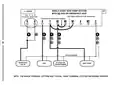


WIRING DIAGRAM NOTES:
(Important, please read all notes before connecting wires)
• If the information provided in the following wiring diagrams does not clearly
represent or match your system, please refer to the “TECHNICAL ASSISTANCE”
section of this manual, and contact us before removing any of your existing
thermostat wiring.
• All of the dashed wires shown in the wiring diagrams are either optional, or
their usage depends upon your specific system type or brand. For example:
Diagram #1 shows the fan wire as optional. If your system does not have a
fan, than this terminal will not be used.
• Terminal letters shown in black represent typical wiring applications.
Depending upon the brand of your specific system or thermostat, your terminal
letters may not match exactly. Terminal letters shown in gray represent other
possible wiring designations that you might see on your existing thermostat
terminals.
• The optional “C” terminal is used for powering the thermostat by the 24-volt
system, using the System Common wire. This can be used alone, or in
addition to installing batteries as a backup. NOTE: connecting the System
Common wire to the thermostat is not necessary for heating and cooling to
function properly.
• If your old thermostat has both a “Y” and “C” wire both present, then “C” is
most likely a System Common wire.
• For Heat Pump systems, you will use either the “O” terminal or the “B”
terminal on this thermostat, but not both. If your old thermostat has both an
“O” and a “B” wire present, then “B” is likely a System Common wire and may
be connected to the “C” terminal. Connecting a System Common wire to this
thermostat’s “B” terminal may damage the thermostat, and also your heating
and cooling system.
• Some Heat Pump systems have a wire for AUX electric heat (usually W2), and
also a separate wire for Emergency electric heat (usually E). This thermostat
uses the W2 terminal for both AUX and Emergency Heat. Tape off your “E”
wire, and confirm that all components function without it.
• If replacing an old thermostat that has a mechanical clock, there may be two
wires labeled as “C” for the clock power. Tape off these wires and do not
connect them to the “C” terminal of this thermostat.
7

| General | Details |
|---|---|
| Name | LUX TX500Ub Non Programmable Thermostat Instruction Manual |
| Make | LUX |
| Language | English |
| Filetype | PDF (Download) |
| File size | 0.31 MB |
 (1 votes, average: 5.00 out of 5)
 Loading...

LUX TX700U Universal Thermostat Instruction Manual

LUX TX1500E Programmable Thermostat Instruction Manual

LUX CAG1500 SERIES Smart Temp Electronic Thermostat Instruction Manual

LUX PSP511A Smart Temp Electronic Thermostat Instruction Manual

LUX PSP511A Series Programmable 5-2 Thermostat Instruction Manual

LUX PSPH521 Series Programmable Heat Pump Thermostat Instruction Manual

LUX DHP2120 Battery Powered Non Programmable Digital Heat Pump Thermostat Installation Guide

CH200SA Versatile Deluxe Low Voltage Thermostat Installation Guide

LUX TH10 Heating Only Mercury FREE Manual Thermostat Instruction Manual

LUX PSP511Ca Programmable Thermostat Instruction Manual


Moes BHT-3000 Series Thermostat User Guide

AJAX108845 White Digital Programmable Thermostat User Guide

Smart Temp SMT-450 Flexistat WiFi Thermostat Instructions

ROMA HEATING CT1000 WiFi Colour Touch Screen Thermostat User Manual

TRANE XR202 Programmable Thermostat User Guide

CYDATA CY917B Daisy Wi-Fi Thermostat User Guide

auronic AU3151 Oil Radiator with Thermostat User Manual

Danfoss RT 107 Thermostat Installation Guide

vaillant VR 92f/3 Wireless Additional Room Thermostat Instructions

VIMAR 02970 Wheel Thermostat Instruction Manual