
KINGHOME WK-010WC1 Smart Thermostat Owner’s Manual










Owner's Manual
underlying setting interface:
(1) If "7 Day" mode is selected, press "Set" to enter the day selection interface.
Press "<" or ">" button to select from Sunday to Saturday, and then press
"Set" again to enter the schedule parameters setting page.
(2) If "5-2" mode is selected, press "Set" to enter the day selection interface.
Press "<" or ">" button to select "Workdays" or "Weekend", and then press
"Set" again to enter the schedule parameters setting page.
(3) If "1 Week" mode is selected, press "Set" to enter the schedule parameters
setting page directly.
On the parameter setting page
:
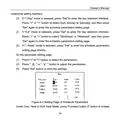
(1) Press "<" or ">" button to select the parameters.
(2) Press " " or " " button to adjust the parameters.
(3) Press "Set" button to save the settings.
Figure 4-2 Setting Page of Schedule Parameters
Under Cool, Heat or AUX Heat Mode, press "Function button 2" button to enable
14

| General | Details |
|---|---|
| Name | KINGHOME WK-010WC1 Smart Thermostat Owner’s Manual |
| Make | KINGHOME |
| Language | English |
| Filetype | PDF (Download) |
| File size | 0.52 MB |
 (1 votes, average: 5.00 out of 5)
 Loading...

KINGHOME WK-010WD1 Smart Thermostat Owner’s Manual

NINGBO TC200 Smart WI-FI Thermostat Owner’s Manual

COLDBUSTER MWD5 Programmable Thermostat User Manual

Goodman GTST Connected Thermostat User Guide

Glow-Worm SRT 50-2 Climastat Select Programmable Room Thermostat User Manual

Danfoss RMT-230 Room Thermostat Installation Guide

Goldair GEPH213 EcoPanel Heater with Thermostat Instruction Manual

resideo TH4110U2005 T4 Pro Programmable Thermostat User Manual

Roth Basicline 230T Programmable Clock Thermostat Instruction Manual

BUDDERFLY BTS-U1 Thermostat User Manual

Moes BHT-006 Series Thermostat User Manual