
KINGHOME WK-010WC1 Smart Thermostat Owner’s Manual










Owner's Manual
within 20 seconds, it will return to the homepage automatically. The detailed user
function list is as follows:
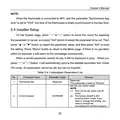
Table 5.2.1 User Parameter List
No.
1
Parameter name
Dual Fuel Type
Humidifier
Parameter range
Standard/Smart
ON/OFF
Remarks
Dual Fuel function type setting
Humidifier ON/OFF setting
Target humidity value setting
Economizer setting
2
3
Humidity set value
ERV
20~80%
4
ON/OFF
NOTE:
(1) The Smart mode of Dual Fuel function requires WiFi connection.
(2) The target humidity value can be set only when the humidifier function is ON.
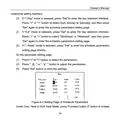
5.3 User Setup
On the System page, press " " or " " button to move the cursor for selecting
∧
∨
the parameter to be set, and press "Set" button to select the parameter to be set. Then
press "▲" or "▼" button to select the parameter value, and then press "Set" to save
the setting. Press "Menu" button to return to the Menu page. If there is no operation
within 20 seconds, it will return to the homepage automatically. The detailed user
parameter list is as follows:
When a certain parameter cannot be set, it will be displayed in gray. Under ON
mode, all parameters cannot be set, but can be inquired.
20

| General | Details |
|---|---|
| Name | KINGHOME WK-010WC1 Smart Thermostat Owner’s Manual |
| Make | KINGHOME |
| Language | English |
| Filetype | PDF (Download) |
| File size | 0.52 MB |
 (1 votes, average: 5.00 out of 5)
 Loading...

KINGHOME WK-010WD1 Smart Thermostat Owner’s Manual


emos P5604 Thermostat Instruction Manual

Regulus TZT 63 Electronic Plug-In Thermostat User Guide

ESi Controls ESRTP4TOUCH Programmable Room Thermostat Instruction Manual

DEVIreg 610 Electronic Thermostat Installation Guide

SALUS CONTROLS BTR230 Non Programmable Thermostat User Guide

Expert4house BHT-9000 Smart Knob Thermostat User Guide

SCHRACK TECHNIK EV103311 Analog Thermostat User Manual

PNI-CT40 Smart Wireless Thermostat User Manual

BOSCH BCC110 Thermostat User Guide

Danfoss VICUV40F,088N3650 Room Thermostat User Guide