
Honeywell N100 Series FocusPRO Thermostat Installation Guide


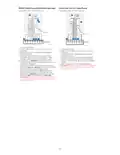


UWP Wall Plate Installation
1
3
2
4
If the cover plate is used, the UWP snaps on the cover plate
as shown here.
1 Before starting, turn the power off at the breaker box or
switch. Open the package to find the UWP. See Figure 1.
2 Position the UWP on wall. Level and mark hole
positions. See Figure 2.
3 Using a 3/16" bit, drill holes at marked positions and
then lightly tap the supplied wall anchors into the wall
using a hammer.
4 Pull the door open and insert the wires through wiring
hole of the UWP. See Figure 3.
5 Place the UWP over the wall anchors. Insert and tighten
mounting screws supplied with the UWP. Do not
overtighten. Tighten until the UWP no longer moves.
Close the door. See Figure 4.
MCR38409A
Use 3x supplied #6 1-1/2" screws
Optional Cover Plate Installation
If the Optional Cover Plate is not required, see UWP Wall Plate
Installation.
1
Use the Optional Cover Plate when you need to cover a paint gap
from the old thermostat.
1 Separate the Cover Plate from Mounting Plate (Figure 1).
2 Mount the Mounting Plate on to the wall or J-box using any of
the 8 screw holes. Insert and tighten mounting screws supplied
2
3
with Cover Plate Kit. Do not overtighten. See Figure 2. Make sure
the Mounting Plate is level.
3 Attach the UWP by hanging it on the top hook of the Mounting
Plate and then snapping the bottom of the UWP in place. See
Figure 3.
4 Snap the Cover Plate onto the Mounting Plate. See Figure 4.
4
MCR39488
Power options
Insert R and C wires into designated
terminals for primary AC power. (C
terminal is optional if batteries are
installed but is recommended).
Remove wires by pressing down on the
terminal tabs.
L/A
O/B
AUX
E
A
S
S
Y
W2
Y2
G
C
U
U
W
K
Thermostats using Y and G wires:
If there is no C wire from the previous
thermostat or no extra wire in the
bundle to the thermostat, you may use
the THP9045A C-wire adapter (sold
separately).
R
Rc
MCR39489
Insert AA batteries for primary or backup power
M36776
For more information on the THP9045A C-wire adapter, go to:
3

| General | Details |
|---|---|
| Name | Honeywell N100 Series FocusPRO Thermostat Installation Guide |
| Make | Honeywell |
| Language | English |
| Filetype | PDF (Download) |
| File size | 1.36 MB |
 (1 votes, average: 5.00 out of 5)
 Loading...

Honeywell T6 Pro Programmable Thermostat User Manual

Honeywell D1-528 Direct Thermostat Installation Guide

Honeywell FocusPRO P200 Programmable Thermostat User Guide

Honeywell RCHT8610WF Series Smart Thermostat Installation Guide

Honeywell T9 Smart Thermostat Installation Guide

Honeywell TH2320WF4011 FocusPRO Smart S200 Series Thermostat User Guide

Honeywell TL116A Thermostat Installation Guide

T10 Pro Smart Thermostat with Redlink Room Sensor

Honeywell TH6320WF2003 Lyric T6 Pro Wi-Fi Programmable Thermostat User Guide

Honeywell RTH9580 Wi-Fi Color Touchscreen Programmable Thermostat User Guide


micro-Air EasyTouch RV 351 Thermostat User Manual

Danfoss 014G0013 Z Wave Radiator Thermostat Installation Guide

heatmiser neoStat Touch-e Touchscreen Electric Floor Heating Thermostat Owner’s Manual

alza WT410 Thermostat User Manual

STELPRO ASSO Series Integrated Thermostat Installation Guide

Honeywell TH8321WF02 Vision Pro WiFi Programmable Thermostat User Manual

GENERAL LIFE ARUNA 301S Digital Room Thermostat User Manual
Honeywell T6 Pro Programmable Thermostat User Manual

MOES ZTRV-BY-100 Radiator Thermostat User Guide

Danfoss Eco Electronic Radiator Thermostat Instruction Manual