
Honeywell N100 Series FocusPRO Thermostat Installation Guide




Troubleshooting
• Check circuit breaker and reset if necessary
• Make sure power switch for heating & cooling system is on
• Make sure furnace door is closed securely
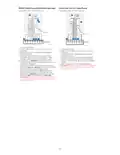
Display is blank
Make sure fresh AA alkaline batteries are correctly installed See Battery
Replacement
• When running heat, display will show HEAT ON in lower right of display
• When running cool, display will show COOL ON in lower right of display
• If display shows WAITING FOR EQUIPMENT under temperature
reading, it is in compressor delay mode to protect the system. Wait 5
minutes to determine if the thermostat makes a Heat or Cool call
• If display doesn’t indicate a call for Heat or Cool or WAITING FOR
EQUIPMENT, verify the mode setting, temperature setpoint and room
temperature
Heating or cooling does not run
If you press the Up or Down arrow
• Upper left of display shows mode setting
• Upper right shows setpoint
• Center of display shows room temperature
If issue persists
• Check circuit breaker and reset if necessary
• Make sure power switch at heating & cooling system is on
• Make sure furnace door is closed securely
• Verify there is not a wire attached to W for heat pump systems. See
Wiring Diagrams.
• For heat pump applications the reversing valve is energized in Heat on
some heat pumps and Cool for other heat pumps. Verify ISU 2060 is
set correctly
Heat or Aux Heat runs with
Cooling
• Verify that no wires are shorted. Look for exposed sections of wire at
the UWP
• Verify display does not indicate HEAT ON, COOL ON or AUX HEAT ON
• Verify there is not a wire attached to W for heat pump systems. See
Wiring Diagram.
• Verify that no wires are shorted. Look for exposed sections of wire at
the UWP
Heat or Aux heat runs with no call
for heat or cooling
• Verify the mode setting (Heat, Cool, Auto, or Em Heat in upper left of
display)
The setting ranges for these modes are
Cannot change setpoint to desired
setting
o Heat or Em Heat: 32 ºF to 90 ºF (0 ºC to 32.0 ºC)
o Cool: 50 ºF to 99 ºF (10.0 ºC to 37.0 ºC)
If the setpoint can be adjusted, but not to the full range shown above, the
thermostat may be configured for a maximum heat or minimum cool
setpoint to restrict settings that are energy inefficient.
WAITING FOR EQUIPMENT The compressor protection feature is engaged. Wait a few minutes for the
shown in display under room system to safely restart to avoid damaging the compressor. See Built-in
temperature
compressor protection.
17

| General | Details |
|---|---|
| Name | Honeywell N100 Series FocusPRO Thermostat Installation Guide |
| Make | Honeywell |
| Language | English |
| Filetype | PDF (Download) |
| File size | 1.36 MB |
 (1 votes, average: 5.00 out of 5)
 Loading...

Honeywell T6 Pro Programmable Thermostat User Manual

Honeywell D1-528 Direct Thermostat Installation Guide

Honeywell FocusPRO P200 Programmable Thermostat User Guide

Honeywell RCHT8610WF Series Smart Thermostat Installation Guide

Honeywell T9 Smart Thermostat Installation Guide

Honeywell TH2320WF4011 FocusPRO Smart S200 Series Thermostat User Guide

Honeywell TL116A Thermostat Installation Guide

T10 Pro Smart Thermostat with Redlink Room Sensor

Honeywell TH6320WF2003 Lyric T6 Pro Wi-Fi Programmable Thermostat User Guide

Honeywell Lyric T5 Wi-Fi Thermostat Installation Guide


WATTS Tekmar Wi-Fi Thermostat Instruction Manual

brennenstuhl HTCZ01 Zigbee Radiator Thermostat Instruction Manual

Honeywell 5000 Series Thermostat Instruction Manual

Stelrad Radiator Thermostat RAS-D2 Combi Pack, Radiator Pack Instructions

King K302PE ClearTouch Programmable Thermostat Instruction Manual

PYMETER PY-23T PID Dimming Thermostat Instruction Manual

SIEMENS TH 193 HC Heating and Cooling Room Thermostat Instruction Manual

HYSEN HY511 WiFi Heating Thermostat Owner’s Manual

Robertshaw 9602 Programmable Thermostat User Manual

vtech T961NN50 E-Smart Thermostat Installation Guide