
Honeywell N100 Series FocusPRO Thermostat Installation Guide


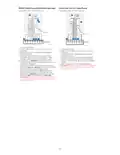


Auto Changeover
When a thermostat is set to Auto Changeover, the thermostat has a Heat setpoint and a Cool setpoint and can run either Heat or
Cool as needed.
1 Verify the thermostat is set to Auto Changeover mode. Press the MODE button in the upper left until AUTO is selected. Press
the SAVE button (Center left).
2 Press the or button. Upper right shows HEAT TO or COOL TO in flashing text, and the setpoint. Use the or button to
adjust the setpoint. If the display shows HEAT TO flashing when you want to adjust the Cool setpoint, or vice versa, press the
System button. While HEAT TO or COOL TO is flashing, the mode indication at upper left shows either HEAT or COOL flashing.
Pressing the MODE button at this time changes the setpoint being adjusted from HEAT to COOL or vice-versa.
Heat and cool set to the same temperature
Most customers are comfortable in a 2–3 degree temperature range. Therefore, the heat is usually set a few degrees below the
Cool setpoint. When the indoor temperature is between the Heat and Cool setpoints, the system is off.
The Heat and Cool setpoints can be the same. To ensure that the system doesn’t cycle back and forth between Heating and
Cooling, the thermostat observes a differential setting (set by the installer). If the thermostat last ran in Heat mode, it cycles heat
on and off to maintain the setpoint. The indoor temperature must rise to the differential setting before it switches to Cool.
Then cooling will run down to the Cool setpoint and cycle cooling on and off to maintain as needed. The thermostat would then
need to drop to the differential setting before switching back to Heat. Typically, a thermostat using Auto Changeover would only
need to switch over twice per day as outdoor temperature rises during the day and drops in the evening.
Alerts
When an alert is active, this icon will appear in the lower part of the
display. Pressing any button will activate the display and show the alert
number above the indoor temperature reading. If more than one alert is
Indoor
active, the thermostat will display the number of the next alert after 10
seconds.
FAN
Auto
Some alerts can be resolved by the homeowner, for example Replace
Batteries. Other alerts may require a service call to the professional
installer.
M39630
Alert Number
Alert Meaning
405 Low batteries
407 Critically low batteries
164 Heat Pump has detected a fault
170 Thermostat Memory Failure
173 Internal Sensor Error
178 Wired Outdoor Sensor Error. Check wires and connections to outdoor sensor.
Replace Filter Reminder
When a Replace Filter reminder occurs, this icon will appear in the
lower part of the display along with the message Replace Filter. After
replacing the furnace filter, you can reset this reminder by pressing and
holding the upper left and lower right buttons for 5 seconds.
MCR39552
14

| General | Details |
|---|---|
| Name | Honeywell N100 Series FocusPRO Thermostat Installation Guide |
| Make | Honeywell |
| Language | English |
| Filetype | PDF (Download) |
| File size | 1.36 MB |
 (1 votes, average: 5.00 out of 5)
 Loading...

Honeywell T6 Pro Programmable Thermostat User Manual

Honeywell D1-528 Direct Thermostat Installation Guide

Honeywell FocusPRO P200 Programmable Thermostat User Guide

Honeywell RCHT8610WF Series Smart Thermostat Installation Guide

Honeywell T9 Smart Thermostat Installation Guide

Honeywell TH2320WF4011 FocusPRO Smart S200 Series Thermostat User Guide

Honeywell TL116A Thermostat Installation Guide

T10 Pro Smart Thermostat with Redlink Room Sensor

Honeywell TH6320WF2003 Lyric T6 Pro Wi-Fi Programmable Thermostat User Guide

Honeywell Lyric T5 Wi-Fi Thermostat Installation Guide


HomeHome App ESP01V2 Mini Relay Thermostat Installation Guide

ELMEKO THRV 22 Double-Thermostat Owner’s Manual

STEGO FTO Preset Thermostat User Guide

BEOK BOT-R6X Wireless Gas Boiler Thermostat User Manual

Wengart TP808-S-2 Low Voltage Thermostat User Guide

sinope TH1134ZB Smart Line Voltage Thermostat Installation Guide

stelpro STZW402 ELECTRONIC THERMOSTAT SMART HOME User Guide

miMonitor MI-TH02-HMO-V2 Wifi Smart Thermostat User Guide

ENGO CONTROLS EONE230 Internet Controlled Thermostat User Guide

Haswill Electronics RC-113M PID Thermostat User Guide