Get the free PDF manual for the PYMETER PY-23T PID Dimming Thermostat Instruction Manual and access setup steps, usage instructions, and troubleshooting tips. 👉 View online or download now to keep your thermostat running smoothly!
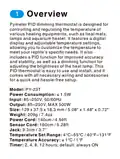
Page 2: Overview Pymeter PID dimming thermostat is designed for controlling and regulating the temperature of various heating equipment, such as heat mats, lamps, and aquarium heaters. It features a digital display and adjustable temperature settings, allowing you to customize the temperature to meet your reptile's specific needs. It includes a PID function for improved accuracy and stability, as well as a dimming function for adjusting the brightness of the heat lamp. This PID thermostat is easy to use and install, and it comes with all necessary wiring and accessories for a quick and hassle-free setup. Model: PY-23T Power consumption: ≤ 1.5W Input: 85~250V, 50/60Hz Output: 85~250V, MAX 500W Temperature set range: 4℃~55℃ / 40℉~131℉ Temperature accuracy: ± 1℃ / 1℉ Timer: 2, 4, 8, 12 hours; default: always ON
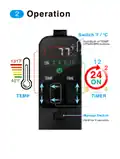
Page 3: Operation Switch between Fahrenheit and Celsius Hold both TEMP UP and DOWN buttons Manual switch Hold for 5 seconds
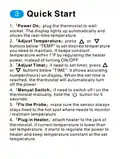
Page 4: Quick Start Power on by plugging the thermostat into the wall socket. The display lights up automatically and shows the real-time temperature. Adjust temperature by pressing the buttons below TEMP to set the desired temperature to maintain. Adjust timer by pressing the buttons below TIME to set the timer in hours. The thermostat will automatically turn off the power when the set time is reached. Manual switch allows you to turn the thermostat off/on by holding the button for 5 seconds. Fix the probe to ensure the sensor stays fixed to the hot spot where temperature needs to be monitored. Plug in the heater to the thermostat jack. If the current temperature is lower than the set temperature, it will regulate the power to the heater.
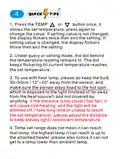
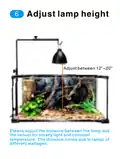
Page 5: Press the TEMP or button once to show the set temperature, and press again to change the value. If the setting value is not changed, the display flickers twice then exits the setting. If the setting value is changed, the display flickers thrice then exits the setting. Under query or setting mode, the dot behind the temperature reading remains lit. The dot keeps flickering until the current temperature reaches the set temperature. When using a heat lamp, keep the bulb 30~50cm / 12~20 away from the sensor. Ensure the sensor stays fixed to the hot spot exposed to the light and is not covered. If the distance is too close or too far, it can cause overheating or take too long to reach the set temperature. The temperature set range does not guarantee that it can reach that temperature. The highest temperature it can reach is dependent on the attached heater and cannot go below ambient temperature.
Page 6: Keep constant temperature and gentle light.
Page 7: Adjust lamp height between 12 and 20. Adjust the distance between the lamp and the sensor for steady light and constant temperature. The distance varies due to lamps of different wattages.
Page 8: Warranty and support information is provided for Pymeter products. Pymeter products come with a lifetime warranty. There is a one-year exchange or refund guarantee. Customers are encouraged to contact support for any questions or issues. Support can be reached via email or live chat. Live chat support is available. A user manual in PDF format is provided.