
PYMETER PY-23T PID Dimming Thermostat Instruction Manual




4
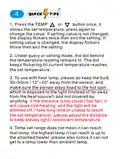
1. Press the TEMP
or
button once, it
shows the set temperature, press again to
change the value. If setting value is not changed,
the display flickers twice then exit the setting. If
setting value is changed, the display flickers
thrice then exit the setting.
2. Under query or setting mode, the dot behind
the temperature reading remains lit. The dot
keeps flickering till current temperature reaches
the set temperature.
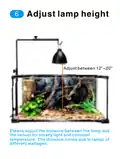
3. To use with heat lamp, please do keep the bulb
30~50cm / 12"~20" away from the sensor, and
make sure the sensor stays fixed to the hot spot
which is exposed to the light (instead of far away
from the heat source!) and not covered by
anything. If the distance is too close (*too far), it
will cause overheating, and the light will be
dimmed off (*take long time or unable to reach
the set temperature), please adjust the distance
to keep steady light / consistent temperature.
4. Temp set range does not mean it can reach
that temp, the highest temp it can reach is up to
the attached heater, please also notice it can not
get to a temp lower than ambient temp.

| General | Details |
|---|---|
| Name | PYMETER PY-23T PID Dimming Thermostat Instruction Manual |
| Make | Pymeter |
| Language | English |
| Filetype | PDF (Download) |
| File size | 0.64 MB |
 (1 votes, average: 5.00 out of 5)
 Loading...


Milesight WT201-868M Smart Thermostat User Guide

WEINMANN C16 WiFi Digital Room Thermostat Instruction Manual

BROUWLAND Brew Monk Fermenter Digital Thermostat Instruction Manual

Beok TGW60B Programmable Smart Wi-Fi Thermostat User Guide

Smith s HAGA95001 Remote Wired Room Thermostat Owner’s Manual

KETOTEK KTF017802 Smart WiFi Thermostat Instructions

EPH CONTROLS PR092K7 RF Cylinder Thermostat Instruction Manual

PURGEAR STC-8080H Digital Thermostat User Guide

MechDoc QD-HVAC10 Programmable Thermostat Instruction Manual

EPH CONTROLS RFR RF Room Thermostat Instruction Manual