
heatmiser neoStat-Pro Smart Thermostat Instruction Manual














Display Options
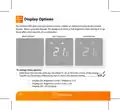
The neoStat PRO gives you the option to have a either an ambient temperature or blank
display. When using the keypad, the display will show at full brightness then dim back or go
blank after a few seconds of no interaction.
Blank (Default)
User Interaction
Dimmed level
To change these options:
•
•
Hold down the tick key until you see either 01, 02 or 03 in the centre of the display........
Tap the Up/Down keys followed by tick to select the desired setting............................
•
•
•
Display On, Brightness Level 1 (Medium) = 01
Display On, Brightness Level 2 (Low) = 02
Display Off = 03 (Default)
11
neo
Series

| General | Details |
|---|---|
| Name | heatmiser neoStat-Pro Smart Thermostat Instruction Manual |
| Make | heatmiser |
| Language | English |
| Filetype | PDF (Download) |
| File size | 0.52 MB |
 (1 votes, average: 5.00 out of 5)
 Loading...

heatmiser neoStat Touch-e Touchscreen Electric Floor Heating Thermostat Owner’s Manual

heatmiser Slimline-RF V3 Programmable Wireless Thermostat Instructions

heatmiser DS1-V2 Thermostat Owner’s Manual

heatmiser neoStat-e Electric Floor Heating Thermostat Instructions

heatmiser Slimline-B V3 Programmable Room Thermostat Owner’s Manual


BOSCH 8-750-002-924 ZigBee Radiator Thermostat User Manual

autani 1000172-01 Wave Thermostat Installation Guide

EUROLAMP HY06BW Digital Heating Smart Thermostat User Manual

Aprilaire S86WMUPR Programmable Wi-Fi Multi Stage Universal Thermostat Installation Guide

Ferono FTH-30 Universal Thermostat Instruction Manual

EPH CONTROLS CDC2 Cylinder Room Thermostat User Guide

Beok Controls TGR85 Thermostat User Guide

WATTS TEK564 Invita WiFi Thermostat Instruction Manual

ENGO EASY230W Wired Thermostat User Guide

ZigBee WiFi Series Water Heating Thermostat User Guide