
GENERAL 300S Wired Room Thermostat User Manual
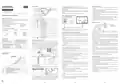


ScreenIndicators
DAY AND HOURSETTINGS
Thermostatto thebackand squeezeittowards theback.
Low Battery Warning: When the “ ” icon appears on the screen, it means
“low battery warning”. It is recommended to replace the batteries when this
warning appears.
ENGLISH
While your Room Thermostat is on, keep pressing ''Settings'' button for 3
seconds.
1
2
3
4
10
11
At the first screen that appears ''Hour'' part will be blinking. You may set
thetimewith“Up” and “Down”buttons.
DIGITAL ROOM THERMOSTAT
12
Warning: When the product is not used for a long period (more than 15 days),
remove the batteries. Otherwise, malfunctions that may occur would be out of
warranty.
After setting the time, ''Settings'' button needs to be pressed once. For
minute setting, minute part will be blinking. You may set the minute with
“Up” and “Down”buttons.
5
generallife.com.tr
6
7
8
9
Please throwyour dead batteries into thewaste bin forbatteries.
After setting the minute, ''Settings'' button needs to be pressed once to set
thedayof theweek.
ROOMTHERMOSTATWIRINGDIAGRAM
THERMA 300S USER MANUAL
Mondayhas setasthefirstdayof theweekand indicated withnumber “1".
Numbers indicates the following days respectively 2-Tuesday, 3-
Wednesday, 4-Thursday, 5-Friday, 6-Saturdayand 7-Sunday
When setting is done you may exit by pressing for 3 seconds to “Settings”
button.
HEATING/COOLING UNIT
GENERALSPECIFICATIONS
1
2
3
4
5
6
7
8
9
Day Indicator
Hours of Day
THERMA 300S is a wired room thermostat. The user can adjust the room
temperature with the required temperature and get more comfortable and
economic heating/cooling.
Hour Indicator
Screen Lock
Dailyand WeeklyProgram (7x24)
MODESETTTINGS
Room Temperature
Set Temperature
Economy Mode
Comfort Mode
Programming Mode
Cooling Indicator
MODES
DifferentMode Options (Comfort Mode and Economy Mode)
PreciseTemperature Measurement
Heating Calibration
ON/OFFControl
Wired Connection
TPIAlgorithm
NO COM
WEEKLY
PROGRAM
MODE
READY MODES
MANUAL MODE
Heating/Cooling Modes
THERMA 300SAND EQUIPMENTS
Warning!
Operations within the heating / cooling unit or the electrical installation
must be carriedout byprofessionally qualified persons.
- If the Cooling Indicator is blinking, the cooling
unit is working.
Comfort
Mode
Economy
Mode
Alkaline
Battery
Dowels and Screws
10
THERMA 300S
Room Thermostat
- If the Cooling Indicator is steady, the cooling unit
is not working.
Heating Indicator
Your Room Thermostat has 4 different modes. Two of them(Comfort and
Economy Mode) are preset modes. Other modes are manual mode and
programming mode.
ROOMTHERMOSTATTEMPERATURECALIBRATION
Temperature sensors which are used in Room Thermostats are highly
sensitive. You mayneed to calibrate yourRoom Thermostat if youwould like
to get the same temperature values with other thermometers in your living
space.
- If the Heating Indicator is blinking, the heating
unit is working.
In preset modes, temperature values are based on user's choices which has
been set in the beginning. Manual mode provides to operate the Room
Thermostat with temperature which user's required and set directly.
Programming mode continues to work according to the weekly program
determined bytheuser.
11
12
- If the Heating Indicator is steady, the heating
unit is not working.
Battery Indicator
While your device is turned off, press and hold the "On/Off"button for 3
seconds.
TECHNICALDATA
Temperaturevaluesof presetmodes can be changed on “Settings” menu.
Press the "On/Off" button until the “
” menu appers. In order to see the
ROOMTHERMOSTATPLACEMENT
Dimensions
Operating Current
Relay NO Switching Current
100mm / 160mm / 18.2mm
In order to go to “Settings” menu, “Settings” button needs to be pressed
for 3 seconds. Date and time settings would appear in first screen, to skip
it“Settings” button should be pressed for 3 times.
desired temperature, set the temperature difference by press the
“Temperature Adjustment Buttons”. This value can be arranged between
“-8oC" and “+8oC".
3V DC (2 x AAA alkaline battery)
2A (30VDC – Resistive load)
0.5A (125VAC – Resistive load)
Room Thermostat needs to be placed in the room which is used most
frequently. For instance; living room or lounge. Placing the Room
Thermostat in a spot that have air circulation like entrance of a room or side
of window should be avoided. Also anywhere close to heating/cooling units
such as radiator, stove and spots which get direct sun lights would not be
suitable. Room Thermostat needs to be located above the floor 150 cm
height. Fewtrialsmaybe made to find themost convenientspot.
Comfort Mode's “
” temperature value would appear and temperature
Temperature Measurement Accuracy 0.1oC
To save the settings and exit, press the "On/Off" button until the device
turns off.
for Comfort Mode can be adjusted bypressing “Up” and “Down”buttons.
When setting is done, by pressing “Settings” button, Economy mode can
be set.
Operating Temperature Range
Battery Life
(5oC) – (30oC)
Note:Recommended tempreture calibration is “0.0oC”.
1 Year (2 x AAA)
(-10oC) – (+50oC)
(-20oC) – (+60oC)
Operating Temperature
Storage Temperature
Economy Mode's “
” temperature value would appear and temperature
ROOMTHERMOSTATHEATING/COOLINGMODES
Your Room Thermostat has heating and cooling modes. In order to switch
easilybetweenheating and cooling modes:
for Economy Mode can be adjusted bypressing “Up” and “Down”buttons.
Pressing “Settings” button for 3 seconds again would close “Settings”
screen.
While your device is turned off, press and hold the “On/Off” button for 3
seconds.
Manual mode temperature can be set by pressing “Up” and “Down”
buttons while on home screen. When “Up” or “Down” buttons are pressed
Room Thermostatwill be seton Manual Mode.
Pressthe“On / Off” button until the“
” menu appears.
ROOMTHERMOSTAT
Buttons Functions
You can switch between “
” (heating) and “ ” (cooling) modes by
Youcanpressthe"Mode" buttontoswitchtoothermodes.
using the “Up” or "Down"buttons in the“
” menu.
To save the settings and exit, press the “On / Off” button or wait 10
seconds until thedeviceturns off.
PROGRAMMING MODE
You may choose which mode will be active, individually for each hour of the
day with programming mode. Weekly program mode includes 2 active
1
2
3
The settings you have made have been saved. Once you turned on your
device, itwill operatewiththechanged settings.
modes. Those areComfort Mode “
” and Economy Mode “
”.
In order to arrange the weekly program ''Programming” button needs to be
FACTORY SETTINGS RESET
pressed for 3 seconds.
4
5
6
You can reset your Room Thermostat to its default factory settings. This
operation resets the mode temperature values, calibration setting and
heating/coling modes to factory setting. To reset your Room Thermostat to
factory setting:
On the screen there will be icons for the day which wants to be
programmed, hours of thedayand activemode.
“By pressing “Mode” button, chosen mode for that specific hour may be
changed.
BATTERY PLACEMENT
Before starting, power off the device connected to the Room Thermostat
and make surethatthe energy is cut off.
While your device is turned off, press and hold the "On/Off"button for 3
seconds.
By pressing the up or down button, you can scroll through the hours of the
dayand program according to the activemode.
Press the “Setting” button to change the day of the week while making a
weeklyprogram.
1
2
3
4
5
6
On/Off Button
Pressthe“On/Off” button until “
While in the “ ” menu, select the “
buttons and pressthe“On/Off” button.
Your devicewill be turned off and resetto factory settings.
” menu appears.
Temperature Adjustment (To Increase)
Temperature Adjustment (To Decrease)
Weekly Program Button
” option by using “Up” or “Down”
After setting a weekly program press the ''Programming'' button for 3
seconds to saveit.
Setting Button
Mode Button – Unlock Button
KEYLOCK
In theRoom Thermostatthereis akeylock function to avoidany unintended
contact.
As shown in the picture above, press the screwdriverforward from the space
shown, bend the tabs and separate the front cover. Insert 2 new AAA alkaline
batteries in the battery housing with the correct battery direction. Replace
both batteriesatthesametime. Then align the front part of yourRoom
In order to unlock the Room Thermostat's key lock “Mode” button should be
pressed for 3 seconds. If buttons on Room Thermostat are not touched for
10seconds, keylock will be reactivated.
1
2
3
4


| General | Details |
|---|---|
| Name | GENERAL 300S Wired Room Thermostat User Manual |
| Make | GENERAL |
| Language | English |
| Filetype | PDF (Download) |
| File size | 2.12 MB |
 (1 votes, average: 5.00 out of 5)
 Loading...

GENERAL ARUNA 300S Smart Room Thermostat User Manual

GENERAL HT250S Digital Room Thermostat User Manual

GENERAL FH260S Underfloor Heating Thermostat User Manual

GENERAL HT100S Digital Room Thermostat User Manual

GENERAL SOLARA 330S SMART Smart Room Thermostat User Manual

GENERAL HT250 Digital Room Thermostat User Manual

GENERAL SENNA 300 Digital Room Thermostat User Manual

GENERAL ARUNA 300S RF Digital Room Thermostat User Manual

GENERAL SENNA 300 Smart Room Thermostat User Manual

GENERAL MITRA 250S Digital Room Thermostat User Manual

General Life 300S Manual: Questions and Answers
What is the difference between Comfort Mode and Economy Mode on the General Life 300S?
Comfort and Economy are preset modes with predefined temperature values. Comfort Mode and Economy Mode temperatures can be individually adjusted in Settings.
| Mode | Description |
|---|---|
| Comfort Mode | Preset mode with user-configured temperature |
| Economy Mode | Preset mode with user-configured temperature |
What does the low battery warning icon mean on the General Life 300S?
The icon indicates low battery. Replace the batteries when this warning appears. User Manual, p. 1
Other General Life 300S manuals
- GENERAL Life ARUNA 300S RF Wireless Room Thermostat User Guide
- GENERAL Life ARUNA 300S Wired Room Thermostat User Guide
- GENERAL ARUNA 300S RF Digital Room Thermostat User Manual
- GENERAL ARUNA 300S Smart Room Thermostat User Manual
- GENERAL LIFE 300S RF Wireless Room Thermostat User Manual
More General Life thermostat manuals

SECURE ThermoPlus PRT1 Programmable Room Thermostat Instruction Manual

homematic IP HAP Radiator Thermostat Instruction Manual

SALUS iT500 Internet Thermostat Installation Guide

seitron 039790 WiFi WiTime Wall Programmable Thermostat User Guide

ENGO CONTROLS ESIMPLE230W Non-Programmable Wired Thermostat User Guide

Honeywell T8775 Digital Round Thermostat Instructions

bticino SX Series Smart Thermostat Installation Guide

Honeywell RTH9580 Wi-Fi Color Touchscreen Programmable Thermostat User Guide

Honeywell TC500A-N Commercial Thermostat User Guide

ENGO CONTROLS E25-BATW Zig Bee 868MHz Smart Thermostat User Guide