
Home > EPH CONTROLS > EPH CONTROLS CP4B Battery Powered Programmable Thermostat User Guide
EPH CONTROLS CP4B Battery Powered Programmable Thermostat User Guide
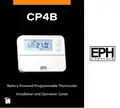


















CP4B
Battery Powered Programmable Thermostat
Installation and Operation Guide


| General | Details |
|---|---|
| Name | EPH CONTROLS CP4B Battery Powered Programmable Thermostat User Guide |
| Make | EPH CONTROLS |
| Language | English |
| Filetype | PDF (Download) |
| File size | 1.38 MB |
 (1 votes, average: 5.00 out of 5)
 Loading...

EPH CONTROLS eTRV-HW Smart Cylinder Thermostat User Guide

EPH CONTROLS eTRV-HW Smart Hot Water Thermostat Instruction Manual

EPH CONTROLS eTRV Smart Radiator Thermostat Instruction Manual

EPH CONTROLS 20221026 RFRA – RF Room Thermostat Instruction Manual

EPH CONTROLS CDTP2 Hardwired Room Thermostat Instruction Manual

EPH Controls CDT2-24 24V Room Thermostat Installation Guide

EPH CONTROLS RFCA RF Cylinder Thermostat Instruction Manual

EPH CONTROLS PR092K7 RF Cylinder Thermostat Instruction Manual

EPH CONTROLS COMBIPACK2 Smart Thermostat with Automation and Optimum Start Instructions

EPH CONTROLS CRT2 Room Thermostat Instruction Manual

EPH CONTROLS CP4B Battery Powered Programmable Thermostat User Guide Overview
Summary of Contents
- Page 1: Battery powered programmable thermostat Installation and operation guide
- Page 2: Table of contents Installation instructions Factory default settings Frost protection Specifications Wiring diagram How your programmable thermostat works Mounting & installation Operating instructions LCD symbol description Button description
- Page 3: Holiday function Backlight mode selection Battery low warning Frost protection Replacing the batteries Installer menu Operating mode options Setting high & low limits Calibrate the thermostat System architecture
- Page 4: CP4B room thermostat installation instructions.
- Page 5: Factory default settings include key specifications for the RFRP-OT room thermostat. The temperature indicator operates in degrees Celsius. The switching differential is set at 0.4°C. In-built frost protection is fixed at 5°C and is not adjustable. The clock function operates on a 24-hour basis. The keypad lock is set to off. The operating mode is configured for a 5/2 day schedule. Frost protection activates when the thermostat is in the off mode and the room temperature drops below 5°C. Frost protection is a critical feature of this thermostat.
- Page 6: Power supply: 2 x AA alkaline batteries. Battery replacement: once a year. Temperature control range: 5 … 35˚C. Ambient temperature: 0 … 45˚C. Contact rating: 8A 230Vac. Switch output: SPDT volt free. Dimensions: 130 x 99 x 25mm. Temperature sensor: NTC 100K Ohm @ 25˚C. Temperature indication: ˚C. Switching differential: 0.4˚C.
- Page 7: Wiring diagram for CP4B. OpenTherm connection details. Mains voltage output requires connection to terminal COM. Do not connect mains voltage to OpenTherm terminals.
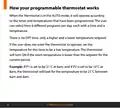
- Page 8: How your programmable thermostat works When the thermostat is in the AUTO mode, it will operate according to the times and temperatures that have been programmed. The user can select from 6 different programs per day, each with a time and a temperature. There is no OFF time, only a higher and a lower temperature setpoint. If the user does not want the thermostat to operate, set the temperature for this time to be a low temperature. The thermostat will turn ON if the room temperature is lower than the setpoint for the current period. Example: If P1 is set to be 21˚C at 6am, and if P2 is set to be 10˚C at 8am, the thermostat will look for the temperature to be 21˚C between 6am and 8am.
- Page 9: Mounting & installation Installation and connection should only be carried out by a qualified person. Only qualified electricians or authorized service staff are permitted to open the thermostat. If the thermostat is used in a way not specified by the manufacturer, its safety may be impaired. Prior to setting the thermostat, it is necessary to complete all required settings described in the section. This thermostat must be directly mounted on a wall.
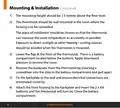
- Page 10: Mounting height should be 1.5 metres above the floor level. The thermostat should be wall mounted in the room where the heating is to be controlled. The place of installation should be chosen so that the thermostat can measure the room temperature as accurately as possible. Exposure to direct sunlight or other heating/cooling sources should be avoided when the thermostat is mounted. Lower the flap at the front of the thermostat. There is a battery compartment located below the buttons. Remove the backplate from the thermostat by inserting a screwdriver into the slots in the battery compartment and pull apart. Fix the backplate to the wall and ensure electrical connections are terminated correctly. Attach the front housing to the backplate and insert the 2 x AA batteries for the thermostat to turn on. Close the battery compartment.
- Page 11: Page 11
- Page 12: CP4B room thermostat operating instructions
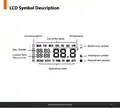
- Page 13: LCD symbol description Current program Temperature Day of the week Battery low symbol Day / month Current time Boost to time Heating on symbol Keypad lock symbol
- Page 14: Button descriptions include set point increase, set point decrease, reset button, automatic mode, manual mode, copy function, holiday mode, off mode, and program mode. The CP4B room thermostat features options for setting date and time, as well as various operational modes.
- Page 15: Resetting the thermostat Press the button. ‘rst no’ will appear on the screen. Press the button on the side of the thermostat. ‘rst yes’ will appear on the screen. Press the button to reset the thermostat. The thermostat will now be reset to the default settings. To lock the keypad, press and hold the buttons for 10 seconds. The keypad is now locked. To unlock the keypad, press and hold the buttons for 10 seconds. The keypad is now unlocked.
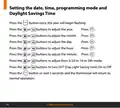
- Page 16: Setting the date, time, programming mode and daylight savings time. Press the button once, the year will begin flashing. Press buttons to adjust the year. Press buttons to adjust the month. Press buttons to adjust the day. Press buttons to adjust the hour. Press buttons to adjust the minute. Press buttons to adjust from 5/2d to 7d or 24h mode. Press buttons to turn DST (Daylight Saving Time) On or Off. Press the AUTO button or wait 5 seconds and the thermostat will return to normal operation.
- Page 17: Factory program setting 5/2 day 7 day 24 hour Mon-Fri Sat-Sun Time settings with corresponding temperatures Temperature settings include 21˚C and 10˚C P1 to P6 program settings
- Page 18: Programming modes of the CP4B Room Thermostat include 5/2 Day mode, 7 Day mode, and 24 Hour mode. 5/2 Day mode allows programming Monday to Friday as one block and Saturday and Sunday as a second block, with each block having 6 different times and temperatures. 7 Day mode enables programming all 7 days individually, with six different times and temperatures per day. 24 Hour mode allows programming all 7 days as one block with the same six times and temperatures.
- Page 19: Adjust the program setting in 5/2 Day mode. Programming for Monday to Friday is now selected. Press the buttons to adjust the P1 time. Press the buttons to adjust the P1 temperature. Repeat this process to adjust P2 to P6 times and temperatures. Programming for Saturday to Sunday is now selected. Press the buttons to adjust the P1 time. Press the buttons to adjust the P1 temperature. Press the button to return to the automatic mode. While in PROG Mode pressing the button will jump from P1-P2 etc without changing the temperature.
- Page 20: Copy function may only be used if the thermostat is in the 7d mode. Set the times and temperatures for the day that you wish to copy from in the programming mode. When still on the day press the button. The day of the week that you have selected will be shown with ‘COPY’ below it. The next day will begin to flash on the top of the screen. Press the button to copy the times and temperatures to that day. Press the button to skip that day. You can copy to multiple days using the button. Press the button when copying has been completed. CP4B Room Thermostat
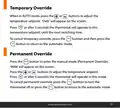
- Page 21: Temporary override allows adjustment of the temperature setpoint in AUTO mode. Pressing the buttons will display ‘OvEr’ on the screen. After 5 seconds, the thermostat will operate at the new temperature setpoint until the next switching time. To cancel temporary override, press the button and then the AUTO button to return to automatic mode. Permanent override is activated by pressing the button to enter manual mode. ‘MAN’ will appear on the screen when in manual mode. Adjust the temperature setpoint using the buttons. After 5 seconds, the thermostat will operate in manual mode. To cancel permanent override, turn the thermostat off or return to automatic mode.
- Page 22: Boost function allows you to increase the temperature temporarily. Press the boost button one, two, or three times to set the boost duration. The thermostat will display the boost time on the screen. Press the OK button to confirm your selection. Adjust the boost temperature setpoint using the designated buttons. Press OK again or wait for 5 seconds to activate the boost. The display will show 'BOOST TO' along with the set temperature. Press the boost button again to deactivate the boost function. If no buttons are pressed, the boost will default to 21C. This section pertains to the CP4B room thermostat.
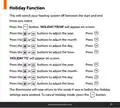
- Page 23: Holiday function allows you to switch your heating system off between selected start and end times. To activate, press the button until 'HOLIDAY FROM' appears on screen. Use the buttons to adjust the year, month, day, and hour for the start time. After setting the start time, 'HOLIDAY TO' will appear on screen. Again, use the buttons to adjust the year, month, day, and hour for the end time. The thermostat will return to the previous mode after the holiday settings are entered. To cancel holiday mode, press the designated button.
- Page 24: Backlight mode selection There are two settings for selection. The factory default setting is AUTO. The backlight is permanently OFF. On pressing any button the backlight stays on for 5 seconds. To adjust the backlight setting, lower the cover on the front of the unit. Press the button for 5 seconds. Press either the or buttons to select the OFF or AUTO mode. When the batteries are almost empty, the symbol will appear on the screen. The batteries must now be replaced or the unit will shut down.
- Page 25: Replacing the batteries Lower the flap on the front of the thermostat. There is a battery compartment located below the buttons. Apply downward pressure to remove the cover. Insert the 2 x AA batteries and the thermostat will turn on. Close the battery compartment.
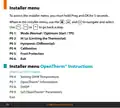
- Page 26: Installer menu access requires holding Prog and OK for 5 seconds. Navigation in the installer menu is done using specific buttons. Mode options include Normal, Optimum Start, and TPI. Hi Lo setting is for limiting the thermostat. Hysteresis refers to the differential setting. Calibration is an adjustable feature. Frost protection is available as a setting. DHW temperature can be set within the menu. OpenTherm® instructions are applicable only for OT boilers. Parameters for OpenTherm® can be set in the menu.
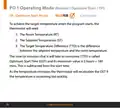
- Page 27: Operating mode options include Normal, Optimum Start, and TPI. In Normal mode, the thermostat aims to reach the target temperature after program changes. For example, if the target temperature is 21°C at 06:30am and the room temperature is 18°C, heating will start at 06:30am. In Optimum Start mode, the thermostat attempts to reach the target temperature by the next switching time. This is achieved by setting a time interval (Ti) for the thermostat, which can be 10, 15, 20, 25, or 30 minutes. The Ti setting allows the thermostat to increase the room temperature by 1°C within the specified time. Ti can be adjusted when Optimum Start is selected in the installer menu.
- Page 28: Operating mode options include normal, optimum start, and TPI. Optimum start mode is designed to achieve the target temperature efficiently. The thermostat reads the room temperature, setpoint temperature, and target temperature difference. Target temperature difference is the difference between the setpoint temperature and the room temperature. Optimum start time is the time required to overcome the target temperature difference. The maximum value for optimum start time is 3 hours or 180 minutes. Optimum start time is subtracted from the start time. The thermostat recalculates optimum start time if the temperature increases too quickly. This section discusses the functionality of the CP4B room thermostat.
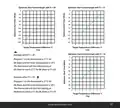
- Page 29: Optimum start control graph with Ti = 20 Optimum start control graph with Ti = 15 Optimum start control graph with Ti = 10 Example when Ti = 20 Program 1 on the thermostat is 21°C for 06:30am and the room temperature is 18°C. The thermostat will start the heating at 05:30am to reach 21°C for 06:30am @ Ti=20. Example when Ti = 10 Program 1 on the thermostat is 21°C for 06:30am and the room temperature is 18°C. The thermostat will start the heating at 06:00am to reach 21°C for 06:30am @ Ti=10. Target temperature difference ˚C TTD
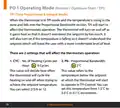
- Page 30: Operating mode options include normal, optimum start, and TPI. TPI mode affects thermostat operation when the temperature is within the proportional bandwidth. The thermostat will turn on and off to avoid overshooting or undershooting the setpoint. Two settings influence thermostat operation: the number of heating cycles per hour and the proportional bandwidth. The number of heating cycles can be set to 2, 3, 6, or 12. The proportional bandwidth determines the temperature below the setpoint at which the thermostat begins to operate in TPI control. The proportional bandwidth can be set between 1.5°C and 3.0°C in 0.1°C increments. These settings help maintain a comfortable level of heat. The thermostat cycles heating on and off to achieve the desired temperature. The CP4B room thermostat is referenced in this context.
- Page 31: TPI control Setpoint temperature Proportional bandwidth Heating on Heating off Example: Program 1 on the thermostat is 21°C for 06:30am and the room temperature is 18°C. The thermostat will start the heating at 06:30am. The room temperature will start to increase but will switch itself off before it reaches temperature. Allow the room temperature to increase naturally. This cycle may begin again if the thermostat isn’t reaching temperature.
- Page 32: High 35˚C and low 5˚C. This menu allows the installer to change the minimum and maximum temperature range that the thermostat can be set at. This menu allows the installer to change the switching differential of the thermostat when the temperature is rising and falling. HOn is the fall in temperature – Default – 0.4°C. This will allow a fall of 0.4°C from the setpoint before the thermostat turns on again. Hoff is the rise in temperature – Default – 0.0°C. This will allow the temperature to rise 0°C above its setpoint. CP4B room thermostat.
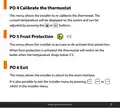
- Page 33: Calibrate the thermostat This menu allows the installer to re-calibrate the thermostat. Frost protection This menu allows the installer to activate or de-activate frost protection. Exit This menu allows the installer to return to the main interface. When frost protection is activated, the thermostat will switch on the boiler when the temperature drops below 5˚C. It is also possible to exit the installer menu by pressing a specific button while in the installer menu.
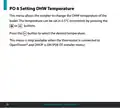
- Page 34: Setting DHW temperature allows the installer to change the DHW temperature of the boiler. The temperature can be set in 0.5°C increments. Press the button to select the desired temperature. This menu is only available when the thermostat is connected to OpenTherm® and DHOP is ON.
- Page 35: OpenTherm® information menu allows the installer to view information from the OpenTherm® boiler. It may take a few seconds to load information relating to each parameter. The information that can be shown from the boiler is outlined in a table. Displayed parameters include target water temperature, outlet water temperature, and return water temperature. Certain parameters are only visible if DHOP is On. DHW temperature and flue gas temperature are also displayed. Outdoor temperature and modulation percentage depend on the boiler. Water flow and water pressure are additional parameters shown.
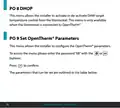
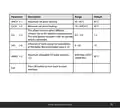
- Page 36: This menu allows the installer to activate or de-activate DHW target temperature control from the thermostat. This menu is only available when the thermostat is connected to OpenTherm®. This menu allows the installer to configure the OpenTherm® parameters. To access the menu please enter the password “08” with the buttons. Press to confirm. The parameters that can be set are outlined in the table below.
- Page 37: Maximum set point heating is 85˚C. Minimum set point heating range is 45 - 85˚C. This allows users to select different climatic curves for weather compensation. This only applies to boilers with an outside sensor connected. Influence of room sensor on modulation of the boiler is adjustable. Recommended value for modulation influence is 10. Maximum allowable CH water setpoint is 85˚C. Press OK button to turn back to main interface.
- Page 38: Set OpenTherm parameters. Climatic curve. This menu allows the installer to return to the main interface. It is also possible to exit the installer menu by pressing AUTO, MAN or OFF whilst in the installer menu. CP4B OpenTherm instructions.
- Page 39: System architecture Example A 1 no. thermostat controlling OT boiler CP4B thermostat OpenTherm® boiler
- Page 40: Page 40

Honeywell Home T822 Series Heat Thermostat Owner’s Manual

Goodman GTST Connected Thermostat User Guide

SALUS TS600 Remote-Only Thermostat User Guide

ELECTECK 701 Non-Programmable Digital Thermostat for Home Instruction Manual

Blue Universal OH-1202 Touchscreen Thermostat Instruction Manual

sinop TH1134ZB Smart Line Voltage Thermostat Installation Guide

TCS SZ1051 Communicating Thermostat User Guide

GENERAL LIFE SOLARA 300S Smart Room Thermostat User Manual

ENGO Controls EONE230W Internet Controlled Thermostat User Guide

GENERAL LIFE 300S RF Wireless Room Thermostat User Manual