
Home > Drayton > Drayton 2290M Digistat 3rd Generation Programmable Room Thermostat Installation Guide
Drayton 2290M Digistat 3rd Generation Programmable Room Thermostat Installation Guide
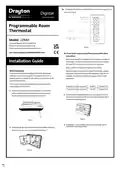

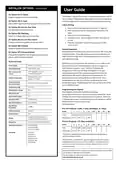


with at the different times you have chosen, and then leave
it alone to do its job. The best way to do this is to set low
What is a programmable
room thermostat?
temperatures first, say 18C, and then turn them up by one degree
each day until you are comfortable with the temperatures. You won’t
have to adjust the thermostat further. Any adjustments above these
settings will waste energy and cost you more money.
…an explanation for householders
Aprogrammableroomthermostatisbothaprogrammerand aroom
thermostat.Aprogrammerallowsyoutoset‘On’and
‘Off’timeperiodstosuityourownlifestyle.Aroomthermostatworks by
sensingtheairtemperature,switchingontheheating whentheair
temperaturefallsbelow thethermostatsetting,andswitching itoff
oncethissettemperaturehasbeenreached.
If your heating system is a boiler with radiators, there will usually be
only one programmable room thermostat to control the whole
house. But you can have different temperatures in individual rooms
by installing thermostatic radiator valves (TRVs) on individual
radiators. If you don’t have TRVs, you should choose a temperature
that is reasonable for the whole house. If you do have TRVs, you can
choose a slightly higher setting
So,aprogrammableroomthermostatletsyouchoosewhattimes you
wanttheheating tobeon,andwhattemperatureitshouldreach while
itison.Itwillallow youtoselectdifferenttemperaturesinyour homeat
differenttimesoftheday(anddaysoftheweek)tomeet yourparticular
needs.
to make sure that even the coldest room is comfortable, then prevent
any overheating in other rooms by adjusting the TRVs.
The time on the programmer must be correct. Some types have to be
adjusted in spring and autumn at the changes between Greenwich
Mean Time and British Summer Time.
Turningaprogrammableroomthermostattoahighersetting willnot
maketheroomheatupanyfaster.How quicklytheroomheatsup
dependsonthedesignoftheheating system,forexample,thesizeof
boilerandradiators.
You may be able to temporarily adjust the heating programme, for
example, ‘Override’, ‘Advance’ or ‘Boost’. These are explained in the
manufacturer’s instructions.
Neitherdoesthesetting affecthow quicklytheroomcools down.
Turning aprogrammableroomthermostattoalowersetting will result
intheroombeing controlledatalowertemperature,andsaves energy.
Programmable room thermostats need a free flow of air to sense the
temperature, so they must not be covered by curtains or blocked by
furniture. Nearby electric fires, televisions, wall or table lamps may
prevent the thermostat from working properly.
Thewaytosetanduseyourprogrammableroomthermostatis to find
thelowesttemperaturesettingsthatyouarecomfortable
Setting up Times/Temperatures on the Digistat
5. In Pre-set Program 1 you will have 4
time periods available, to add more
(max. 8 per day) press + when you
see the SAVE option on-screen and
time period 5 at the bottom of the
screen, to scroll to the Add option.
Press O to add time period then
adjust time and temperature as
required.
1. With the product operating as normal
in Auto Mode, press once. Use +
and – to select the day or set of days
you want to adjust the times and
temperatures for. Press O to confirm.
2. The time on the display will now be
flashing as shown, use + and – to
adjust the first period start time. Press
O to confirm.
6. To exit press to go back until you
return to the home screen.
3. Once the time has been set the
temperature on the display will now
be flashing, use + and – to adjust the
temperature for the first time period.
Press O to confirm.
Automatic to Manual
1. Press and hold Cog button until you see USEr 01,
2. Press the O button to select and you will see Mode,
3. Press O to enter and you will see either Auto, Man or off.
4. Use the + and - button to choose between these options.
5. Press the O button to select your option then press the Cog
button twice to take you to the home page.
4. Move to the next time and temperature
periods and adjust as needed,
confirming the changes by pressing O.
The new schedule will be saved
pressing O when the word SAvE is
flashing.
User guide
Where to find User Guide
Please use the QR code to the right or go to our
our full online user guide which also features
Bluetooth pairing, and how to use the smartphone
app.
401 Southway Drive
Plymouth
Schneider Electric Industries SAS
35 rue Joseph Monier
F-92500 Rueil-Malmaison
France
PL6 6QT
United Kingdom

| General | Details |
|---|---|
| Name | Drayton 2290M Digistat 3rd Generation Programmable Room Thermostat Installation Guide |
| Make | Drayton |
| Language | English |
| Filetype | PDF (Download) |
| File size | 0.31 MB |
 (1 votes, average: 5.00 out of 5)
 Loading...


Drayton RF902 Digistat 3rd Generation Wireless 2-Channel Programmable Thermostat Installation Guide

Drayton Wiser Smart Room Thermostat Instruction Manual
Drayton 22902 Programmable 2 Channel Room Thermostat Installation Guide

Drayton RF710 Digital Wireless Room Thermostat Installation Guide

Drayton 2290M Mains Digital Room Thermostat User Manual


BUDDERFLY BTS-U2 Thermostat User Manual

MRCOOL MST04 Smart Thermostat Owner’s Manual

GENERAL Life HT220S Digital Room Thermostat User Manual

GENERAL LIFE HT250 RF Wireless Room Thermostat User Manual

Wengart TP808 Wi-Fi Low Voltage Thermostat User Guide

TFC Group OP-WFSTAT Wi-Fi Thermostat User Guide

INKBIRD C216T Plug In Timer Thermostat User Manual

HEIL TSTATIIEWF-01 Smart Thermostat Owner’s Manual

ADAX 62208 WiFi Thermostat User Guide

GENERAL LIFE MITRA 260S RF Digital Room Thermostat User Manual