
Home > Drayton > Drayton 2290M Digistat 3rd Generation Programmable Room Thermostat Installation Guide
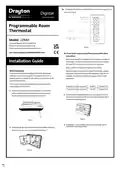
Drayton 2290M Digistat 3rd Generation Programmable Room Thermostat Installation Guide

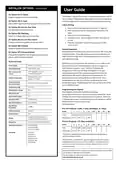


INSTALLER OPTIONS - continued
User Guide
The Drayton Digistat thermostat is a universal thermostat with 24
hour, 5-2day or 7day program types and up to 8 time/temperature
events per day and can also be used as a simple room thermostat.
(Si Option 01) Si Status
Enable or disable Service Interval Mode.
(Si Option 02) Si Type
Select effect imposed on the heating when service is due.
Clock Setting
(Si Option 03) Service Due Date
Set date when next service is due.
•
•
Press and hold the cog button until User 01 appears,
Press the plus button to Advanced 02, then press O to
enter,
(Si Option 04) Warning
Select no. of days before service due date.
•
•
Press O to enter Time settings,
Using the + and - you can adjust the time, then press O
to save,
(Si Option 05) Service Due Alarm
Enable or disable the audible service due alarm.
•
Press the cog button twice to bring you back to the
home screen.
(Si Option 06) Si Boost
Enable or disable the Service Boost feature (5 boosts).
General Operation
Programmable thermostats do not have “On” and “Off” times like
traditional timers. They offer temperature control both day and
night and you simply select which temperatures you require at
each point in the day.
(Si Option 07) Password Reset
Change the 4 digit PIN. If you forget your Si password,
please call the Technical Helpline.
Technical Data
With the unit in “Auto Mode” (the calendar icon is visible at the
bottom of the screen) the temperature can be changed for a
short time by using the + and – buttons. Changing the
temperature in this way will keep the Digistat set to your
new temperature until the next pre-programmed event (at
which time it will revert to programmed temperature). The
temperature you are setting will flash on the screen. Once
temperature is set, the unit will revert to showing the room
temperature again. The indicator will show on the screen if the
unit is calling for heat.
Power supply
230VAC +/-10%, 50Hz
16(2)A at 230V / 50Hz
Switch type & rating
Min. recommended
current
SPDT (voltage free contacts)
10mA@24VAC (inductive)
Operating: 0°C to +40°C
Storage: -20°C to 65°C
Ambient temperature
Ambient humidity
(non condensing)
20% to 80%, 90% non-condensing
Temperature range
Rated impulse voltage
Ball pressure test
5°C to 30°C
4KV
Programming the Digistat
Your Digistat comes with the following settings
pre-programmed for your convenience and is suitable for those
working out of the house during a typical 9-5 pattern. When the
5-2day program type is selected the pre-set temperatures will be
different Mon-Fri and Sat-Sun, as per
75°C
Disconnection means
Automatic action
1B
100,000 cycles
2402-2480 MHz
Operating Frequency
the tables below:
Max RF Power
transmitted
+10dBm
Pre-set Program 1 (24h, 5-2day weekdays, or 7day):
Pollution situation
Protection level
Degree 2
IP30
Event
1
2
3
4
(5)*
(6)
(7)
(8)
(8)
Time
06:30 08:30 16:30 22:30
Designed for fixed wiring only, to
comply with IEE wiring regulations
Temperature 20°C 16°C 21°C OFF
Wiring
Pre-set Program 1 (5-2day weekend):
Energy Class
V = 3% using OpenTherm connection
Event
1
2
3
4
(5)*
(6)
(7)
Relevant EC Directives:
2014/53/EU (RED)
2011/65/EU (RoHS)
2012/19/EU (WEEE)
Time
07:00 09:00 16:00 23:00
Temperature 20°C 18°C 21°C OFF
Standards:
EN 60730-1
*To add these additional time periods manually (max. 8 per day) please
refer to the steps to the right.
EN 60730-2-7
EN 60730-2-9
ESTI EN 300 328
The Bluetooth® word mark and logos are registered trademarks owned
by Bluetooth SIG, Inc. and any use of such marks by Schneider Electric is
under license. Other trademarks and trade names are those of their
respective owners.
ESTI EN 301 489
EN IEC 63000
Hereby, Schneider Electric Controls UK Ltd, declares that Digistat 2290B
is in complia nce with Direc tive 2014/53/EU.
The declaration of conformity may be consulted at

| General | Details |
|---|---|
| Name | Drayton 2290M Digistat 3rd Generation Programmable Room Thermostat Installation Guide |
| Make | Drayton |
| Language | English |
| Filetype | PDF (Download) |
| File size | 0.31 MB |
 (1 votes, average: 5.00 out of 5)
 Loading...


Drayton RF902 Digistat 3rd Generation Wireless 2-Channel Programmable Thermostat Installation Guide

Drayton Wiser Smart Room Thermostat Instruction Manual
Drayton 22902 Programmable 2 Channel Room Thermostat Installation Guide

Drayton RF710 Digital Wireless Room Thermostat Installation Guide

Drayton 2290M Mains Digital Room Thermostat User Manual


Honeywell T827 Series Heat Only Vertical Thermostat Owner’s Manual

GENERAL LIFE Mitra Series Smart Room Thermostat User Manual

EPH CONTROLS CMF Room Frost Thermostat Instruction Manual

SIEMENS RDF660MB Flush Mount Room Thermostat Instruction Manual
LUX PSP511Ca Programmable Thermostat Instruction Manual

VASCO BHT-3000 Series Thermostat User Guide

GLOBAL HY06RF-BW/WW/WE Thermostat User Manual

nVent RAYCHEM RayStat-M2 Thermostat Instruction Manual

Wengart TP808-S-2 Low Voltage Thermostat User Guide

LUX PSP511A Series Programmable 5-2 Thermostat Instruction Manual