
BEOK TCB38WIFI Color TFT-LCD Heating Thermostat User Manual




b
SEN
n
Setting And Options
Factory Defult
In-s control
a
a
In-s control
Out-s control
In-s control., Out-s limit
b
Sensor mode
b
1
2
OSV
DIF
Floor set temp. range
5-99℃
42℃
a
Floor temp. ctrl diff
Room temp set max
Room temp set min
Room temp. adjust
1-9℃
2℃
b
5-99℃
5-99℃
35℃
SVH
SVL
5℃
4
3
ADJ
FRE
PON
-5-5℃
close/open
off/on
0℃
Close
On
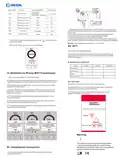
1. Open the main control board as shown in the figure, press the power
part of the thermostat, gently lift it up, and separate it from the mounting
board hook.
2. Connect the wires correctly according to the wiring diagram and
secure the rear cover to the mounting plate with M4 screws
3. Connect the lower cover cable to the upper cover.
Anti-frozen
Power memory
4. Insert the back into the four hooks of the mounting plate. Gently press
down on the thermostat to lock the front housing and complete installation
7. Switch of Manual mode and Auto mode: Press
mode or Auto mode.
to switch manual
NOTICE: The installation wire should be 1.5-2.5mm2.
8.Power off : Press
to turn on or off thermostat.
XII. ATT:
Thank you for buying this product!
Please read this manual for complete instructions on installing and
operating your thermostat. If you require further assistance, please
feel free to contact us.
In the box you will find:
Model
Thermostat
User Manual
XXX-EP
XXX-WP
XXX-WPB
√
√
√
√
√
√
√
√
X. Attention to Phone WiFi Connection:
Screws
√
√
External sensor
1. After you press Configure, if connection fails:
a. Please confirm your mobile phone is set to WLAN mode, and ensure its
(mobile data)3g/4g is turned off. Please connect to 2.4G wifi, not 5G wifi.
Our Service:
We offer the warranty of 24 months from the sales day.
b. Please add your wifi router name, we recommend it does not include
spaces or Chinese symbol.
During the warranty, if it is belong to the quality issue, we will fix or
replace them for you by free after test them.
c. Please check your wifi router password. We recommend not over 32
characters, no spaces, no blank password, no special symbols except
letters and numbers.
If it is not quality problem or beyond the warranty time, we will
charge for the after-sales service.
d. AP config: AP thermostat hotspot configuration (operate FAC=12 in
advanced settings).
e. Please confirm wifi password is correctly filled. We recommend you
check password to be visible when it is input.
2. If it displays the following reminder, please go to Advanced Setting to
reset corresponding setting.
Wifi Series Touch Screen Thermostat
XI. Installation Instruction
This product is suitable for standard 80*80mm wall box and 60 mm
european round box.

| General | Details |
|---|---|
| Name | BEOK TCB38WIFI Color TFT-LCD Heating Thermostat User Manual |
| Make | BEOK |
| Language | English |
| Filetype | PDF (Download) |
| File size | 0.4 MB |
 (1 votes, average: 5.00 out of 5)
 Loading...

BEOK Color TFT-LCD Heating Thermostat User Manual

BEOK TDS21WIFI-AC Fan Coil Thermostat Instruction Manual

BEOK TGR85-EP Underfloor Heating Thermostat User Guide

BEOK TDR89 Zigbee Room Thermostat User Guide

BEOK BOT-R7X Wireless Gas Boiler Heating Thermostat Instruction Manual

BEOK TDS23 Wi-Fi Fan Coil Thermostat Instruction Manual

BEOK TGP53 China Piano Buttons Underfloor Heating Thermostat User Guide

beok TGW60 Thermostat User Guide

BEOK TS4 Series Wi-Fi Touch Screen Thermostat User Manual

BEOK TGP53 Wifi Thermostat User Guide


EVOLVEO Thermal Smart Wireless Programmable Thermostat Owner’s Manual

DELTA 8000 Heating Thermostat Instructions

Honeywell CT87N The Round Non Programmable Thermostat Owner’s Manual

Sinum R-S3 Room Thermostat Owner’s Manual

EMERSON 1F87U-42WF Sensi Smart Thermostat User Guide

Google Cloud 2024 Nest Learning Thermostat Instructions

Honeywell Home RTH9585WF Smart Color Touchscreen Programmable Thermostat User Guide

BOSCH BCC110 Connected Control Wi-Fi Thermostat User Manual

Unisenza 230V-24V Stats Wired and Wireless Thermostat User Manual

Honeywell RTHL2510 Series Programmable Thermostat Owner’s Manual