
azbil TY6000Z2000 Neostat Room Thermostat Instruction Manual






AB-7258
Humidistat model
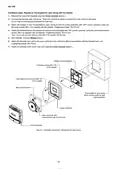
Setpoint is factory-set and locked at 90 %RH.
Lock of the setting
1) Remove the cover of Neostat. (See the Cover removal section.)
2) Loosen the setting screw that fixes the setpoint.
3) Turn the setting dial so that the pointer points to the desired setpoint. Then, tighten the setting screw.
Pointer
Setting dial
Setting screw
Figure 25. Lock of the setting of the humidistat model
4) Attach the cover to the main unit.
Maintenance
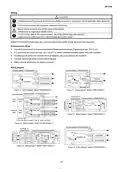
Protection cover
If the product is installed in an animal breeding facility or an operating room, and when the room is fumigated, attach the
protection cover (sold separately) over the product.
●
Before removing the cover, check that fumigants are dried out. If fumigants remain on the case, chemical cracks might be
made on it.
●
Pull the cover slowly and straightly to remove it.
Do not apply excessive force, up and down, left and right, on the cover, or retrieve pull the cover out. Otherwise, the latch on
the cover might be damaged.
Disposal
Dispose of the product as industrial waste in accordance with your local regulations.
Do not reuse all or part of this product.
17

| General | Details |
|---|---|
| Name | azbil TY6000Z2000 Neostat Room Thermostat Instruction Manual |
| Make | azbil |
| Language | English |
| Filetype | PDF (Download) |
| File size | 0.75 MB |
 (1 votes, average: 5.00 out of 5)
 Loading...


Danfoss RET1001M – V2 Room Thermostat Installation Guide

AIRZONE AZX6AIQSNSB-AZX6AC1VALR Think Wireless Monochrome Thermostat User Manual

Danfoss TP5001B Programmable Room Thermostat User Guide

honeywell RLV3150 Electronic Thermostat User Manual

Stiebel Eltron RTA-3000 S2 Thermostat Installation Guide

Honeywell Programmable Thermostat T4 Pro Installation Guide

STEGO STO 011 Compact Thumbwheel Thermostat User Guide

Klima SF300 Digital Thermostat Instruction Manual

GENERAL LIFE HT100S RF Wireless Room Thermostat User Manual

BEOK BOT-R6X Wireless Gas Boiler Thermostat User Manual