×
- 1. Installation & User Manual
- 2. Enabling Complete Home Heating (The Tio Tevo Wireless Thermostat → A Tio Multifunctional Gateway)
- 3. Your Smart Life Journey Begins Now (You Can Operate Your System Wirelessly Using The Smartlife App.)
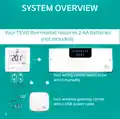
- 4. System Overview (Your Tevo Thermostat Requires 2 Aa Batteries (not Included). Your Wiring Centre Needs To Be Wired Manually. Your Wireless Gateway Comes With A Usb Power Cable.)
- 5. Overview (Wiring Centre Pairing → Thermostat Configuration → Gateway Pairing → App Configuration → Important Notes → Voice Control)
- 6. Icon Overview (Rf Network Signal → Setup -when In Dual Mode → Calling/demand → Wifi - Connected To Gateway → Timed On/off Functionality → Holiday Mode Selected → Low Battery)
- 7. Icon Overview (Wifi - Connected To Gateway → Screen Lock → Low Battery → Program Status → Desired Sensor Temperature → Holiday Mode → Manual)
- 8. Configuration Menu (Setting Options → Operating Mode → Temperature Calibration → Lock Screen → Max. Settable Temperature → Min. Settable Temperature)
- 9. Factory Default (Programs → Period Display → Description → Time → Set Temp. C → Bedtime/overnight)
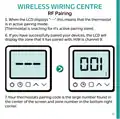
- 10. Wireless Wiring Centre (Rf Pairing → Pairing Your Wiring Centre)
- 11. Wireless Wiring Centre (Rf Pairing)
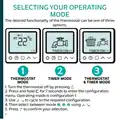
- 12. Selecting Your Operating Mode (Thermostat Mode → Timer Mode)
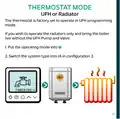
- 13. Thermostat Mode (Ufh Or Radiator)
- 14. Thermostat Mode (Manual Mode)
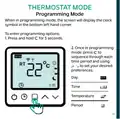
- 15. Thermostat Mode (Programming Mode → Time → Temperature → Period)
- 16. Timer Operation (Program Mode → Hold Mode)
- 17. Timer Operation (Program Mode → Hold Mode)
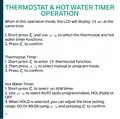
- 18. Thermostat & Hot Water Timer (Operation → Thermostat Timer: → Hot Water Timer:)
- 19. Thermostat & Hot Water Timer (Operation → Holiday Mode)
- 20. Sensor Compatibility
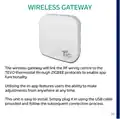
- 21. Wireless Gateway (Tevo Thermostat → Zigbee Protocols → App Functionality → Installation Instructions)
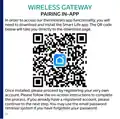
- 22. Wireless Gateway (Pairing In-app)
- 23. Wireless Gateway (Pairing In-app)
- 24. Wireless Gateway (Pairing In-app → Key Benefit Of Pairing To The Smart Life App)
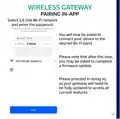
- 25. Wireless Gateway (Pairing In-app → Select 2.4 Ghz Wi-fi Network → Connect Your Device To The Desired Wi-fi Band → Firmware Update)
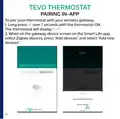
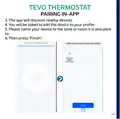
- 26. Tevo Thermostat (Pairing In-app)
- 27. Tevo Thermostat (Pairing In-app)
- 28. App Configuration (Power: On/off → Mode Selection: Manual/eco/program → Child Lock: Lock/unlock The Thermostat → Settings: Temperature Compensation Adjustment, Anti-freeze Switch And Factory Reset Switch → System: Long Press This Button Over 3 Seconds → Holiday: Alter Day And Temperature Selection For When You Go For A Vacation → Program: You Can Program Your Thermostats Heating And Timer Functions For Each Day Over 4 Time Periods.)
- 29. App Configuration (Thermostat Function)
- 30. App Configuration (Timer Function)
- 31. App Configuration
- 32. App Configuration (Thermostat & H/w Timer Function)
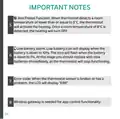
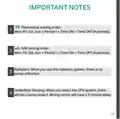
- 33. Important Notes (Thermostat Setting Order → H/w Setting Order → Radiators → Underfloor Heating)
- 34. Important Notes (Anti Freeze Function → Low Battery Alarm → Error Code → Wireless Gateway Is Needed For App Control Functionality)
- 35. Voice Control (Third-party Control)
- 36.
×
TIOEVO0003 TEVO Wireless Thermostat User Manual
| General | Details |
|---|---|
| Name | TIOEVO0003 TEVO Wireless Thermostat User Manual |
| Make | Tio |
| Language | English |
| Filetype | PDF (Download) |
| File size | 0.38 MB |

TX1000 Thermostat Instruction Manual

Tio 230v Thermostat User Manual

Tio TEVO Smart RF Wireless Thermostat User Manual


LUX TX500Ub Non Programmable Thermostat Instruction Manual

SILVERCREST IAN 469312_2310 Digital Radiator Thermostat Instruction Manual

technolysis HYT002-WIFI WI-FI Digital Heating Thermostat User Manual

ENGO E901 Wireless Internet Thermostat User Manual
GEYER GS-THWF Wifi Water Heating Thermostat Owner’s Manual

PECO T372P Thermostat Instruction Manual

Neomitis RTMA Mechanical Room Thermostat Instruction Manual

tekmar T-560 Touchscreen Thermostat User Manual

SALUS TS600 Wireless Temperature Sensor Thermostat User Guide

ControlTemp Basic Tamper Proof Thermostat Instructions
Table of Contents
- 1. Installation & User Manual →
- 2. Enabling Complete Home Heating - The Tio Tevo Wireless Therm... →
- 3. Your Smart Life Journey Begins Now - You Can Operate Your Sy... →
- 4. System Overview - Your Tevo Thermostat Requires 2 Aa Batteri... →
- 5. Overview - Wiring Centre Pairing →
- 6. Icon Overview - Rf Network Signal →
- 7. Icon Overview - Wifi - Connected To Gateway →
- 8. Configuration Menu - Setting Options →
- 9. Factory Default - Programs →
- 10. Wireless Wiring Centre - Rf Pairing →
- 11. Wireless Wiring Centre - Rf Pairing →
- 12. Selecting Your Operating Mode - Thermostat Mode →
- 13. Thermostat Mode - Ufh Or Radiator →
- 14. Thermostat Mode - Manual Mode →
- 15. Thermostat Mode - Programming Mode →
- 16. Timer Operation - Program Mode →
- 17. Timer Operation - Program Mode →
- 18. Thermostat & Hot Water Timer - Operation →
- 19. Thermostat & Hot Water Timer - Operation →
- 20. Sensor Compatibility →
- 21. Wireless Gateway - Tevo Thermostat →
- 22. Wireless Gateway - Pairing In-app →
- 23. Wireless Gateway - Pairing In-app →
- 24. Wireless Gateway - Pairing In-app →
- 25. Wireless Gateway - Pairing In-app →
- 26. Tevo Thermostat - Pairing In-app →
- 27. Tevo Thermostat - Pairing In-app →
- 28. App Configuration - Power: On/off →
- 29. App Configuration - Thermostat Function →
- 30. App Configuration - Timer Function →
- 31. App Configuration →
- 32. App Configuration - Thermostat & H/w Timer Function →
- 33. Important Notes - Thermostat Setting Order →
- 34. Important Notes - Anti Freeze Function →
- 35. Voice Control - Third-party Control →
- 36. Page 36 →