×
- 1. Installation & User Manual
- 2. Enabling Complete Home Heating (The Tio Tevo Wireless Thermostat → A Tio Multifunctional Gateway)
- 3. Your Smart Life Journey Begins Now (You Can Operate Your System Wirelessly Using The Smartlife App.)
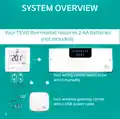
- 4. System Overview (Your Tevo Thermostat Requires 2 Aa Batteries (not Included). Your Wiring Centre Needs To Be Wired Manually. Your Wireless Gateway Comes With A Usb Power Cable.)
- 5. Overview (Wiring Centre Pairing → Thermostat Configuration → Gateway Pairing → App Configuration → Important Notes → Voice Control)
- 6. Icon Overview (Rf Network Signal → Setup -when In Dual Mode → Calling/demand → Wifi - Connected To Gateway → Timed On/off Functionality → Holiday Mode Selected → Low Battery)
- 7. Icon Overview (Wifi - Connected To Gateway → Screen Lock → Low Battery → Program Status → Desired Sensor Temperature → Holiday Mode → Manual)
- 8. Configuration Menu (Setting Options → Operating Mode → Temperature Calibration → Lock Screen → Max. Settable Temperature → Min. Settable Temperature)
- 9. Factory Default (Programs → Period Display → Description → Time → Set Temp. C → Bedtime/overnight)
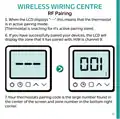
- 10. Wireless Wiring Centre (Rf Pairing → Pairing Your Wiring Centre)
- 11. Wireless Wiring Centre (Rf Pairing)
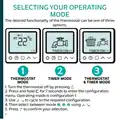
- 12. Selecting Your Operating Mode (Thermostat Mode → Timer Mode)
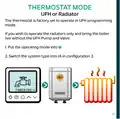
- 13. Thermostat Mode (Ufh Or Radiator)
- 14. Thermostat Mode (Manual Mode)
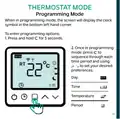
- 15. Thermostat Mode (Programming Mode → Time → Temperature → Period)
- 16. Timer Operation (Program Mode → Hold Mode)
- 17. Timer Operation (Program Mode → Hold Mode)
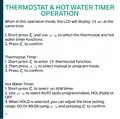
- 18. Thermostat & Hot Water Timer (Operation → Thermostat Timer: → Hot Water Timer:)
- 19. Thermostat & Hot Water Timer (Operation → Holiday Mode)
- 20. Sensor Compatibility
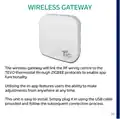
- 21. Wireless Gateway (Tevo Thermostat → Zigbee Protocols → App Functionality → Installation Instructions)
- 22. Wireless Gateway (Pairing In-app)
- 23. Wireless Gateway (Pairing In-app)
- 24. Wireless Gateway (Pairing In-app → Key Benefit Of Pairing To The Smart Life App)
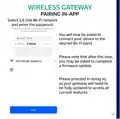
- 25. Wireless Gateway (Pairing In-app → Select 2.4 Ghz Wi-fi Network → Connect Your Device To The Desired Wi-fi Band → Firmware Update)
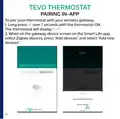
- 26. Tevo Thermostat (Pairing In-app)
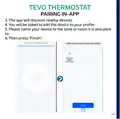
- 27. Tevo Thermostat (Pairing In-app)
- 28. App Configuration (Power: On/off → Mode Selection: Manual/eco/program → Child Lock: Lock/unlock The Thermostat → Settings: Temperature Compensation Adjustment, Anti-freeze Switch And Factory Reset Switch → System: Long Press This Button Over 3 Seconds → Holiday: Alter Day And Temperature Selection For When You Go For A Vacation → Program: You Can Program Your Thermostats Heating And Timer Functions For Each Day Over 4 Time Periods.)
- 29. App Configuration (Thermostat Function)
- 30. App Configuration (Timer Function)
- 31. App Configuration
- 32. App Configuration (Thermostat & H/w Timer Function)
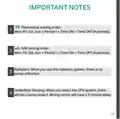
- 33. Important Notes (Thermostat Setting Order → H/w Setting Order → Radiators → Underfloor Heating)
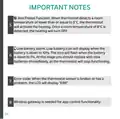
- 34. Important Notes (Anti Freeze Function → Low Battery Alarm → Error Code → Wireless Gateway Is Needed For App Control Functionality)
- 35. Voice Control (Third-party Control)
- 36.
×
TIOEVO0003 TEVO Wireless Thermostat User Manual
| General | Details |
|---|---|
| Name | TIOEVO0003 TEVO Wireless Thermostat User Manual |
| Make | Tio |
| Language | English |
| Filetype | PDF (Download) |
| File size | 0.38 MB |

Tio 230v Thermostat User Manual

TX1000 Thermostat Instruction Manual

Tio TEVO Smart RF Wireless Thermostat User Manual


MOES BRT-100 Radiator Thermostat User Guide

KINGHOME WK-010WD1 Smart Thermostat Owner’s Manual

homematic IP HmIP-eTRV-E Series Radiator Thermostat Evo Installation Guide

Danfoss KP 61 Thermostat Installation Guide
UNIWATT UT202NP Series Non Programmable Electronic Thermostat Owner’s Manual

EVERBILT Electric Upper Thermostat Instructions

EAE TECHNOLOGY KNX ORIA Thermostat Installation Guide

Dimplex DWT431W Non-Programmable Thermostat 4000W Owner’s Manual

HIVE HAH2INSTAMZ-01 Active Heating Thermostat User Guide

WATTS 563 WiFi Thermostat User Manual
Table of Contents
- 1. Installation & User Manual →
- 2. Enabling Complete Home Heating - The Tio Tevo Wireless Therm... →
- 3. Your Smart Life Journey Begins Now - You Can Operate Your Sy... →
- 4. System Overview - Your Tevo Thermostat Requires 2 Aa Batteri... →
- 5. Overview - Wiring Centre Pairing →
- 6. Icon Overview - Rf Network Signal →
- 7. Icon Overview - Wifi - Connected To Gateway →
- 8. Configuration Menu - Setting Options →
- 9. Factory Default - Programs →
- 10. Wireless Wiring Centre - Rf Pairing →
- 11. Wireless Wiring Centre - Rf Pairing →
- 12. Selecting Your Operating Mode - Thermostat Mode →
- 13. Thermostat Mode - Ufh Or Radiator →
- 14. Thermostat Mode - Manual Mode →
- 15. Thermostat Mode - Programming Mode →
- 16. Timer Operation - Program Mode →
- 17. Timer Operation - Program Mode →
- 18. Thermostat & Hot Water Timer - Operation →
- 19. Thermostat & Hot Water Timer - Operation →
- 20. Sensor Compatibility →
- 21. Wireless Gateway - Tevo Thermostat →
- 22. Wireless Gateway - Pairing In-app →
- 23. Wireless Gateway - Pairing In-app →
- 24. Wireless Gateway - Pairing In-app →
- 25. Wireless Gateway - Pairing In-app →
- 26. Tevo Thermostat - Pairing In-app →
- 27. Tevo Thermostat - Pairing In-app →
- 28. App Configuration - Power: On/off →
- 29. App Configuration - Thermostat Function →
- 30. App Configuration - Timer Function →
- 31. App Configuration →
- 32. App Configuration - Thermostat & H/w Timer Function →
- 33. Important Notes - Thermostat Setting Order →
- 34. Important Notes - Anti Freeze Function →
- 35. Voice Control - Third-party Control →
- 36. Page 36 →