Home > TECH CONTROLLERS > TECH CONTROLLERS EU-T-4.1n Wireless Thermostat User Manual
×
- 1. User Manual
- 2. Safety (Device Description → How To Install The Controller → First Start-up → How To Use The Regulator → Technical Data)
- 3. Safety (Warning → Environmental Protection)
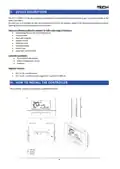
- 4. Device Description (How To Install The Controller)
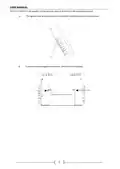
- 5. User Manual (The Eu-t-4.1n/eu-t-4.2n Regulator May Be Put In Any Place Or Used As A Wall-mountable Panel.)
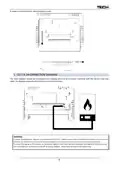
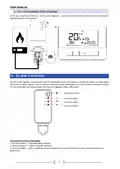
- 6. Tech (Connection Diagram → If Pump Manufacturer Requires An External Main Switch, Power Supply Fuse Or Additional Residual Current Device Selective For Distorted Currents It Is Recomemnded Not To Connect Pumps Directly To Pump Control Outputs.)
- 7. Connection Diagram (Receiver)
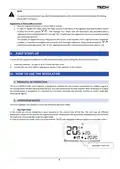
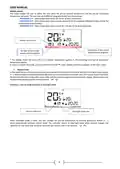
- 8. Note (First Start-up → How To Use The Regulator → Principle Of Operation → Operation Modes)
- 9. Weekly Control (Manual Mode)
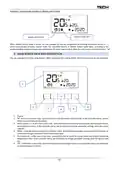
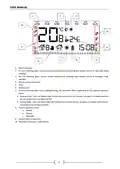
- 10. Example 2 - Manual Mode Activation In Weekly Control Mode (Main Screen View And Description)
- 11. Day Of The Week (An Icon Informing About Current Economical Temperature → An Icon Informing About Current Comfort Temperature → Pre-set Room Temperature → Current Operation Mode → Current Room Temperature)
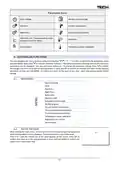
- 12. Parameter Icons (Clock Settings → Weekly Control Settings → Comfort Temperature → Economical Temperature → Service Menu → Controller Functions)
- 13. Clock (Day → Night → Button Lock → Optimum Start)
- 14. Activating Optimum Start Function (Automatic Manual Mode → Weekly Program → How To Change Weekly Program Number → How To Configure Particular Weekly Programs → Step 1 - Choose The Program To Be Edited → Step 2 - Select Days Of The Week)
- 15. User Manual (Editing Parameters For Monday → Step 3 - Assigning Comfort Or Economical Temperature To Particular Hours → 10. Pre-set Comfort Temperature → 11. Pre-set Economical Temperature → 12. Pre-set Temperature Hysteresis)
- 16. Temperature Sensor Calibration (Registration → Service Menu → Heating Heat/cooling Cool Mode → How To Edit The Minimum (t1) And Maximum (t2) Pre-set Temperature → Optimum Start Calibration → Def Factory Settings)
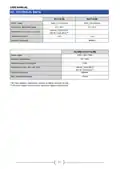
- 17. Technical Data (Power Supply → Room Temp. Adjustment Range → Potential-free Cont. Nom. Out. Load → Measurement Error → Operation Frequency → Maximum Power Consumption)
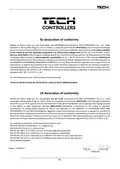
- 18. Eu Declaration Of Conformity (Compliance Assessment)
- 19.
- 20.
×
TECH CONTROLLERS EU-T-4.1n Wireless Thermostat User Manual
| General | Details |
|---|---|
| Name | TECH CONTROLLERS EU-T-4.1n Wireless Thermostat User Manual |
| Make | TECH CONTROLLERS |
| Language | English |
| Filetype | PDF (Download) |
| File size | 0.53 MB |

TECH CONTROLLERS EU-R-8b PLUS Wireless Two Position Room Thermostat User Manual

TECH CONTROLLERS EU-R-12b Wireless Room Thermostat User Manual

TECH CONTROLLERS EU-T-4.1n, EU-T-4.2n Wireless Thermostat User Manual

Honeywell Non-Programmable Thermostat RTH5160D1003 Installation Guide

GENERAL LIFE 270S RF Room Thermostat User Manual
AJAX108846 White Smart Wifi Thermostat Instruction Manual

vtech T961NN50 Amana Wired Thermostat User Guide

COPELAND 1F95G-1235GC Humidity Universal Thermostat Instruction Manual

olympia electronics BS-850-KIT Wireless Programmable WiFi Electronic Chrono Thermostat User Manual
MYS Air MS20,22,25 Thermostats User Manual

SALUS RT510 Thermostat Instruction Manual

WHITE-RODGERS 1F86EZ-0251 Emerson Blue Easy Set Thermostat User Manual
ENSTO ECO500 Frost Protection Thermostat Instruction Manual
Table of Contents
- 1. User Manual →
- 2. Safety - Device Description →
- 3. Safety - Warning →
- 4. Device Description - How To Install The Controller →
- 5. User Manual - The Eu-t-4.1n/eu-t-4.2n Regulator May Be Put I... →
- 6. Tech - Connection Diagram →
- 7. Connection Diagram - Receiver →
- 8. Note - First Start-up →
- 9. Weekly Control - Manual Mode →
- 10. Example 2 - Manual Mode Activation In Weekly Control Mode - ... →
- 11. Day Of The Week - An Icon Informing About Current Economical... →
- 12. Parameter Icons - Clock Settings →
- 13. Clock - Day →
- 14. Activating Optimum Start Function - Automatic Manual Mode →
- 15. User Manual - Editing Parameters For Monday →
- 16. Temperature Sensor Calibration - Registration →
- 17. Technical Data - Power Supply →
- 18. Eu Declaration Of Conformity - Compliance Assessment →
- 19. Page 19 →
- 20. Page 20 →