
STELPRO STE302NP Single Programming Electronic Thermostat User Guide
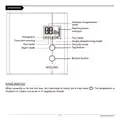


Adjustment procedure of the Single programming mode:
1. If necessary, adjust the Day/Night set point at the desired temperatures. If needed, switch from one
mode to the other by simultaneously pressing down the two buttons and releasing them immediately.
2. From the Night mode, simultaneously press down the two buttons for more than 3 seconds. If needed,
adjust the timer by pressing down the top button to increase the value, or the bottom button to decrease
it. The Night mode timer adjustment range is from 1 hour to 23 hours in the Single programming mode.
To quickly scroll through the timer values, press and hold the bottom button.
Note: If you set the timer to any value exceeding 23 hours, it will be impossible to activate the Single
programming mode and if it was activated, the Single programming mode will be deactivated.
3. Activate the Single programming mode by simultaneously pressing down the two buttons for at least 3
seconds. The
icon will appear. If the Single programming mode was already activated, the same
procedure should be used to deactivate it.
4. When the adjustment is completed, release the buttons and wait for 5 seconds to exit the adjustment
function.
NOTE: It is always possible to manually change the Day/Night mode during
a
24-hour cycle.
However, any manual return to the Night mode will re-initialize the Night mode timer to the latest
value recorded, which modifies the cycle in progress. In all cases, at the end of the 24-hour cycle,
the thermostat will return to the Night mode and start
a
new cycle. It is thus not necessary to
readjust the Single programming mode when a manual change is made to the Day/Night mode.
When turning back on after being powered off (because of a power failure, for example), the Single
programming mode is deactivated, and, if previously activated, the
stop as soon as you press down a button.
icon will blink. The blinking will
Display in either degrees Celsius/Fahrenheit
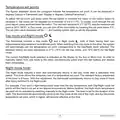
The thermostat can display the ambient temperature and the set point in degrees Celsius (standard
factory setting) or Fahrenheit.
1. From the Day mode, simultaneously press down the two buttons for 3 seconds. The Celsius/
Fahrenheit symbol will blink after 3 seconds. (For the backlit models, press down the two buttons for
8 seconds. Note that the backlight will blink after 3 seconds, but you must hold down the buttons. The
Celsius/Fahrenheit symbol will blink after 8 seconds.) Release the buttons.
2. Press down the top button to switch from the degrees Celsius to the degrees Fahrenheit, and
conversely. The degree Celsius or Fahrenheit symbol will be displayed.
INSSTE302NP0614
10

| General | Details |
|---|---|
| Name | STELPRO STE302NP Single Programming Electronic Thermostat User Guide |
| Make | StelPro |
| Language | English |
| Filetype | PDF (Download) |
| File size | 0.36 MB |
 (1 votes, average: 5.00 out of 5)
 Loading...

STELPRO STF362NP Floor Heating Thermostat Owner’s Manual

STELPRO ST302P Programmable Electronic Thermostat Owner’s Manual

STELPRO SAT402ZB Smart Thermostat User Guide

STELPRO ST252NPFF Non-Programmable Electronic Thermostat Owner’s Manual

STELPRO ST402PFF Programmable Electronic Thermostat Owner’s Manual

STELPRO ASMC402 Maestro Zigbee Smart Programmable Thermostat User Guide

STELPRO SIBTE12C Electronic Thermostat Owner’s Manual

STELPRO STZW402+ Electronic Thermostat for The Smart Home Owner’s Manual

STELPRO SIBTE13F Electronic Thermostat User Guide

STELPRO STCP MULTIPLE PROGRAMMING ELECTRONIC THERMOSTAT User Guide


Braebur 1230 Non Programmable Thermostat Instruction Manual

beca BHT-003 Series Thermostat Instruction Manual

Honeywell Home ElitePRO S1200 Smart Thermostat User Guide
DAIKIN One Lite Smart Thermostat User Guide

GENERALLIFE ARUNA 302S RF Wireless Room Thermostat User Manual

COMPUTHERM Q20 Programmable Digital Room Thermostat Instruction Manual

Hotwire HWTH Horizontal Thermostat Instructions

Honeywell Home T2 Programmable Thermostat Installation Guide

tekmar U-T-562 WiFi Thermostat User Manual

heatmiser Slimline-RF V3 Programmable Wireless Thermostat Instructions