
PECO T8168 Performance Pro Thermostat Installation Guide

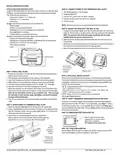


TERMINAL BLOCK DESIGNATIONS
• WARNING: Disconnect power before beginning installation
• CAUTION: Use copper wire only
!
Terminal
\Description
Return To
▲
24 VAC-1 24 VAC 1 (UNSWITCHED)
24 VAC-2 24 VAC 2
24 VAC-2 24 VAC 2
Connection NOTES:
1. Connect the first 24 VAC signal to 24VAC1.
2. Connect the second 24 VAC signal to 24 VAC2
3. Neither 24 VAC signal should be connect to ground.
4. Confirm system type selection in Service Menu 110
5. Confirm Fan Operation in Service Menu 112.
Y1
W1
Y2
W2
G
COOL 1
HEAT 1
COOL Open (TWF)
HEAT Open (TWF)
24 VAC 1
24 VAC 1
24 VAC 1
24 VAC 1
24 VAC 1
24 VAC 1
24 VAC 2
24 VAC 2
24 VAC 2
SC
COOL 2 or FAN 3 (MED) COOL Close (TWF)
HEAT 2
HEAT Close (TWF)
6. ON-OFF and Three Wire floation operation is determined by the
System Type set in Service Menu 110.
FAN 1 (HI)
G1
YD
WD
GD
S1
S2
SC
4A
4B
4C
FAN LO or DAMPER Configurable
0-10VDC COOL (4-20mA)
0-10VDC HEAT (4-20mA)
0-10VDC FAN (4-20mA)
REMOTE SENSOR, FAULT DETECTION
PIPE SENSOR
SC
Verify Correct Return
for Proper Operation
24 VAC 1
SENSOR COMMON
Not Available
24 VAC 2
Not Available
Not Available
0-10 VDC
Circuit Return
24 VAC
Circuit Return
Note: A load must be connected to outputs for testing
(VAC Output Common)
24 VAC 1
VAC-1
VAC-2
VAC-2
24
XFMR
SUPPLY
24VAC
(VDC Output Common)
24 VAC 2
24 VAC 2
24
24
COOL OPEN
or
Y1
(COOL STAGE 1)
BACnet® Communication
HEAT OPEN
or
W1
T8168B-2 Thermostat is equipped with BACnet® IP or MS/TP
wired Connections. More detailed information is available using
com in the Connected Smart Controls location.
( HEAT STAGE 1)
COOL CLOSE
or (FAN MED)
Y2
or (COOL STAGE 2)
HEAT CLOSE
or
(HEAT STAGE 2)
BACnet® IP Communication
W2
• This thermostat will broadcast a Wi-Fi network on power up.
• From your device Wi-Fi the network will appear as “T8168 #####”.
• Select this network and enter Password: 12345678, then press connect.
• Next Sign-In to open the BACnet Configuration Page at
IP Address 10.10.0.1 on the T8168XXXX
FAN HI
G
G1
FAN LO
or
(DAMPER)
MS/TP Wired Connections
0-10 VDC COOL
(or 4-20 mA)
YD
WD
Recommended wiring specification
22 -24 AWG Shielded twisted pair, Low Capacitiance.
0-10 VDC HEAT
(or 4-20 mA)
1. Care must be taken to ensure that the communi-
cation wiring does not touch the Shield/Ground.
0-10 VDC FAN
(or 4-20 mA)
2. Do not connect the Shield/Ground to earth ground
or the controllers power ground.
GD
+ 4A
- 4B
OPTIONAL REMOTE PROBE
OPTIONAL PIPE SENSOR
3. Care should be taken to assure that polairty is
maintained for all connections with shared power
S1
S2
SC
4A
4B
4C
Shield 4C
4. This controller does not have an EOL termination
or biasing.
SENSOR COMMON
RS485A +
5. Terminal 4A is positive, 4B is negative and 4C is
ground
RS485B -
6. When complete this thermostat will be part of a
system that is not controlled by PECO. Follow
system equipment specifications for approporate
installation.
RS485 Common
© COPYRIGHT 2025 PECO, INC. ALL RIGHTS RESERVED.
P/N 74599 3220-2406 REV 02
4

| General | Details |
|---|---|
| Name | PECO T8168 Performance Pro Thermostat Installation Guide |
| Make | PECO |
| Language | English |
| Filetype | PDF (Download) |
| File size | 0.47 MB |
 (1 votes, average: 5.00 out of 5)
 Loading...

PECO T372P Thermostat Instruction Manual

PECO T8168B-2 BACnet Proportional Thermostat Installation Guide

PECO TW180 Thermostat Instruction Manual


TECH CONTROLLERS EU-R-8b PLUS Wireless Two Position Room Thermostat User Manual

GENERAL LIFE FH104 Underfloor Heating Thermostat User Manual

HASWILL ELECTRONICS STC-200 Thermostat User Guide

HERSCHEL 12860 T-BT Battery Powered Wireless Thermostat Instruction Manual

Danfoss TVM-H Thermostat Valve Owner’s Manual

Danfoss RET230P Electronic Thermostat Instruction Manual

Amana DS01G Digi Smart Thermostat Instruction Manual

BEOK BOT-R315 RF GasBolier Programmable Thermostat Instruction Manual

AFRISO RT 10 D 230 Room Thermostat Instruction Manual

EPH CONTROLS CP4 Programmable RF Thermostat User Manual