
nest B08K2M13NY Thermostat E Smart Thermostat Installation Guide


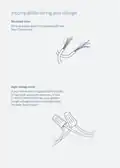
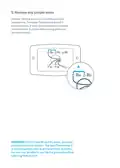


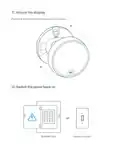




6.Label the wires
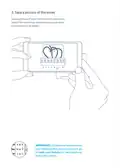
Peel off the labels below and attach them
to the thermostat’s matching wires.
Note: If you have an Rc or Rh wire, put the
R label on it.
Wiring tips
Wire colors can vary, but:
• Common or C wires are generally blue.
• If there’s an orange wire in the connector labeled both W and O/B,
then you likely have a heat pump. Put this wire inthe Nest Thermostat’s
O/B connector.
*
• If there’s a white wire in the connector labeled both W and O/B,
then you probably don’t have a heat pump. Put this wire in the Nest
Thermostat’s W connector.
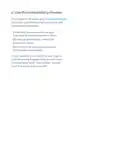
IMPORTANT:If you’re unsure about wiring your
thermostat, go to nest.com/install to contact
a Nest Pro in your area.

| General | Details |
|---|---|
| Name | nest B08K2M13NY Thermostat E Smart Thermostat Installation Guide |
| Make | Nest |
| Language | English |
| Filetype | PDF (Download) |
| File size | 0.19 MB |
 (1 votes, average: 5.00 out of 5)
 Loading...

Google Nest Learning Thermostat (4th gen) Installation Guide


sensi 1F87U-42WF Smart Thermostat Installation Guide

White-Rodgers 1F56N-444 Thermostat User Manual

Danfoss MBC 8000 Heavy Duty Thermostat Installation Guide

thermotouch 5235W Wi-Fi Programmable Thermostat Instructions

Robertshaw RS9220 Programmable Thermostat Installation Guide

Rayotec Coloursense Wi-Fi Thermostat Instruction Manual

White Rodgers 1F95-1277 Big Blue Universal Thermostat Instruction Manual

LAE AC1-2W Digital Thermostat Instruction Manual

GENERAL LIFE ARUNA 302S Wired Room Thermostat User Manual

Smith s HAGA95001 Remote Wired Room Thermostat Owner’s Manual