
nest B08K2M13NY Thermostat E Smart Thermostat Installation Guide









10. Connect wires
Use the wiring diagram you got from the
compatibility checker in step 4 to connect
your system wires to the Nest Thermostat.
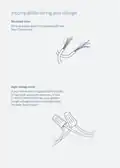
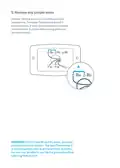
3/8 in
The exposed wire should be straight.
Note: If you have an R, Rc or Rh wire,
you can put it into the R connector on
the Nest Thermostat.
If you have a W2, Y2 or O/B wire, you
can put it into the O/B connector,
*
if needed.
Gently tug each wire to check
they’re secure, and make sure
each connector that has a wire
stays down.
After all the wires are securely
connected, push them down
to make sure they’re flush with
the base.

| General | Details |
|---|---|
| Name | nest B08K2M13NY Thermostat E Smart Thermostat Installation Guide |
| Make | Nest |
| Language | English |
| Filetype | PDF (Download) |
| File size | 0.19 MB |
 (1 votes, average: 5.00 out of 5)
 Loading...

Google Nest Learning Thermostat (4th gen) Installation Guide


htc HYT001 WIFI Digital Heating Thermostat User Manual

tado 104388 Smart Thermostat Installation Guide

Guangzhou XR-01 Central Air Conditioning Thermostat User Manual

ENGO CONTROLS EONEBATW Internet Controlled Thermostat User Guide

Danfoss 014G2420 Ally Radiator Thermostat User Guide

GREYSTONE TLDF Series Flexible Cable Duct Average Low Limit Thermostat Instruction Manual

GENERAL LIFE FC220 Digital Fan Coil Thermostat User Manual

ENSTO ECO10BTW-J Heat Control Thermostat Instruction Manual

ARUNA 302S RF Digital Room Thermostat User Manual

MechDoc QD-HVAC10 Programmable Thermostat Instruction Manual