
nest B08K2M13NY Thermostat E Smart Thermostat Installation Guide










4. Use the compatibility checker
If you haven’t already, go to nest.com/works
and enter your thermostat’s wires into the
compatibility checker.
• Enter only the connectors on your
thermostat that have wires in them
• Do not use wire colors – enter the
connector labels
• Do not enter any jumper wires into
the checker (see step 5)
If your system is compatible, you’ll get a
custom wiring diagram that you will need
to install your Nest Thermostat. You can
print it or email it to yourself.

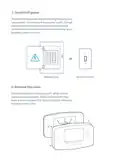
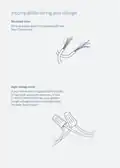
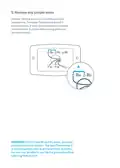
5.Remove any jumper wires
Jumper wires are short wires between two
connectors. The Nest Thermostat doesn’t
need jumpers. If your thermostat has jumpers,
remove them, but save them along with your
old thermostat.
IMPORTANT:If you have Rh and Rc wires, you have
a dual transformer system. The Nest Thermostat E
is not compatible with dual transformer systems,
but you may be able to use the 3rd generation Nest
Learning Thermostat.

| General | Details |
|---|---|
| Name | nest B08K2M13NY Thermostat E Smart Thermostat Installation Guide |
| Make | Nest |
| Language | English |
| Filetype | PDF (Download) |
| File size | 0.19 MB |
 (1 votes, average: 5.00 out of 5)
 Loading...

Google Nest Learning Thermostat (4th gen) Installation Guide


STELPRO SIBTE13F Electronic Thermostat User Guide
ring Homeowner’s Pro Smart Thermostat User Manual

OJ ELECTRONICS MCD3 Digital Thermostat Instructions

GENERAL LIFE HT220S RF Digital Room Thermostat User Manual

LUX DHP2120 Battery Powered Non Programmable Digital Heat Pump Thermostat Installation Guide

Danfoss ECtemp Smart Intelligent Electronic Timer Thermostat Installation Guide

BEOK CONTROLS TGP508 Wi-fi Touch Screen Thermostat Instruction Manual

MCO Home MH-4936 Z Wave Thermostat Instruction Manual

VIMAR 02912 Wi-Fi Thermostat Instruction Manual

BUDDERFLY BTS-U2 Thermostat User Manual