
×
- 1. Zigbee 002 Series (Thermostat → User Manual)
- 2. Čeština – (Slovenčina –)
- 3. Dear Customer,
- 4. Packaging (Introducing The Thermostat → Features → Enhanced Convenience In Design)
- 5. Advanced Functionality (4. Customizable Programmable Settings: Utilize The 5+1+1 Six-period)
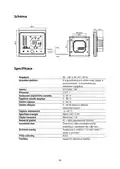
- 6. Diagram (Specifications → Current Load 5 A (applicable For Water Heating, Water → Sensor Ntc3950, 10k → Accuracy ± 0,5° C → Set Temperature Range 5 35 °c)
- 7. Before Wiring And Installing (Carefully Read And Understand These Instructions → Verify That The Product Ratings Are Suitable → Installation Should Be Carried Out By A Trained Technician → Thoroughly Test The Product's Operation → Caution: There Is A Risk Of Electrical Shock Or Equipment Damage)
- 8. Wiring Instructions (Ga Is Intended For Water Heating Systems. → Gb Is Designed For Electric Heating Systems. → Gc Is Compatible With Water/gas Boiler Setups. → Ntc And Modbus Options Are Available At Your Discretion.)
- 9. Dry Contact (Modbus → Electric Floor → Installation Instructions)
- 10. Connect The Power Supply And Load To The Designated Terminals (Securely Affix The Mounting Plate To The Wall → Attach The Thermostat Body To The Mounting Plate → The Installation Is Now Complete)
- 11. Home Screen Guide (Heating On → Lock → Network → Set Temperature → Energy Saving → Programmable)
- 12. Thermostat Control (Power Control → Manual & Programmable Modes → Setting The Temperature → Adjusting The Clock → Thermostat Lock Feature → Program Schedule Adjustments)
- 13. Default Settings For Program Schedule (Programming Your Thermostat Using The App → Monitoring Floor Sensor Temperature)
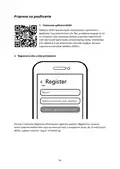
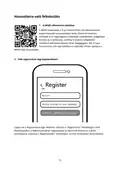
- 14. Getting Ready For Use (Downloading The Moes App → Account Registration Or Login)
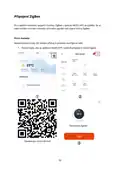
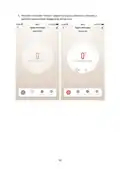
- 15. Zigbee Connection (Method One: → Zigbee Thermostat)
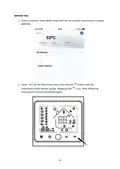
- 16. Method Two (Ensure → Reset)
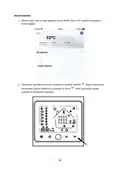
- 17. Access
- 18. Once The Device Is Added Successfully, You Can Edit Its Name On The Device Page By Clicking 'done'.
- 19. Click 'done' To Enter The Device Page And Indulge In The Convenience Of Your Smart Home Automation.
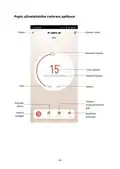
- 20. Description Of App User Interface (Temperature Adjustment → Target Temperature → Current Temperature → Weekly Programmable Schedule → Advanced Options)
- 21. Troubleshooting Guide (Power On, No Display → No Output, Display Working → Slight Room Temperature Discrepancy → Warranty Conditions)
- 22. Eu Declaration Of Conformity (Weee)
- 23. Děkujeme Vám Za Zakoupení Našeho Produktu. Před Prvním Použitím Si Prosím Pečlivě Přečtěte Následující Pokyny A Uschovejte Si Tento Návod K …
- 24. Balení (Představení Termostatu → Funkce → Zvýšené Pohodlí V Designu → 3. Módní Design, Který Splývá S Okolím → Intuitivní Uživatelské Rozhraní Vhodné Pro Všechny Věkové Kategorie)
- 25. Pokročilé Funkce (Přizpůsobitelné Programovatelné Nastavení: Využijte Programovatelnou → Centrální Seskupení Termostatů: Vytvářejte Skupiny Termostatů Pro → 6. Integrace Chytré Domácnosti → Rozšiřitelný A Kompatibilní S Inteligentními Scénami)
- 26. Schéma (Specifikace → Senzor Ntc3950, 10k → Přesnost → Nastavení Teplotního Rozsahu 5 - 35 °c → Teplotní Rozsah Displeje 5 - 99 °c)
- 27. Před Zapojením A Instalací (Upozornění)
- 28. Pokyny K Zapojení (Poznámka: → Ga Je Určen Pro Systémy Ohřevu Vody. → Gb Je Určen Pro Elektrické Topné Systémy. → Gc Je Kompatibilní S Vodními/plynovými Kotli. → Pokud Má Váš Kotel Více Než Tři Vodiče, Kontaktujte Nás Pro Správný Způsob Instalace. → Podle Vašeho Uvážení Jsou K Dispozici Možnosti Ntc A Modbus.)
- 29. Suchý Kontakt (Pokyny K Instalaci → Modbus → Elektrická Podlaha)
- 30. Zapojení Termostatu (Montážní Desku → Těleso Termostatu → Instalace)
- 31. Průvodce Domovskou Obrazovkou (Zapnuté Vytápění → Zámek → Síť → Úspora Energie → Programovatelné → Manuální)
- 32. Ovládání Termostatu (Řízení Výkonu → Manuální A Programovatelné Režimy → Nastavení Teploty → Nastavení Hodin → Funkce Uzamčení Termostatu → Úpravy Programového Plánu)
- 33. Výchozí Nastavení Pro Programový Plán (Všední Den (pondělí - Pátek) → Víkend (sobota) → Víkend (neděle) → Programování Termostatu Pomocí Aplikace → Sledování Teploty Podlahového Čidla)
- 34. Příprava Na Použití (Stažení Aplikace Moes → Registrace Účtu Nebo Přihlášení)
- 35. Připojení Zigbee (První Metoda: → Termostat Zigbee)
- 36. Druhá Metoda (Zkontrolujte, Zda Se Vaše Aplikace Smart Moes Smart App Úspěšně Připojila K Bráně Zigbee → Obnovení)
- 37. K Bráně Přistupte Podle Kroků Na Obrázku Níže A Dokončete Proces Výběrem Možnosti 'přidat Dílčí Zařízení Led Již Bliká'. Připojení Bude Trva…
- 38. Po Úspěšném Přidání Zařízení Můžete Jeho Název Upravit Na Stránce Zařízení.
- 39. Kliknutím Na Tlačítko 'hotovo' Vstoupíte Na Stránku Zařízení A Můžete Si Dopřát Pohodlí Automatizace Chytré Domácnosti.
- 40. Popis Uživatelského Rozhraní Aplikace (Název → Upravit Název → Nastavení Teploty → Cílová Teplota → Aktuální Teplota → Týdenní Programovatelný Plán)
- 41. Průvodce Řešením Problémů (Záruční Podmínky)
- 42. Eu Prohlášení O Shodě (Weee)
- 43. Vážený Zákazník (Bezpečnostné Pokyny → Zákaznícka Linka → Dovozca)
- 44. Balenie (Predstavenie Termostatu → Funkcie → Zvýšené Pohodlie V Dizajne → Zjednodušená Prevádzka Pre Život Bez Námahy → 3. Módny Dizajn, Ktorý Zapadá Do Interiéru)
- 45. Rozšírené Funkcie (1. Presné Riadenie Teploty → Všestranné Možnosti Pripojenia → 5. Centrálne Zoskupenie Termostatov: Vytvorte Skupiny Termostatov Pre → 6. Integrácia Inteligentnej Domácnosti: Bezproblémová Integrácia So → Rozšíriteľný A Kompatibilný S Inteligentnými Scénami)
- 46. Schéma (Špecifikácia → Aktuálne Zaťaženie → Senzor Ntc3950, 10k → Presnosť → Nastavenie Teplotného Rozsahu 5 - 35 °c)
- 47. Pred Zapojením A Inštaláciou (Upozornenie)
- 48. Pokyny Na Zapojenie (Ga Je Určený Pre Systémy Ohrevu Vody. → Gb Je Určený Pre Elektrické Vykurovacie Systémy. → Gc Je Kompatibilný S Nastaveniami Vodného/plynového Kotla. → Možnosti Ntc A Modbus Sú K Dispozícii Podľa Vášho Uváženia.)
- 49. Suchý Kontakt (Pokyny Na Inštaláciu)
- 50. Pripojte Napájanie A Záťaž K Určeným Svorkám (Montážnu Dosku Bezpečne Pripevnite Na Stenu → Pripevnite Teleso Termostatu K Montážnej Doske → Inštalácia Je Teraz Dokončená)
- 51. Sprievodca Domovskou Obrazovkou (Zapnuté Vykurovanie → Zámok → Sieť → Úspora Energie → Programovateľné → Režim)
- 52. Ovládanie Termostatu (Manuálne A Programovateľné Režimy → Nastavenie Teploty → Nastavenie Hodín → Funkcia Uzamknutia Termostatu → Úpravy Programového Plánu)
- 53. Predvolené Nastavenia Pre Programový Plán (Programovanie Termostatu Pomocou Aplikácie → Monitorovanie Teploty Podlahového Snímača)
- 54. Príprava Na Používanie (Stiahnutie Aplikácie Moes → Registrácia Účtu Alebo Prihlásenie)
- 55. Pripojenie Zigbee (Termostat Zigbee)
- 56. Druhá Metóda (Skontrolujte, Či Sa Vaša Aplikácia Smart Moes Smart App Úspešne Pripojila K Bráne Zigbee → Obnovenie)
- 57. Prístup K Bráne
- 58. Po Úspešnom Pridaní Zariadenia Môžete Upraviť Jeho Názov Na Stránke Zariadenia
- 59. Kliknutím Na Tlačidlo 'hotovo' Vstúpte Na Stránku Zariadenia A Doprajte Si Pohodlie Automatizácie Inteligentnej Domácnosti.
- 60. Popis Používateľského Rozhrania Aplikácie (Nastavenie Teploty → Cieľová Teplota → Aktuálna Teplota → Týždenný Programovateľný Plán → Prepínač Režimu → Rozšírené Možnosti)
- 61. Príručka Na Riešenie Problémov (Zapnuté, Bez Displeja → Žiadny Výstup, Pracovný Displej → Mierna Odchýlka V Izbovej Teplote → Záručné Podmienky)
- 62. Eú Vyhlásenie O Zhode (Weee)
- 63. Kérjük, Hogy Az Első Használat Előtt Figyelmesen Olvassa El Az Alábbi Utasításokat, És Őrizze Meg Ezt A Használati Útmutatót A Későbbi Haszn…
- 64. Csomagolás (A Termosztát Bemutatása → Jellemzők → Fokozott Kényelem A Tervezésben → Elegáns Lehetőségek)
- 65. Fejlett Funkcionalitás (Precíziós Hőmérséklet Fenntartja A Kívánt Hőmérsékleti Szintet 0,5 → 1. -szabályozás → Sokoldalú Csatlakozási Lehetőségek → 6. Intelligens Otthoni Integráció)
- 66. Ábra (Műszaki Adatok → Terhelés 5 A (vízmelegítéshez, Vízforralóhoz És → Érzékelő → Pontosság ± 0,5° C → Beállított Hőmérséklet)
- 67. Bekötés És Telepítés Előtt (Gondosan Olvassa El És Értse Meg Ezeket Az Utasításokat. → Ellenőrizze, Hogy A Használati Utasításban És A Készüléken Feltüntetett Termékminősítések Megfelelnek-e Az Adott Alkalmazásnak. → A Beszerelést Képzett És Tapasztalt Szerviztechnikusnak Kell Elvégeznie. → A Telepítés Befejezése Után Alaposan Tesztelje A Termék Működését A Mellékelt Utasításokat Követve. → Figyelem: Fennáll Az Áramütés Vagy A Berendezés Károsodásának Veszélye.)
- 68. Vezetékek Bekötési Utasításai (Ga Vízmelegítő Rendszerekhez Készült. → Gb Elektromos Fűtési Rendszerekhez Tervezték. → A Gc Kompatibilis A Víz-/gázkazán-berendezésekkel. → Ntc És Modbus Opciók Az Ön Választása Szerint Állnak Rendelkezésre.)
- 69. Száraz (Modbus → Elektromos Padló → Száraz Érintkezés → Telepítési Utasítások)
- 70. Csatlakoztassa (Rögzítse A Szerelőlemezt → A Termosztáttestet Rögzítse → A Telepítés Befejezése)
- 71. Kezdőképernyő Útmutató (Fűtés Bekapcsolva → Hálózat → Padlóhőmérséklet → Beállított Hőmérséklet → Energiatakarékosság → Programozható)
- 72. Termosztát Vezérlés (Teljesítményszabályozás → Kézi És Programozható Üzemmódok → A Hőmérséklet Beállítása → Az Óra Beállítása → Termosztátzár Funkció → Programmenetrend Kiigazítások)
- 73. Alapértelmezett Beállítások A Program Ütemezéséhez (Hétköznap (hétfő - Péntek) → Hétvége (szombat) → Hétvége (vasárnap) → Termosztát Programozása Az Alkalmazás Segítségével → A Padlóérzékelő Hőmérsékletének Ellenőrzése)
- 74. Használatra Való Felkészülés (Moes Alkalmazás Letöltése → Fiók Regisztráció Vagy Bejelentkezés)
- 75. Zigbee Kapcsolat (Első Módszer: → Zigbee Termosztát)
- 76. Második Módszer (Visszaállítás)
- 77. Aleszköz Hozzáadása
- 78. Miután Az Eszközt Sikeresen Hozzáadta, A 'kész' Gombra Kattintva Szerkesztheti A Nevét Az Eszköz Oldalán.
- 79. Kattintson A 'kész' Gombra Az Eszközoldalra, És Élvezze Az Intelligens Otthoni Automatizálás Kényelmét.
- 80. Az Alkalmazás Felhasználói Felületének Leírása
- 81. Hibaelhárítási Útmutató (Bekapcsolás, Nincs Kijelző → Nincs Kimenet, Kijelző Működik → Enyhe Szobahőmérséklet Eltérés → Jótállási Feltételek)
- 82. Megfelelőségi Nyilatkozat (Weee)
- 83. Sicherheitshinweise (Kundenservice → Lieferant)
- 84. Inhalt Der Verpackung (Einführung → Eigenschaften → Erhöhter Komfort Im Design → 4. Leicht Ablesbarer Touchscreen: Das Touchscreen-display Mit)
- 85. 5. Beleuchtete Knöpfe Für Ständige Aufmerksamkeit: Hell Beleuchtete Ta
- 86. Erweiterte Funktionalitäten (3. Dauerhafter Datenspeicher: Profitieren Sie Von Den Funktionen Des → 4. Anpassbare, Programmierbare Einstellungen: Nutzen Sie Die → 8. Erweiterbar Und Smart Scene-kompatibel: Genießen Sie Unbegrenzte)
- 87. Diagramm (Spezifikationen → Belastung 5 A (geeignet Für Warmwasserbereitung, → Sensor Ntc3950, 10k → Genauigkeit ± 0,5° C → Temperaturbereich - Einstellung 5 - 35 °c)
- 88. Vor Der Verkabelung Und Installation (Lesen → Vergewissern → Die Installation Sollte Von Einem Geschulten Und Erfahrenen Servicetechniker Durchgeführt Werden. → Testen → Vorsicht)
- 89. Verdrahtungshinweise (Anmerkung: → Ga Ist Für Warmwasserheizungsanlagen Bestimmt. → Gb Ist Für Elektrische Heizsysteme Ausgelegt. → Gc Ist Mit Wasser-/gaskesselanlagen Kompatibel. → Ntc- Und Modbus-optionen Sind Nach Ihrem Ermessen Erhältlich.)
- 90. Einbauanleitung
- 91. Schließen (Befestigen → Die Installation Ist Nun Abgeschlossen)
- 92. Leitfaden Für Den Startbildschirm (Heizung An → Schloss → Netzwerk → Energieeinsparung → Programmierbar → Timing Ein Und Aus)
- 93. Thermostatsteuerung (Steuerung Der Stromversorgung → Manuelle Und Programmierbare Modi → Einstellen Der Temperatur → Einstellen Der Uhr → Thermostat-sperrfunktion → Programmplan-anpassungen)
- 94.
- 95. Standardeinstellungen Für Programmplanungen (Wochentag (montag → Wochenende (samstag) Wochenende (sonntag) → (6 Sendungen Auf Dem (7 Sendungen Auf Dem Zeitanze → Erscheint Auf Dem → Bildschirm) Bildschirm) Ige)
- 96.
- 97. 2. Registrierung Oder Anmeldung Eines Kontos
- 98. Zigbee-verbindung (Methode 1)
- 99. Zigbee-thermostat
- 100. Methode 2 (Stellen Sie Sicher, Dass Ihre Smart Moes Smart App Erfolgreich Mit Einem Zigbee-gateway Verbunden Ist. → Zurücksetzen)
- 101. Greifen (Subdevice Hinzufügen → Led Blinkt)
- 102. Sobald Das Gerät Erfolgreich Hinzugefügt Wurde, Können Sie Seinen Namen Auf Der Geräteseite Bearbeiten, Indem Sie Auf 'fertig' Klicken.
- 103. Klicken Sie Auf 'fertig', Um Die Geräteseite Aufzurufen, Und Genießen Sie Den Komfort Ihrer Intelligenten Hausautomatisierung.
- 104. Beschreibung Der Benutzeroberfläche Der App (Einstellung Der Temperatur → Zieltemperatur → Aktuelle Temperatur → Wöchentlich Programmierbare R Zeitplan → Modus-schalter → Erweiterte Optionen)
- 105. Leitfaden Zur Fehlerbehebung (Einschalten, Keine Anzeige → Keine Ausgabe, Anzeige Funktioniert → Leichte Abweichung Von Der Raumtemperatur → Garantiebedingungen)
- 106. Eu-konformitätserklärung (Weee)
×
Moes ZigBee 002 Series Thermostat User Manual














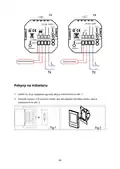













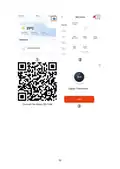


Wiring Instructions
Note:
•
•
•
•
GA is intended for water heating systems.
GB is designed for electric heating systems.
GC is compatible with water/gas boiler setups.
If your boiler has more than three wires, please contact us for the correct
installation method.
•
NTC and Modbus options are available at your discretion.
RED
RED
WHITE
WHITE
Modbus
Modbus
No Actuator
No Actuator
8

| General | Details |
|---|---|
| Name | Moes ZigBee 002 Series Thermostat User Manual |
| Make | MOES |
| Language | English |
| Filetype | PDF (Download) |
| File size | 0.73 MB |
 (1 votes, average: 5.00 out of 5)
 Loading...

Moes WTP-BY-EU BHT-12 Smart Thermostat Instruction Manual

MOES BHT-12 Smart Thermostat Instruction Manual

Moes 002 Series Wifi Thermostat User Guide

Moes M30 x 1.5 Smart Radiator Thermostat User Manual

MOES BRT-100 Radiator TRV Thermostat Instruction Manual

Moes BHT-3000 Series Thermostat User Guide

Moes BHT-006 Series Thermostat User Manual

MOES BRT-100 Radiator Thermostat User Guide

Moes WIFI 002 Series Wi-Fi Thermostat Instruction Manual

Moes WHT-PJ01 Smart WiFi Thermostat User Manual


TIOEVO0003 TEVO Wireless Thermostat User Manual

Honeywell VisionPRO TH8000 Series Touchscreen Programmable Thermostat Instruction Manual

EPH CONTROLS COMBIPACK2 Smart Thermostat with Automation and Optimum Start Instructions

EPH CONTROLS CDT2 Room Thermostat Instruction Manual

Beok Controls TS4 Series Thermostat User Guide

Honeywell Home FocusPRO N100 Series Non Programmable Thermostat Installation Guide

TELLUR TLL331441 Thermostat Instructions

SALUS RT310RF Digital Wireless Central Heating Room Thermostat User Manual

EPH CONTROLS PR092K7 RF Cylinder Thermostat Instruction Manual

Honeywell TL116A Thermostat Installation Guide
Table of Contents
- 1. Zigbee 002 Series - Thermostat →
- 2. Čeština – - Slovenčina – →
- 3. Dear Customer, →
- 4. Packaging - Introducing The Thermostat →
- 5. Advanced Functionality - 4. Customizable Programmable Settin... →
- 6. Diagram - Specifications →
- 7. Before Wiring And Installing - Carefully Read And Understand... →
- 8. Wiring Instructions - Ga Is Intended For Water Heating Syste... →
- 9. Dry Contact - Modbus →
- 10. Connect The Power Supply And Load To The Designated Terminal... →
- 11. Home Screen Guide - Heating On →
- 12. Thermostat Control - Power Control →
- 13. Default Settings For Program Schedule - Programming Your The... →
- 14. Getting Ready For Use - Downloading The Moes App →
- 15. Zigbee Connection - Method One: →
- 16. Method Two - Ensure →
- 17. Access →
- 18. Once The Device Is Added Successfully, You Can Edit Its Name... →
- 19. Click 'done' To Enter The Device Page And Indulge In The Con... →
- 20. Description Of App User Interface - Temperature Adjustment →
- 21. Troubleshooting Guide - Power On, No Display →
- 22. Eu Declaration Of Conformity - Weee →
- 23. Děkujeme Vám Za Zakoupení Našeho Produktu. Před Prvním Použi... →
- 24. Balení - Představení Termostatu →
- 25. Pokročilé Funkce - Přizpůsobitelné Programovatelné Nastavení... →
- 26. Schéma - Specifikace →
- 27. Před Zapojením A Instalací - Upozornění →
- 28. Pokyny K Zapojení - Poznámka: →
- 29. Suchý Kontakt - Pokyny K Instalaci →
- 30. Zapojení Termostatu - Montážní Desku →
- 31. Průvodce Domovskou Obrazovkou - Zapnuté Vytápění →
- 32. Ovládání Termostatu - Řízení Výkonu →
- 33. Výchozí Nastavení Pro Programový Plán - Všední Den (pondělí ... →
- 34. Příprava Na Použití - Stažení Aplikace Moes →
- 35. Připojení Zigbee - První Metoda: →
- 36. Druhá Metoda - Zkontrolujte, Zda Se Vaše Aplikace Smart Moes... →
- 37. K Bráně Přistupte Podle Kroků Na Obrázku Níže A Dokončete Pr... →
- 38. Po Úspěšném Přidání Zařízení Můžete Jeho Název Upravit Na St... →
- 39. Kliknutím Na Tlačítko 'hotovo' Vstoupíte Na Stránku Zařízení... →
- 40. Popis Uživatelského Rozhraní Aplikace - Název →
- 41. Průvodce Řešením Problémů - Záruční Podmínky →
- 42. Eu Prohlášení O Shodě - Weee →
- 43. Vážený Zákazník - Bezpečnostné Pokyny →
- 44. Balenie - Predstavenie Termostatu →
- 45. Rozšírené Funkcie - 1. Presné Riadenie Teploty →
- 46. Schéma - Špecifikácia →
- 47. Pred Zapojením A Inštaláciou - Upozornenie →
- 48. Pokyny Na Zapojenie - Ga Je Určený Pre Systémy Ohrevu Vody. →
- 49. Suchý Kontakt - Pokyny Na Inštaláciu →
- 50. Pripojte Napájanie A Záťaž K Určeným Svorkám - Montážnu Dosk... →
- 51. Sprievodca Domovskou Obrazovkou - Zapnuté Vykurovanie →
- 52. Ovládanie Termostatu - Manuálne A Programovateľné Režimy →
- 53. Predvolené Nastavenia Pre Programový Plán - Programovanie Te... →
- 54. Príprava Na Používanie - Stiahnutie Aplikácie Moes →
- 55. Pripojenie Zigbee - Termostat Zigbee →
- 56. Druhá Metóda - Skontrolujte, Či Sa Vaša Aplikácia Smart Moes... →
- 57. Prístup K Bráne →
- 58. Po Úspešnom Pridaní Zariadenia Môžete Upraviť Jeho Názov Na ... →
- 59. Kliknutím Na Tlačidlo 'hotovo' Vstúpte Na Stránku Zariadenia... →
- 60. Popis Používateľského Rozhrania Aplikácie - Nastavenie Teplo... →
- 61. Príručka Na Riešenie Problémov - Zapnuté, Bez Displeja →
- 62. Eú Vyhlásenie O Zhode - Weee →
- 63. Kérjük, Hogy Az Első Használat Előtt Figyelmesen Olvassa El ... →
- 64. Csomagolás - A Termosztát Bemutatása →
- 65. Fejlett Funkcionalitás - Precíziós Hőmérséklet Fenntartja A ... →
- 66. Ábra - Műszaki Adatok →
- 67. Bekötés És Telepítés Előtt - Gondosan Olvassa El És Értse Me... →
- 68. Vezetékek Bekötési Utasításai - Ga Vízmelegítő Rendszerekhez... →
- 69. Száraz - Modbus →
- 70. Csatlakoztassa - Rögzítse A Szerelőlemezt →
- 71. Kezdőképernyő Útmutató - Fűtés Bekapcsolva →
- 72. Termosztát Vezérlés - Teljesítményszabályo... →
- 73. Alapértelmezett Beállítások A Program Ütemezéséhez - Hétközn... →
- 74. Használatra Való Felkészülés - Moes Alkalmazás Letöltése →
- 75. Zigbee Kapcsolat - Első Módszer: →
- 76. Második Módszer - Visszaállítás →
- 77. Aleszköz Hozzáadása →
- 78. Miután Az Eszközt Sikeresen Hozzáadta, A 'kész' Gombra Katti... →
- 79. Kattintson A 'kész' Gombra Az Eszközoldalra, És Élvezze Az I... →
- 80. Az Alkalmazás Felhasználói Felületének Leírása →
- 81. Hibaelhárítási Útmutató - Bekapcsolás, Nincs Kijelző →
- 82. Megfelelőségi Nyilatkozat - Weee →
- 83. Sicherheitshinweise - Kundenservice →
- 84. Inhalt Der Verpackung - Einführung →
- 85. 5. Beleuchtete Knöpfe Für Ständige Aufmerksamkeit: Hell Bele... →
- 86. Erweiterte Funktionalitäten - 3. Dauerhafter Datenspeicher: ... →
- 87. Diagramm - Spezifikationen →
- 88. Vor Der Verkabelung Und Installation - Lesen →
- 89. Verdrahtungshinweise - Anmerkung: →
- 90. Einbauanleitung →
- 91. Schließen - Befestigen →
- 92. Leitfaden Für Den Startbildschirm - Heizung An →
- 93. Thermostatsteuerung - Steuerung Der Stromversorgung →
- 94. Page 94 →
- 95. Standardeinstellungen Für Programmplanungen - Wochentag (mon... →
- 96. Page 96 →
- 97. 2. Registrierung Oder Anmeldung Eines Kontos →
- 98. Zigbee-verbindung - Methode 1 →
- 99. Zigbee-thermostat →
- 100. Methode 2 - Stellen Sie Sicher, Dass Ihre Smart Moes Smart A... →
- 101. Greifen - Subdevice Hinzufügen →
- 102. Sobald Das Gerät Erfolgreich Hinzugefügt Wurde, Können Sie S... →
- 103. Klicken Sie Auf 'fertig', Um Die Geräteseite Aufzurufen, Und... →
- 104. Beschreibung Der Benutzeroberfläche Der App - Einstellung De... →
- 105. Leitfaden Zur Fehlerbehebung - Einschalten, Keine Anzeige →
- 106. Eu-konformitätserklä... - Weee →