
Moes WTP-BY-EU BHT-12 Smart Thermostat Instruction Manual



HOME,SMART MOES HOME
Thank you for purchasing
4.Temperature setting: Press "
temperature.
"/"
" to set the target
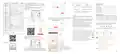
Product UI
Dimensions and installation instructions
Instruction Manual
Dimensions: millimeters (mm)
Thank you for choosing our thermostat. We are committed to
bringing together high-end technology, high-quality produc-
tion technology, safe and reliable materials to produce
high-quality and low-cost products.
Please read this manual for comprehensive product informa-
tion. Also make sure a professional installs the thermostat and
follows all your local regulations.
Week
Heating/Cooling
5.Time setting: The Wifi version will automatically synchronize
the time after connecting to the network. Or long press " " to
enter the time setting, and press " " to adjust the value,
respectively set up for minutes, hours, and days of the week
("①" at the top of the screen means Monday, "②" means
Tuesday, and so on) . After the adjustment is completed, press
BHT-12 Smart Thermostat
WTP-BY-EU
62.0
53.2
35.0
Energy saving
mode
Room temp.
Clock
Set temp.
Floor temp.
WIFI
Period
External sensor
Programming
mode
Manual mode
"
" to exit the time setting.
Packing List
External
sensor
connector
6.Child lock : Press and hold "
" and "
" at the same
Clock
Thermostat*1
User Manual*1
QC certificate*1
time for 5 seconds, the thermostat will enter the child lock
mode. You can also set full lock and half lock in advanced
options, please refer to the description of advanced options
below.
Power
Mode
External Sensor 2.5m ( optional)*1
Up/Down
120.0
About Your Thermostat
BHT-12 is suitable for electric heating radiator, electric
cooling and temperature control system.It can be used in smart
homes, shopping malls, and industrial places.
Before use, please confirm that this product is compatible with
your temperature control equipment.
7.5+1+1 programming mode setting: wifi version can be set in
APP. In the non-wifi version, long press "
setting, and then press " " 4 times to enter the programming
mode setting. At this time, the screen displays (①②③④⑤), the
minute of the time flashes, and the cycle is 1 " ". Then press
" to select and set the hour, temperature and cycle. Press "
" or " " to adjust the corresponding value. After complet-
" to enter the clock
Appearance Features
"
1. Small size: small and flexible, can be installed without a large
space;
ing the setting, you need to shut down once to store the data in
the thermostat.
Connect to the controlled device
Connect to a power outlet
2. Classic color matching: pearl white, midnight black, into a variety
of decoration styles;
Bitte scannen Sie den QR-Code, um das deutsche Handbuch,
das Installationsvideo und die Funktionseinführung zu erhalten
Escanee el código QR para obtener el manual en español, el
video de instalación y la introducción de la función
Veuillez scanner le code QR pour obtenir le manuel en
français, la vidéo d'installation et l'introduction des fonctions
Отсканируйте QR-код, чтобы получить руководство на
русском языке, видео по установке и описание функций
Leia o código QR para obter o manual em português, o vídeo
de instalação e a introdução das funções
Manipulation Instructions
1.Power: Press
2.Cooling / Heating mode: This thermostat supports cooling or heating
mode, which can be selected and switched in the APP, or refer to
"Advanced Options Settings".
Default settings for program schedule
3. Warm hand feel: curved body, chamfer transition, no hand cutting;
Precautions Before Installation
to turn the thermostat on/off.
MON. -FRI.
SAT.
SUN.
Function Features
1. Touch buttons: no need to worry about the buttons being stuck
and not rebounding;
(①②③④⑤ shows on
1. Before installation, please confirm that the plug type of this
product is suitable for your local standard and heating equipment;
2. Please contact the after-sales service for equipment failure,
please do not try to repair it by yourself;
3. After the installation, please refer to this manual to check again to
ensure normal safety
Time
display
(⑥shows on scteen)
(⑦shows on scteen)
scteen)
TIME
6:00~8:00
8:00~11:30
TEMP.
20
ON TIME
TEMP.
20
ON TIME
6:00~8:00
TEMP.
20
Period 1
6:00~8:00
2. Heat and cool dual mode: heating and cooling, one device, two
control modes;
3. Internal and external dual senors; default built-in sensor, optional
external sensor;
4. Heating indication: two working indicator lights on the left and
right, know its working status without coming close;
5. Dual temperature systems: support Celsius-℃ and Fahrenheit-℉
switching;
6. Various plugs: optional plugs of various specifications, British
standard, European standard, American standard, Australian
standard, and national standard are optional;
3.Manual/Programming/Temporary Manual/Holiday Mode:
Period 2 8:00~11:30
Period 3 11:30~13:00
Period 4 13:30~17:00
Period 5 17:00~22:00
Period 6 22:00~6:00
15
8:00~11:30
11:30~13:00
13:30~17:00
17:00~22:00
22:00~6:00
20
8:00~11:30
11:30~13:00
13:30~17:00
17:00~22:00
22:00~6:00
20
Press
in the APP or on the control panel of the thermostat to switch
15
20
20
between Manual/Programming/Holiday mode. Depending on the mode,
the corresponding icon will be displayed at the top of the screen.
Manual Mode : In this mode, the thermostat controls the device
according to the manually set temperature.
15
20
20
22
20
20
15
15
15
Caution!
Electric shock hazard
Programming Mode
: In this mode, the screen displays the current
8.External sensor data query: long press "
the screen will display the temperature of the sensor data.
If no external sensor is connected, "err" will be displayed
" for 5 seconds,
programming cycle the thermostat is in, and the thermostat controls
the device according to the weekly programming schedule. Please refer
to point 7 for timetable setting.
Temporary manual mode: In the programming mode, manually adjust
the temperature and enter the temporary manual mode. At this time,
the screen display icon " " will flash, and the thermostat will execute
the current set temperature at this time, and the temperature will
restore during next weekly programming cycle.
请扫描二维码获取中文的说
明书、安装视频及功能介绍
Product Parameters
Voltage: 95~220V, 50~60Hz
Maximum load: 16A
Temperature sensing element: NTC10K
Temperature control accuracy: ±0.5℃
Temperature control range: 5 - 90°C, can be changed in advanced
options
Shell material: PC+ABS (flame retardant)
Working environment: 0 - 45℃, 5 -95%RH (no condensation)
Storage temperature: -5 - 55℃
7. Convenient control: The advanced options of the thermostat can
be set in the APP, which is more convenient.
Advanced Options Settings
Transportation
In the power-off state, long press "
the advanced options settings. Press "
" for 5 seconds to enter
" to select a function,
8. Intelligent voice: connected to Tmall Genie, Alexa, Google
Assistant, Xiaodu, Yandex, voice control, which frees hands;
9. APP control: The APP supports ios/android system, and the
temperature is updated in real time; automatically obtains the
temperature and humidity, PM2.5 of the local area, and creates
intelligent scenes. It has supported all regions and languages at
home and abroad, and the service is more comprehensive.
The products shall be free from severe vibration, impact,
exposure to rain, dumping and other problems during
transportation, and shall comply with the provisions of the
marks on the packing boxes.
and press "
" or "
" to adjust the corresponding code.
All advanced options settings will take effect automatically
after restarting the thermostat.
Holiday Mode
" and "
: In this mode, the screen will display the icons
", and the thermostat will maintain a fixed temperature
"
Safety Information
until the holiday is over. Lasting days of Holiday Mode can be set in the
APP or Or long press " " to enter the clock setting, then press "
4 times to enter the holiday mode day setting, the test screen "RT" will
1. Do not disassemble, reassemble, modify, or attempt to
"
repair the product by yourself.
Protection class: IP20
Display temperature range: 5~99℃
2.This product has no waterproof and dustproof function.
flash..


| General | Details |
|---|---|
| Name | Moes WTP-BY-EU BHT-12 Smart Thermostat Instruction Manual |
| Make | MOES |
| Language | English |
| Filetype | PDF (Download) |
| File size | 0.62 MB |
 (1 votes, average: 5.00 out of 5)
 Loading...

MOES BHT-12 Smart Thermostat Instruction Manual

Moes 002 Series Wifi Thermostat User Guide

Moes ZigBee 002 Series Thermostat User Manual

Moes M30 x 1.5 Smart Radiator Thermostat User Manual

MOES BRT-100 Radiator TRV Thermostat Instruction Manual

Moes BHT-3000 Series Thermostat User Guide

Moes BHT-006 Series Thermostat User Manual

MOES BRT-100 Radiator Thermostat User Guide

Moes WIFI 002 Series Wi-Fi Thermostat Instruction Manual

Moes WHT-PJ01 Smart WiFi Thermostat User Manual

Moes WTP-BY-EU BHT-12 Instruction Manual: Specifications
| Power supply | 95~220V, 50~60Hz |
| Storage temperature | -5 - 55℃ |
| IP rating | IP20 |
Moes WTP-BY-EU BHT-12 compared with other Moes thermostats
| Specification | Moes WTP-BY-EU BHT-12 | Moes 002 |
|---|---|---|
| Power supply | 95~220V, 50~60Hz | 95 - 240 V, AC, 50 - 60 Hz |
| Storage temperature | -5 - 55℃ | - 5 – 45 °C |
| IP rating | IP20 | IP 20 |
Other Moes BHT-12 manuals
More Moes thermostat manuals

Danfoss ECtemp 532 Electronic Thermostat Installation Guide

beok-controls TGM50 Smart WiFi Underfloor Thermostat User Guide

Beca BAC-1000 Series WiFi Thermostat User Guide

RET-230-HC-3 Electronic Heat Cool Thermostat User Manual

White-Rodgers 1E78 Non Programmable Heat Only Thermostat User Manual

Honeywell CM721 Programmable Room Thermostat User Guide

WHITE-RODGERS 1F86EZ-0251 Emerson Blue Easy Set Thermostat User Manual

SAVANT CLI-W220X-00 Multistat Smart Thermostat User Guide

hawco AC2-5 Two Stage Thermostat Instruction Manual

Haswill Electronics STC-9200 Thermostat User Guide