
LUXPRO PSD111+ Series Thermostat Instruction Manual


INSTALLATION AND OPERATING
INSTRUCTIONS
OPERATING INSTRUCTIONS
●
In the winter, set the system switch to HEAT to control your heating
system.
●
●
In the summer, set the switch to COOL to control your air conditioner.
Press either the TEMPERATURE UP or DOWN key in order to show
the current SET TEMPERATURE.
PSD111+ SERIES
●
●
Press TEMPERATURE UP or DOWN keys again until your desired
temperature is displayed. The display will show the current room
temperature again after two seconds.
Press the light bulb button to illuminate the display. Adjusting the
temperature will keep the display lit until no button has been pressed for
over ten seconds.
●
●
In spring and fall or when windows are open, you can set the system
switch to OFF.
Setting the FAN switch to AUTO automatically runs your system’s fan
during heating and cooling.
Setting the FAN switch to ON runs your system’s fan continuously even
without heating or cooling.
WARNING: Use Energizer® or DURACELL® Alkaline
Batteries Only. Energizer® is a registered trademark of Eveready
Battery Company, Inc. DURACELL® is a registered trademark of
The Gillette Company, Inc.
●
N O T E
The FAN switch works only if your system provides a wire for the
thermostat’s “G” terminal.
I M P O R TA N T !
Please read all instructions carefully before beginning
installation and save for future reference. Before
removing any wiring from your existing thermostat, its
wires must be labeled with their terminal designations.
Ignore the color of the wires since they may not
comply with any standard.
INSTALLATION
Please read all instructions carefully before beginning installation.
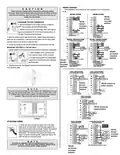
C A U T I O N
Turn off electricity to the appliance before installing or
Thank you for your confidence in our product. To obtain the best results
from your investment, please read this manual and acquaint yourself with
your purchase before installing your new thermostat. Then follow the
installation procedures, one step at a time. This will save you time and
minimize the chance of damaging the thermostat and the systems it
controls. These instructions may contain information beyond that required
for your particular installation. Please save for future reference.
F
OF
servicing thermostat or any part of the system. Do not turn
electricity back on until work is completed.
●
Do not short (jumper) across electric terminals at control on furnace or
air conditioner to test the system. This will damage the thermostat and
void your warranty.
●
●
All wiring must conform to local codes and ordinances.
This thermostat is designed for use with 24 volt and millivolt systems.
The thermostat should be limited to a maximum of 1.5 amps; higher
current may cause damage to the thermostat. If you are in doubt, call
your HVAC contractor.
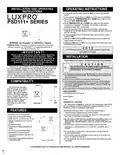
COMPATIBILITY
TEMP UP
MODE
The unit can be used with
●
Your thermostat is a precision instrument. Please handle it with care.
most 24 volt gas, oil or electric
heating and air conditioning
systems, gas millivolt heating
systems, and single stage heat
pumps. It cannot be used with
120 volt heating systems or two
stage heat pumps. Ask your
TOOLS REQUIRED
●
#1 Phillips screwdriver (small)
●
●
Wire Stripper
Drill
FAN
dealer for other LUXPRO
THERMOSTAT LOCATION
MODE
thermostats to control those
TEMP DOWN
On replacement installations, mount the new thermostat in place of the
old one unless the conditions listed below suggest otherwise. On new
installations, follow the guidelines listed below.
systems.
●
Remember that your PSD111+ may be mounted vertically or
horizontally when determining the optimal location.
FEATURES
●
●
●
●
Vertical or Horizontal Orientation
Large easy to read backlit display
Mode and Fan control for ease of use
Simple Temperature UP and Down
Control.
Calibration control
Temperature Swing adjustability (9
levels)
●
Locate the thermostat on an inside wall, about 5 ft. (1.5m) above the
floor, and in a room that is used often.
● direct sunlight; near a lamp, radio, television, radiator, register, or
fireplace; near hot water pipes in a wall; near a stove on the other side
of a wall.
Do not install it where there are unusual heating conditions, such as: in
●
Do not locate in unusual cooling conditions, such as: on a wall
separating an unheated room; or in a draft from a stairwell, door, or
window.
●
●
●
●
●
2 or 5 minute compressor delay
Fahrenheit or Celsius selection
Temperature Limits for High and Low
selections
Test mode to temporarily disable the
compressor delay
●
●
●
Do not locate in a damp area. This can lead to corrosion that will
shorten thermostat life.
Do not locate where air circulation is poor, such as: in a corner or an
alcove; or behind an open door.
Do not install the unit until all construction work and painting has been
completed.
●
Patent # 6,951,306
© COPYRIGHT 2016 LUX PRODUCTS CORPORATION. ALL RIGHTS RESERVED


| General | Details |
|---|---|
| Name | LUXPRO PSD111+ Series Thermostat Instruction Manual |
| Make | LUXPRO |
| Language | English |
| Filetype | PDF (Download) |
| File size | 0.25 MB |
 (1 votes, average: 5.00 out of 5)
 Loading...

LuxPro T10-1141 Heat Thermostat Instruction Manual

LuxPro PSPLV512d Programmable Heating Thermostat Instruction Manual


degrii THP Remote Thermostat User Guide

SIEMENS RDZ100ZB Zigbee Room Thermostat Owner’s Manual

Danfoss RET230 HCW-1 Electronic Heat Cool Thermostat User Manual

EMERSON ST765470 Digital Thermostat User Manual

CIELO BM101WA Breez Max Smart Thermostat Installation Guide

Schneider Electric CCTFR6100Z3 Wiser Radiator Thermostat User Manual

BEOK CONTROLS TCR7 IPS Colorful LCD Screen Smart Thermostat Owner’s Manual

Honeywell TH6320ZW2003 Pro Z-Wave Programmable Thermostat Installation Guide

BEOK CONTROLS TGP508 Wi-fi Touch Screen Thermostat Instruction Manual

RET-230-HC-3 Electronic Heat Cool Thermostat User Manual