
LUXPRO PSD111+ Series Thermostat Instruction Manual


SERVICING THERMOSTAT
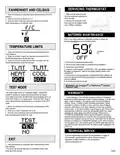
FAHRENHEIT AND CELSIUS
1. Make sure all power is turned
off to the equipment connected to
the thermostat
1. Press and hold the Up and Down button simultaneously at the F/C
selection.
2. Press Up or Down to select the F or C
3. Once the value is selected, press and hold the Up and Down
button simultaneously to select the value
2. Remove the front plate of the
thermostat per the diagram below
with a Phillips screwdriver
BATTERIES/ MAINTENANCE
When a low battery indication is displayed, proceed to replace the
batteries immediately per the instructions below:
TEMPERATURE LIMITS
Low Battery
Icon
1. Press and hold the Up and Down button simultaneously at the
TLMT selection.
2. Press Up or Down to select the Heat limit, then press UP and
DOWN simultaneously to set the Heat limit
3. Press Up or Down to select the Cool limit, then press UP and
DOWN simultaneously to set the Cool limit
1. Remove fresh batteries from their carton.
2. Remove body of thermostat as described during installation.
3. Remove the used batteries.
4. Install two new Energizer® or DURACELL® "AA" size alkaline batteries in
the battery compartment. Observe the polarity marking shown in the
compartment.
5. If the device is no longer powered, all programmed Menu settings will
have to be reprogrammed if the batteries were not immediately replaced
with new batteries.
6. Place the body back on the wall
®
®
WARNING: Use Energizer or DURACELL Alkaline
Batteries Only.
TEST MODE
This mode is also known as Compressor Defeat. It allows the
installer to operate the heating and cooling without any delays.
Once entering this mode, the thermostat will automatically return out
of the TEST mode in a 10 minute period. When the TEST mode is
active, the temperature reading blinks as an indication of the TEST
mode.
WARRANTY
Limited Warranty: If this unit fails because of defects in materials or
workmanship within three years of date of original purchase, LUX will, at its
option, repair or replace it. This warranty does not cover damage by
accident, misuse, or failure to follow installation instructions. Implied
warranties are limited in duration to three years from date of original
purchase. Some states do not allow limitations on how long an implied
warranty lasts, so the above limitation may not apply to you. Please return
malfunctioning or defective units to the participating retailer from which
purchase was made, along with proof of purchase. Please refer to
"TECHNICAL ASSISTANCE" before returning thermostat. Purchaser
assumes all risks and liability for incidental and consequential damage
resulting from installation and use of this unit. Some states do not allow the
exclusion of incidental or consequential damages, so the above exclusion
may not apply to you. This warranty gives you specific legal rights and you
may also have other rights which vary from state to state. Applicable in the
U.S.A. only.
1. Press and hold the Up and Down button simultaneously at the
TEST selection.
2. Press Up or Down to select the Yes or No
3. Once the value is selected, press and hold the Up and Down
button simultaneously to select the value
TECHNICAL SERVICE
If you are experiencing any issues with the installation or usage of
the thermostat, please feel free to call our Technical Support
department at (856) 234-8803 or visit our website at
EXIT
1. Press and hold the Up and Down button simultaneously at the
EXIT selection.
* The device will automatically exit out of the MENU screen after
being idle for 60 seconds
PSD001

| General | Details |
|---|---|
| Name | LUXPRO PSD111+ Series Thermostat Instruction Manual |
| Make | LUXPRO |
| Language | English |
| Filetype | PDF (Download) |
| File size | 0.25 MB |
 (1 votes, average: 5.00 out of 5)
 Loading...

LuxPro T10-1141 Heat Thermostat Instruction Manual

LuxPro PSPLV512d Programmable Heating Thermostat Instruction Manual


Schluter DITRA-HEAT-E-RS1 Smart Thermostat Instruction Manual

Honeywell TH1100DV PRO Series Non Programmable Thermostat Instruction Manual

Honeywell TH8321WF1001 Programmable Thermostat User Guide

Network Thermostat NetXTM X-Series Thermostat Installation Guide

MYS Air MS20,22,25 Thermostats User Manual

ecoartheating B07QZRVC8K Temperature Controller Electric Thermostat Instruction Manual

Zhongjin STN731RF Thermostat Instruction Manual

Micro-Air EasyTouch 355 Touch Screen Thermostat User Manual

VILPE WIVE 100 Intake Vent Plus Thermostat Installation Guide

Danfoss ECtemp 531 Electronic Thermostat Installation Guide