
Home > HVAC Controls > HVAC Controls UT32 Titan Touchscreen Thermostat User Manual
HVAC Controls UT32 Titan Touchscreen Thermostat User Manual






BASIC FUNCTIONS
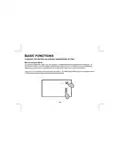
FAN SELECTION
Touch the display until the back light comes on. Touch the Fan box on the screen to select
Automatic or Always On fan mode. In Automatic mode, the fan operates with a heating or cooling
call. If set to Always On, the fan will run continuously. If the thermostat is turned Off while the fan is
set to Always On, the fan will continue to run until it is placed in the Automatic mode.
PROGRAMMABLE FAN (OPTION)
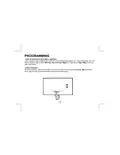
If your thermostat has been configured for Programmable Fan, you can change the fan mode for
each scheduled program event. For example, you might wish to have Always On for the morning
schedule and Automatic for the Day schedule. Each time the thermostat changes schedules, the
selected fan mode will automatically be implemented. (See page 18 for further details).
Mon
AM
Heat Set
01/01/2014
Autoatic
Heat
Morning
9

| General | Details |
|---|---|
| Name | HVAC Controls UT32 Titan Touchscreen Thermostat User Manual |
| Make | HVAC Controls |
| Language | English |
| Filetype | PDF (Download) |
| File size | 0.2 MB |
 (1 votes, average: 5.00 out of 5)
 Loading...


ENGO CONTROLS EASY-24W 24V Wired Thermostat User Guide

ICP Control Ion Gray Smart Thermostat Owner’s Manual

velleman VM148 Programmable Thermostat Instruction Manual

Danfoss KP 61 Thermostat Installation Guide

VIVE TP-S-955WH Programmable Thermostat Instruction Manual

Beca BAC-1000 Series WiFi Thermostat User Guide

ADAX VG11 Digital Thermostat User Guide

Arcoaire TSTATIIEWF-01 Gray Smart Thermostat Owner’s Manual

BECA BHP-8000 Room Thermostat User Manual

hansgrohe 15384XXX RainSelect Thermostat Instruction Manual