
HERSCHEL iQ T2 Wireless Thermostat Instruction Manual


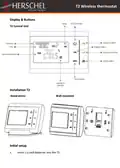
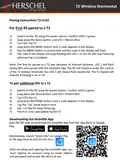
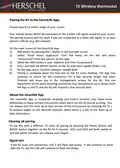

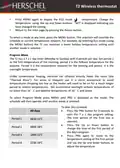


T2 Wireless thermostat
Pairing the R2 to the SmartLife App:
Ensure your R2 is within range of your router.
Your mobile phone MUST be connected to the 2.4GHz wifi signal issued by your router.
The pairing process will not work if you are connected to a 5GHz wifi signal, or to your
phone’s cellular (e.g. 4G) network.
On the main screen of the SmartLife App:
1)
2)
Add device by pressing the + button in the top right corner.
Select “Small Home Appliance” from the menu on the left and select
“Thermostat” from the options on the right.
Check the SSID shown is your network and enter its password.
Press and hold the BOOST button on the R2 until LED1 rapidly flickers red.
On the App, press “Confirm indicator rapidly blink”.
Pairing is complete when the Red LED on the R2 stops flashing. The App may
continue to search for the connection for a few seconds longer and when
finished, will leave you in the management screen for the R2. You can
experiment at this point entering commands (e.g. temperature up or down) from
the App or the T2 and the R2 will respond a few seconds later.
3)
4)
5)
6)
About the Smartlife App
The Smartlife App is constantly evolving and future versions may have some
differences to these printed instructions which were correct at time of printing. You
can always find the most up to date version of the instructions by checking the T2 /
R2 product pages on the Herschel website, where there is a link to the most up to
date instructions.
Clearing all pairing
To use R2s with a different T2, clear all pairing by pressing the Power button and
BOOST button together on the R2 for 5 seconds. LED1 and LED2 will both switch on
and will switch off when you release your fingers.
Signal lost
If the R2 loses wifi connection, LED 1 will flash red slowly. It will continue to work
with the T2, but the LED will continue to flash red slowly.

| General | Details |
|---|---|
| Name | HERSCHEL iQ T2 Wireless Thermostat Instruction Manual |
| Make | HERSCHEL |
| Language | English |
| Filetype | PDF (Download) |
| File size | 0.19 MB |
 (1 votes, average: 5.00 out of 5)
 Loading...

HERSCHEL MD2 Wi-fi Enabled Wired Thermostat Instruction Manual

HERSCHEL 12860 T-BT Battery Powered Wireless Thermostat Instruction Manual

HERSCHEL T-MT Mains Powered WiFi Thermostat Instruction Manual

HERSCHEL T-BT Battery Powered Wireless Thermostat Instruction Manual

HERSCHEL T-MT Mains Powered WiFi Thermostat

STELPRO UT202NP Series Non-Programmable Electric Thermostat Owner’s Manual

DELTA DORE TYBOX 1127 Programmable Thermostat User Guide

Day and Night TSTATIIEWF-01 Gray Smart Thermostat Owner’s Manual

SmartDHOME 01335-1864-00 Zone Thermostat for 2-Pipe Fan Coil with 0-10 VDC Fan Regulator and Valve Management User Manual

Honeywell Home TH2110U4004 Programmable Thermostat Installation Guide

DOOR D4004 Wireless Thermostat User Guide

GENERAL LIFE HT330S Digital Room Thermostat User Manual

GENERAL LIFE 270 Wireless Room Thermostat User Manual

sinope TH1400NP Non Programmable Low Voltage Thermostat Installation Guide

EPH CONTROLS CP4 Programmable RF Thermostat User Manual