
HERSCHEL iQ T2 Wireless Thermostat Instruction Manual


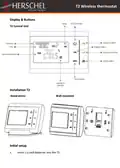
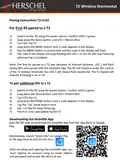
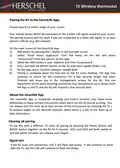



T2 Wireless thermostat
•
Press PRG again to move to the second period of the first day’s program.
Repeat the above procedure to finish setting the other periods of the first
day’s program.
•
•
Press PRG again to move to the first period of the second day.
Once setup is complete, press Return to get back to the main display.
Temperature can always be overridden manually by pressing the Up and Down buttons.
The temperature will remain at this setting until the next programmed change occurs.
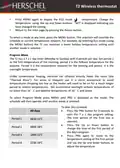
For example, using the default schedule in the previous table, if it was 18:00 on a
Monday the thermostat would be set to 20°C. If you wished to increase the
temperature to 21°C, press the Up button to increase temperature to 21°C. The
thermostat would then retain this setting until 23:00 when the period 4 schedule
would reduce the set temperature to 16°C.
Parameter Settings
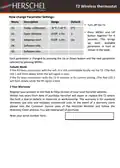
The T2 has several special operating parameters you can set, these are:
Temperature Calibration to adjust the unit to compensate temperature up or down by
up to 8°C. For example if you have another control in the room which reads
differently from the T2, or if you have to place the T2 close to the radiator and don’t
want to have the
T2 stop the heat before the rest of the room has warmed up (negative adjustment
needed). Or perhaps the T2 is placed in a cold area (e.g by a window) and you want the
T2 to stay on less so the rest of the room does not overheat (positive adjustment
needed).
Open Window on / off
Open Window is an energy saving feature. When the room temperature is 14°C and
above, if the thermostat senses a fall in temperature of 2°C or more within a 15
minute period, the T2 will turn off the heater(s) for one hour and “OP” will show in the
display. This is to avoid wasting electricity where a window or door is likely to have
been opened. Whilst you can always override this by adjusting the temperature Up or
Down or pressing the BOOST button on the R2, you can also switch off the function
totally (see how to change the Parameter Settings below).
Adaptive Start
Adaptive Start is another energy saving feature designed to smooth-out heating
consumption when large jumps in temperature exist between the current set
temperature and the next scheduled temperature (implies large energy use). Herschel’s
adaptive start function will compare the currently sensed temperature against the next
scheduled setpoint and if the difference is more than 5°C it will start the heater
earlier. You can use Parameter Settings to turn off Adaptive start totally.

| General | Details |
|---|---|
| Name | HERSCHEL iQ T2 Wireless Thermostat Instruction Manual |
| Make | HERSCHEL |
| Language | English |
| Filetype | PDF (Download) |
| File size | 0.19 MB |
 (1 votes, average: 5.00 out of 5)
 Loading...

HERSCHEL MD2 Wi-fi Enabled Wired Thermostat Instruction Manual

HERSCHEL 12860 T-BT Battery Powered Wireless Thermostat Instruction Manual

HERSCHEL T-MT Mains Powered WiFi Thermostat Instruction Manual

HERSCHEL T-BT Battery Powered Wireless Thermostat Instruction Manual

HERSCHEL T-MT Mains Powered WiFi Thermostat


GENERAL LIFE 230S RF Digital Room Thermostat User Manual

LUX TH10 Heating Only Mercury FREE Manual Thermostat Instruction Manual

EcoNet RETST800SYS Smart Thermostat User Guide

PECO T8168 Performance Pro Thermostat Installation Guide

International Environmental GoldringFan Coil Digital Thermostat Installation Guide

KETOTEK KTF0163 Series Smart Thermostat Instruction Manual

ADVENT AIR ACTH12 Digital LCD Thermostat Instruction Manual

Danfoss RT 2 Series Capillary Tube Thermostat Installation Guide

Honeywell N100 Series FocusPRO Thermostat Installation Guide

MONARCH I 1031 Homematic IP Wall Thermostat Instruction Manual