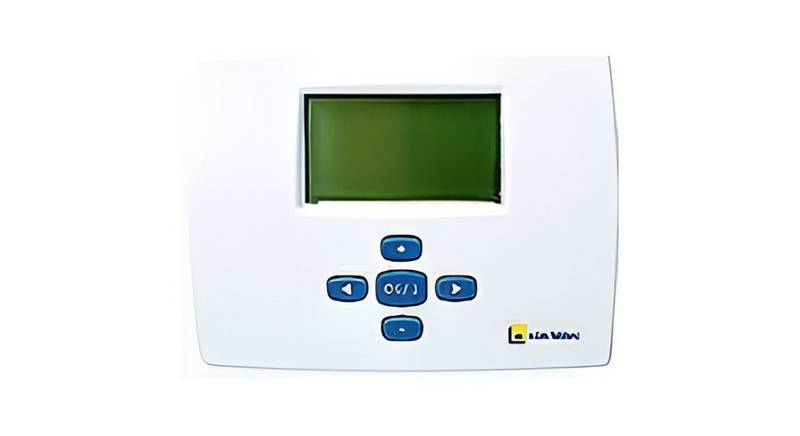
HERSCHEL T-MT Mains Powered WiFi Thermostat Instruction Manual
Herschel XLS Heating Controls
T-MT Mains powered Wifi thermostat
Installation and operating instructions
Technical Information
Power Supply:
Installation:
Mains 120-240V
Wall-mounted using recessed back-box (not supplied)
Setpoint Range:
Protection Class:
Wireless:
Wireless Range:
Accuracy:
5-40°C
IPX0
433Mhz (RF) and 2.4GHz (Wifi)
35m
+/- 0.5°C
Programming:
Energy saving:
7 day program, 4 periods per day
Open Window, Adaptive Start
Smartlife App Control
Works with Alexa and Google Assistant
when paired with the Smartlife App
2 years
Warranty:
Certifications:
CE, RoHS, EMC, RED, LOT20
Compliance
Hereby, Herschel Infrared Ltd declares that the radio equipment type T-MT Wireless
Thermostat is in compliance with Directive 2014/53/EU. The full text of the EU declaration of
| General | Details |
|---|---|
| Name | HERSCHEL T-MT Mains Powered WiFi Thermostat Instruction Manual |
| Make | HERSCHEL |
| Language | English |
| Filetype | PDF (Download) |
| File size | 0.17 MB |

HERSCHEL MD2 Wi-fi Enabled Wired Thermostat Instruction Manual

HERSCHEL iQ T2 Wireless Thermostat Instruction Manual

HERSCHEL 12860 T-BT Battery Powered Wireless Thermostat Instruction Manual

HERSCHEL T-BT Battery Powered Wireless Thermostat Instruction Manual

HERSCHEL T-MT Mains Powered WiFi Thermostat

HERSCHEL T-MT Mains Powered WiFi Thermostat Instruction Manual Overview
Summary of Contents
- Page 1: Herschel XLS heating controls T-MT mains powered Wifi thermostat Installation and operating instructions Power supply: mains 120-240V Wall-mounted using recessed back-box (not supplied) Setpoint range: 5-40 °C Wireless: 433Mhz (RF) and 2.4GHz (Wifi) Programming: 7 day program, 4 periods per day Smartlife app control Certifications: CE, RoHS, EMC, RED, LOT20
- Page 2: Safety guidelines include using the device in accordance with EU and national regulations and ensuring it is for indoor use only. The device must be installed by a competent person and in compliance with all relevant regulations. Always isolate the AC mains supply before working on components requiring 230V AC 50 Hz mains. The appliance is rated IPX0 and should be installed outside of splash zones in bathrooms. The T-MT mains powered Wifi thermostat is designed to work exclusively with Herschel XLS heaters featuring a built-in SMART-R receiver. It offers Wifi capability for remote heating control via the Smartlife App or voice control using Alexa or Google Assistant. The T-MT includes manual temperature mode, a 7x1 day program mode, and a holiday mode. All modes operate the heater by turning it ON when the room temperature is below the desired level and OFF once the desired temperature is reached. The thermostat incorporates energy-saving features such as open window technology and an adaptive start function. The T-MT can control multiple heaters within the same room.
- Page 3: T-MT must be wall-mounted using mains power. If possible, position the T-MT at least 2m away from the Herschel XLS heater. Ensure mains power is switched off before connecting. The T-MT is a Class II electrical appliance and does not require an Earth connection. Ensure any Earth wire is either removed or insulated to prevent damage. Ensure wiring clamps are fully opened before inserting mains wires. Place Brown Live mains wire into the clamp marked “L” and the Blue Neutral wire into the clamp marked “N”. Screw the rear casing of the T-MT onto the back box using bolts provided. Be sure to position the vents at the bottom when positioning the rear of the casing on the wall. Place the front face of the T-MT over the rear casing and snap shut.
- Page 4: T-MT mains powered wifi thermostat operating instructions Display & buttons include day of week, time, temperature, heating on symbol, adaptive start function enabled, window open function enabled, operating modes, holiday days remaining, program number being run, power on/off, and various control buttons. Pairing the T-MT with the heater involves double pressing the pairing button on the SMART-R box, ensuring power is available to the T-MT, long-pressing the SET button, and confirming successful pairing by checking the status LED. If pairing is unsuccessful, ensure the T-MT and heater are within range and repeat the process. Press the power button on the T-MT to start using it to control the heater.
- Page 5: T-MT mains powered wifi thermostat Managing your heating using your T-MT Controller All the following steps can be performed using either the Smartlife App or the controller keypad. The Smartlife App makes the controller very simple and convenient to operate. We recommend using the App to program the T-MT. About the Smartlife App The Smartlife App is constantly evolving and future versions may have some differences to these printed instructions. You can always find the most up to date version of the instructions by checking the T-MT controller product page on the Herschel website. Downloading & installing the Smartlife App Scan the QR code below to download the Smartlife App from the App Store or Google Play. After installing and opening the Smartlife App, you must register an account using an email address and password.
- Page 6: T-MT mains powered wifi thermostat To add your T-MT controller, turn the T-MT off using the power button. Long-press PRG until the Wifi symbol flashes. Tap ‘+’ top right of App and select “Small Home Appliances” and then “Thermostats.” If this is your first thermostat you are adding, you will be asked to enter your Wifi password. You will not have to do this when you add subsequent thermostats to the App. Give your T-MT a name. From the main screen of the Smartlife app, you can access management features also available from the keypad of your T-MT. Operations available on the App include power on/off, temperature override, manual operation, smart operation (program mode), holiday mode, settings, and controller keypad lock.
- Page 7: T-MT mains powered wifi thermostat Explanation of operating modes Smart / PRG mode allows your heater to run against a program controlled by the T-MT thermostat, ensuring your room reaches the desired temperature at the right time. To enable Smart mode, touch the Smart icon on the App main screen and alter the program settings in Settings. Manual / MAN mode allows you to set and maintain a constant temperature that does not vary with the time of day. Select Manual mode by touching the Manual icon on the App main screen and adjust the temperature using the + and – buttons. You can override programmed or manual set temperatures using the + or – keys on the App main screen or T-MT keypad. In Smart / PRG mode, the T-MT will maintain the override temperature until the next programmed period. Under Manual mode, the override temperature will remain set until you change it again manually. Holiday mode allows you to save energy by setting a lower temperature while you are away, with a day-counter feature. Select Holiday mode by touching the Holiday icon on the App main screen and set your holiday temperature using the + or – buttons. It is recommended to end holiday mode at least one day before your return to allow your house to warm back up.
- Page 8: T-MT mains powered wifi thermostat Settings on the App allow you to change various features. The Smart / PRG mode program schedules and temperatures. Temperature units can be set to Centigrade or Fahrenheit. Calibration is explained later in this manual. Adaptive start can be turned On or Off. Open Window Technology can be activated or deactivated. The Lock function on the App locks the keypad of the T-MT. You can alter details about your T-MT, including enabling Alexa or Google Assistant. Setting time and calibration involves pressing the SET button and using the + or - keys.
- Page 9: T-MT mains powered wifi thermostat Press SET to change the minutes and use the + or – keys to adjust. Press SET to change the hour and use the + or – keys to adjust (it is a 24 hour clock). Press SET to calibrate the temperature of the T-MT to match another thermostat. The T-MT automatically saves your changes as you enter them. If you use the T-MT with the Smartlife App, your controller and phone will automatically synchronize time and date settings. To select Manual (MAN) or Programming (PRG) modes, press the PRG button until the mode you require is shown. Select the Manual mode by clicking the PRG button until MAN is shown on the display. The T-MT will maintain this temperature 24 x 7 until you switch to another mode. The T-MT comes with program defaults which you can keep or change.
- Page 10: T-MT mains powered wifi thermostat Set time & temperature for each day Long-press PRG to enable input of the time and temperature of the 4 periods for each day of the week. The time will flash at the top left of the display. Use + or – buttons to change the time. Press PRG to advance to the temperature setting which will then flash. Holiday mode allows you to set a cooler fallback temperature to save energy. The mode has a countdown timer in which you can set up to 99 days away. To set the countdown timer, long press on the Holiday button on the keypad. Adjust the number of days you are away using + and – keys.
- Page 11: Mains powered wifi thermostat Press the Holiday button again to save and exit. The days number will count down daily until your entered number of days has elapsed and your thermostat will revert to its previous mode and settings. We recommend ending holiday mode at least one day before your return to allow your house to warm back up again. If the T-MT detects a temperature drop of more than 3°C within 15 minutes, the controller will power-off the heater. Open Window detection will only work if the feature is activated and shown as an Open Window icon on the display. Adaptive start is an intelligent energy-saving feature which will turn on the heating in advance of the next scheduled time if the current temperature is more than 5°C below the next target temperature. To activate the Adaptive Start feature, press “SET” and ‘-’ together for 3 seconds. To activate the keypad lock, press SET and Holiday Mode buttons together for 3 seconds. A shut padlock icon will appear on the screen. Press SET and Holiday Mode buttons together again for another 3 seconds to deactivate the keypad lock.
- Page 12: Calibration is a process to alter the temperature of the T-MT up or down in order to align the unit with another thermostat. The T-MT can be calibrated 5°C up or down from the default of 0 (no calibration). You can calibrate in steps of 0.5°C. Calibrating UP means the T-MT will display a higher temperature than the present one being shown. Calibrating DOWN means the T-MT will display a lower temperature than the present one being shown. When adjusting the T-MT Time & Temperature settings using the SET button, calibration is the final setting you can change. The default is 0. Register your product at the Help & FAQs section of your local Herschel website. Within two years from date of purchase, Herschel will repair or replace the T-MT where the fault is due to defects in materials or workmanship. This warranty is for standard domestic use only and excludes commercial uses.