
HERSCHEL MD2 Wi-fi Enabled Wired Thermostat Instruction Manual
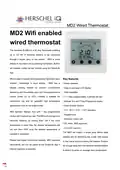


MD2 Wired Thermostat
MD2 Wifi enabled
wired thermostat
The Herschel iQ MD2 is a 16 amp thermostat enabling
up to 3.6 kW of Herschel Heaters to be connected
through a single, easy to use control. MD2 is wired
directly to the mains circuit powering the heaters. Built-in
wifi enables control via the internet using the SmartLife
App.
MD2 is easy to operate and incorporates Herschel’s open
window technology to save energy. MD2 has a
keypad locking feature to prevent unauthorised
tampering with the settings and it can be programmed to
control zones up to 45°C, making it suitable for
commercial use and for specialist high temperature
applications such as hot yoga studios.
Key features
• Mains operated
• Easy to use large LCD display
• Wall installation
• 7 x 1 day programmable, 4 periods per day
• Manual, Eco and 7 Day Programme modes
• Open window function
• 5°C - 45°C / 41°F - 113°F operation
• Keypad Lock
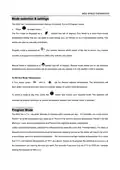
MD2 features Manual, Eco and 7 day programming
modes with 4 periods per day. The MD2 will operate your
Herschel heater(s) by turning them ON if the room
temperature is lower than the desired temperature and
will turn them OFF once the desired temperature is
reached or exceeded.
• Wireless 2.4GHz wifi
• CE, Rohs, RED approved
• 24 month warranty
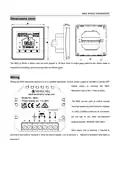
The MD2 will require a single gang 46mm deep
pattress box for recessing into a wall, with access
to the mains circuit powering the heaters. Position
far enough away from the Herschel infrared heaters
to allow it to sense an average room temperature.
Please read these instructions carefully. MD2 operates
stand-alone, but can be paired to the SmartLife App if
internet operation is required.


| General | Details |
|---|---|
| Name | HERSCHEL MD2 Wi-fi Enabled Wired Thermostat Instruction Manual |
| Make | HERSCHEL |
| Language | English |
| Filetype | PDF (Download) |
| File size | 0.3 MB |
 (1 votes, average: 5.00 out of 5)
 Loading...

HERSCHEL iQ T2 Wireless Thermostat Instruction Manual

HERSCHEL 12860 T-BT Battery Powered Wireless Thermostat Instruction Manual

HERSCHEL T-MT Mains Powered WiFi Thermostat Instruction Manual

HERSCHEL T-BT Battery Powered Wireless Thermostat Instruction Manual

Herschel MD2 Manual: Questions and Answers
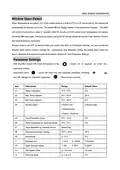
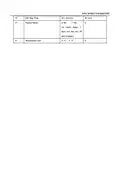
Herschel MD2 specifications
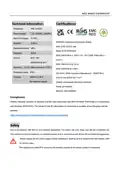
| Power supply | 110 - 230VAC, 50/60Hz |
| Setpoint range | 5~45℃ |
| Sensor | NTC 10K |
| Operating temperature | 0~50℃ |
| Radio frequency | Wifi 2.4 Ghz |
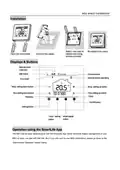
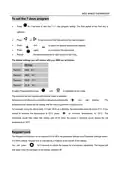
How do I set the time and day on the Herschel MD2?
Turn the thermostat on and press the button to enter time settings.
- Press for 3 seconds until the minutes display flashes.
- Press or to adjust minutes, each press changes the value by 1 minute.
- Press the button again to change the hour display, use or to adjust by 1 hour increments. This is a 24 hour clock.
- Press the button again to change the day, press or to select 1-7 for Monday through Sunday. Instruction Manual, p. 6
Which terminals on the Herschel MD2 are for mains input and heater output?
Connect mains power and load connections to the marked terminals as follows.
| Connection | Terminal |
|---|---|
| Mains Live | 1 |
| Mains Neutral | 2 |
| Heater Live | 3 |
| Heater Neutral | 4 |
| Earth | 5 |
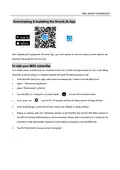
How do I pair the Herschel MD2 to the SmartLife App?
Your phone must be connected to your router's main 2.4GHz wifi signal, not a 5GHz signal or extender.
- In the SmartLife App home page, press the + button in the top right corner.
- Select Small Home Appliances, then Thermostats from the list.
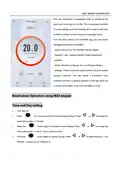
- Turn the MD2 on and long press the power button to enter wifi connection mode.
- Long press the icon for 25-30 seconds until the wifi status symbol begins to flash.
- In the app, confirm the prompt about the indicator rapidly blinking.
- Pairing is complete when the thermostat appears in the app and the wifi symbol on the MD2 stops blinking. This may take up to one minute. Instruction Manual, p. 5
Can the Herschel MD2 be used to control non-Herschel heating devices?
No, the MD2 must not be used for any non-Herschel heating devices. Instruction Manual, p. 3
Herschel MD2 compared with other Herschel thermostats
| Specification | Herschel MD2 | Herschel iQ T2 |
|---|---|---|
| Setpoint range | 5~45℃ | 5-35°C (temperature increments 0.5 °C) |
| Sensor | NTC 10K | NTC 10K |
| Operating temperature | 0~50℃ | 0 - 50 °C |
More Herschel thermostat manuals

SIEMENS RDZ100ZB Zigbee Room Thermostat Owner’s Manual

EMERSON 1F75H-21PR Programmable Heat Pump Thermostat Instruction Manual

COOKING PERFORMANCE GROUP 351030208 Retrofit Thermostat Instructions

SIEMENS RDG400 Room Thermostat Instruction Manual

ICP Control Ion Gray Smart Thermostat Owner’s Manual

Braeburn TH-BR22 Programmable Thermostat Instructions

EMERSON ST765470 Digital Thermostat User Manual

hansgrohe 15763003 Shower Select Thermostat Instruction Manual

heatmiser Slimline-B V3 Programmable Room Thermostat Owner’s Manual

LUX PSP511A Series Programmable 5-2 Thermostat Instruction Manual