Home > SmartDHOME > SmartDHOME 01335-1864-00 Zone Thermostat for 2-Pipe Fan Coil with 0-10 VDC Fan Regulator and Valve Management User Manual
SmartDHOME 01335-1864-00 Zone Thermostat for 2-Pipe Fan Coil with 0-10 VDC Fan Regulator and Valve Management User Manual
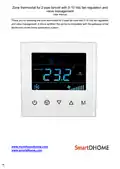
Zone thermostat for 2-pipe fancoil with 0-10 Vdc fan regulation and  
valve management  
User manual  
Thank you for choosing the zone thermostat for 2-pipe fan coils with 0-10 Vdc fan regulation  
and valve management. Z-Wave certified, the device is compatible with the gateways of the  
MyVirtuoso Home home automation system.  
1
GeneralDetails
NameSmartDHOME 01335-1864-00 Zone Thermostat for 2-Pipe Fan Coil with 0-10 VDC Fan Regulator and Valve Management User Manual
MakeSmartDHOME
LanguageEnglish
FiletypePDF (Download)
File size0.24 MB
Download PDF
1 Star2 Stars3 Stars4 Stars5 Stars (1 votes, average: 5.00 out of 5)
Loading...

SmartDHOME 01335-1864-00 Zone Thermostat for 2-Pipe Fan Coil with 0-10 VDC Fan Regulator and Valve Management User Manual
Get the free PDF manual for the SmartDHOME 01335-1864-00 Zone Thermostat for 2-Pipe Fan Coil with 0-10 VDC Fan Regulator and Valve Management User Manual and access setup steps, usage instructions, and troubleshooting tips. 👉 View online or download now to keep your thermostat running smoothly!
SmartDHOME 01335-1864-00 Zone Thermostat for 2-Pipe Fan Coil with 0-10 VDC Fan Regulator and Valve Management User Manual Overview

Summary of Contents

  • Page 1: Zone thermostat for 2-pipe fancoil with 0-10 Vdc fan regulation and valve management User manual Thank you for choosing the zone thermostat for 2-pipe fan coils with 0-10 Vdc fan regulation and valve management. Z-Wave certified, the device is compatible with the gateways of the MyVirtuoso Home home automation system.
  • Page 2: Zone thermostat for 2-pipe fancoil with 0-10 Vdc fan regulation and valve management The zone thermostat for fan coils is a Z-Wave device for controlling the internal temperature. This device is designed to be applied to a 2-pipe fan coil system. It can detect the ambient temperature, the local time and automatically controls the fan speed based on the temperature difference. This product can be included and used in any Z-Wave network with other Z-Wave certified devices. Power supply: 230V, 50 / 60HZ Fan regulation: 0-10 Vdc Temperature sensor: NTC 10K Temperature setting: 5 ~ 35 °C (adjustable) Package content: Zone thermostat for fan coils, Use manual
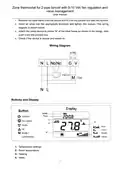
  • Page 3: Zone thermostat for 2-pipe fancoil with 0-10 Vdc fan regulation and valve management. Remove the steel frame from the device and fix it to the junction box with two screws. Insert all wires into the appropriate terminals and tighten the screws. Attach the wired device to points A of the steel frame as shown in the image, then push it into the junction box. Check if the device is secure and switch on. Wiring diagram. Temperature settings. Room temperature. Heating. Valve.
  • Page 4: Zone thermostat for 2-pipe fancoil with 0-10 Vdc fan regulation and valve management. To turn the device on and off, simply press the ON / OFF button. Press and hold the M button to access the settings menu. Select the local time and press M to move from Week to Hour to Minute. Touch or to set the local temperature value. Press and hold the buttons can be set continuously. Tap M to enter working mode setting, the current mode flashes. Press or to switch between Cooling, Heating, and Ventilation modes. In normal view, press to switch between fan speeds: “Low, Medium, High, Auto”. If you decide to manually set the fan speed, the device will close the valve and stop the ventilation if the room temperature is ≥ the set one. Room temperature ≥ set temperature, the fan stops. Room temperature ≤ set temperature -1 ° C, the fan turns on in slow speed.
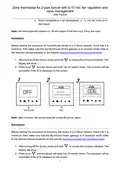
  • Page 5: Zone thermostat for 2-pipe fancoil with 0-10 Vdc fan regulation and valve management Room temperature ≤ set temperature -3 °C, the fan turns on in fast speed. The thermostat will operate on, off and speed of the fans only if they are open. Before starting the procedure for including the device in a Z-Wave network, check that it is turned on. Make sure that the MyVirtuoso Home gateway is in inclusion mode. The display will show “- - - “ when accessing the inclusion interface. The inclusion will be successful if the ID is displayed on the screen. After inclusion, the device must be turned off and on again. Before starting the procedure for excluding the device in a Z-Wave network, check that it is turned on. The exclusion will be successful if the ID is displayed on the screen.
  • Page 6: Zone thermostat for 2-pipe fancoil with 0-10 Vdc fan regulation and valve management Do not dispose of electrical appliances in mixed urban waste, use separate collection services. Contact the local council for information about available collection systems. If electrical appliances are disposed of in landfills or in inappropriate places, hazardous substances can escape into groundwater and enter the food chain. When replacing old appliances with new ones, the retailer is legally obliged to accept the old appliance for free disposal. Visit our website for warranty and customer support. If you encounter technical problems or malfunctions, visit the helpdesk site. After a short registration, you can open a ticket online, also attaching images. One of our technicians will answer you as soon as possible. Product Code: 01335-1864-00.