
hama 00176592 Smart Radiator Thermostat Instruction Manual


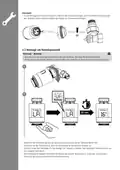


Child safety
• Press and hold the control dial (1) for approximately 5 seconds to activate the child safety function.
• "LC" appears in the display.
• Child safety can be disabled by pressing the control dial for 5 seconds.
Temperature change during an operational heating program
• When a heating program is active, the temperature can be changed manually by turning the control dial.
•
flashes briefly on the display. The manual change of temperature remains active until the next change of
program mode.
• If the program mode then becomes active, the manual temperature is overridden.
• If no appears, the thermostat is in manual mode.
• To immediately return the radiator thermostat to the temperature set in the heating program, press twice on
the control dial while the display is lit up.
• The temperature shown in the display returns to the original value.
• The display shows
.
On/Off
• If the temperature is set at <5°C, "OF" appears in the display.
• If the temperature is set at >30°C, "ON" appears in the display.
• If the thermostat has a wireless connection to the central control unit, this is shown in the display
• The thermostat has two modes. Programming mode is indicated in the display by
If the thermostat is in manual mode, no
.
appears.
Alarm
• If an error occurs in the sensor, "Er" appears in the display.
Low battery alarm
Note - Low battery status
• If the battery voltage is low, the symbol appears in the controller display.
• The app notifies the user about the low battery level via a push message.
• If the battery voltage is very low, the symbol on the controller display starts flashing.
• For frost protection reasons, the controller opens the valve 100%. The Wi-Fi connection is interrupted.
New version (V2)
• For frost protection reasons, the controller opens the valve 30%. The Wi-Fi connection is interrupted.
• The valve can still be manually set to 0% (OF) or 100% (ON) on the controller.
• Once a low battery voltage is reached, it is strongly recommended that the batteries are
replaced to ensure smooth operation.
• Change the batteries as described in Section 4.1 Inserting / changing the batteries.
Outward mode
• Outward mode can be activated in the app. As soon as this is activated, "LH" appears on the display.
• If this mode is active, the set temperature is automatically dialled down to 16°
Display turning
• First move the dial to the OF position. Then, by pressing the control dial 5 times, the display can be rotated
around 180°.
Note - Pairing restart
Restarting the central control unit
• Press and hold the button on the central control unit for around 5 seconds. As soon as the LEDs start to
flash, you can, as described in Section 4.6 Integrating devices into the Hama Smart Solution app,
start a further pairing attempt.
Thermostat restart
• Press and hold the control dial on the radiator thermostat for around 5 seconds until "- -" appears on the
LED display. Ensure that the thermostat previously displayed "OF".
• You can now, as described in Section 4.6 Integrating devices into the Hama Smart Solution app,
start a further pairing attempt.

| General | Details |
|---|---|
| Name | hama 00176592 Smart Radiator Thermostat Instruction Manual |
| Make | Hama |
| Language | English |
| Filetype | PDF (Download) |
| File size | 1.94 MB |
 (1 votes, average: 5.00 out of 5)
 Loading...


Honeywell Non-Programmable Digital Thermostat User Guide

HERSCHEL iQ T2 Wireless Thermostat Instruction Manual

Roth Basicline 230T Programmable Clock Thermostat Instruction Manual

TCS SZ1051 Communicating Thermostat User Guide

Futurehome Co020, Co021 Smart Thermostat PR Owner’s Manual

ATAG One Zone Thermostat User Manual

heatit WiFi TRM3 Intelligent Smart Home Thermostat User Guide

EMOS P56201UF Floor Heating Thermostat Instruction Manual

DEVIreg Electronic Intelligent Timer Thermostat Installation Guide

Wengart TP808 Low Voltage Thermostat User Guide