
hama 00176592 Smart Radiator Thermostat Instruction Manual


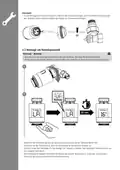


4.4 Fitting the central control unit
Flashing
Warning
• Only operate the product from a socket that has been approved for the device. The socket must be installed
close to the product and must be easily accessible.
• Disconnect the product from the power supply using the On/Off switch – if this is not available, unplug the
power cord from the socket.
• If using a multi-socket power strip, make sure that the total power consumption of all connected devices
does not exceed the power strip's maximum throughput rating.
• If you will not be using the product for a prolonged period, disconnect it from mains power.
• Connect the enclosed micro-USB cable to the micro-USB socket and the USB power supply unit.
• Connect the power supply unit to a properly installed and easily accessible mains socket.
• The LEDs start to flash.
4.5 Installing the app
• Download the "Hama Smart Solution" app using the QR code and install it.
smarthome#smart-solution

| General | Details |
|---|---|
| Name | hama 00176592 Smart Radiator Thermostat Instruction Manual |
| Make | Hama |
| Language | English |
| Filetype | PDF (Download) |
| File size | 1.94 MB |
 (1 votes, average: 5.00 out of 5)
 Loading...


Honeywell T834 Series Thermostat Owner’s Manual

EPH CONTROLS TRFPi2 COMBIPACK2 Programmable RF Thermostat Instruction Manual

emos P5606OT Programmable Electronic Indoor Thermostat User Manual

azbil TY6000Z2000 Neostat Room Thermostat Instruction Manual

DEVI 530M Electronic Thermostat Installation Guide

SALUS HTRP-RF50 Programmable Wireless Digital Room Thermostat Installation Guide

SALUS AT10F Wireless Contact Thermostat User Manual

ENGO CONTROLS E901 Wireless Programmable Smart Wifi Thermostat User Manual

vtech T961NN50 Wired Thermostat User Guide

Danfoss RET230 Electronic Heat Cool Thermostat Instruction Manual